June 10, 2026
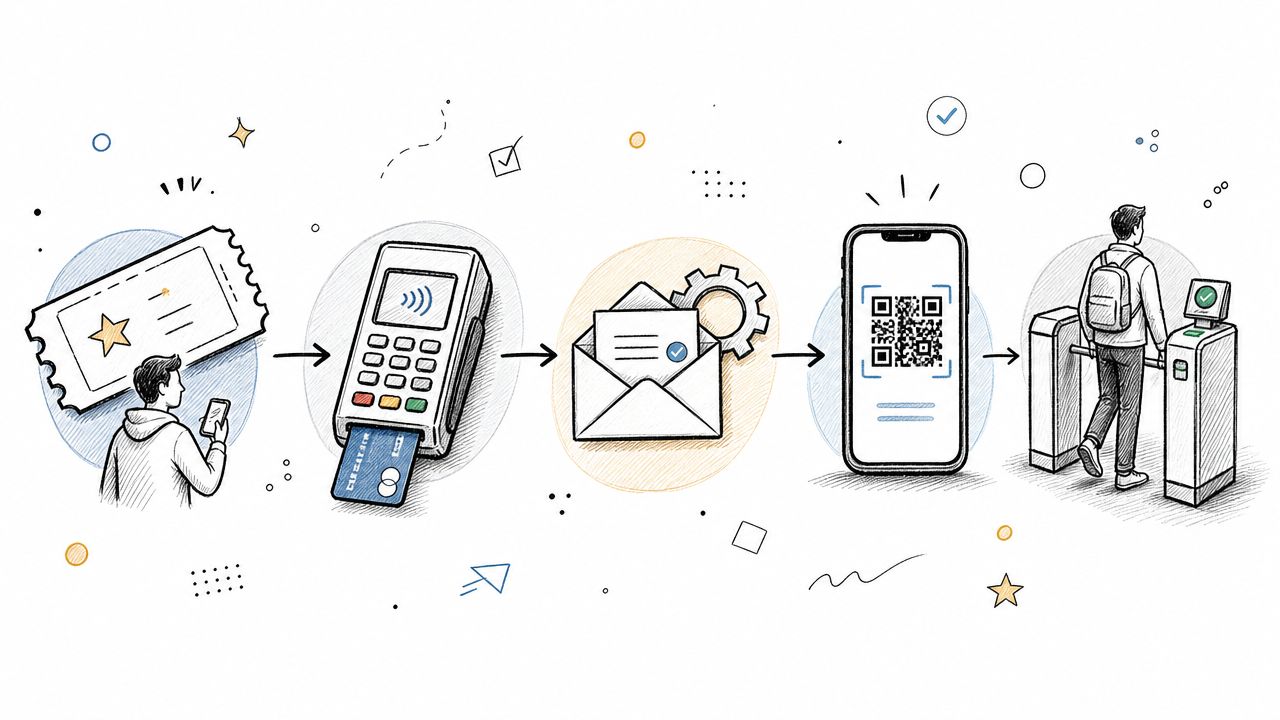
The week before a conference is when weak ticketing operations get exposed. Someone can't find their confirmation email. A sponsor bought the wrong package and now expects VIP access. A group registration came through, but half the attendee names are missing. Finance wants to know which payments cleared. Operations needs a clean check-in list. Support is stuck answering the same question across email, chat, and direct messages.
Then event day arrives, and the damage shows up in public. You get a line at the registration desk, a volunteer with an outdated spreadsheet, and attendees holding screenshots that may or may not be valid tickets. The problem usually isn't effort. It's the lack of a defined ticketing system process flow.
For event and community teams, that flow isn't just a support queue with nicer labels. It's the operating model behind registration, payment, confirmation, access control, check-in, exception handling, and post-event follow-up. If the flow is loose, your staff absorbs the complexity manually. If the flow is tight, attendees feel like the event is well run because it is.
I've seen teams spend huge amounts of energy solving avoidable problems created by their own handoffs. They patch things with inbox rules, spreadsheets, Slack messages, and “just check with Sarah” workarounds. That may hold for a small gathering. It breaks fast when you add VIP tiers, sponsors, member pricing, group sales, session limits, and onsite check-in across multiple entry points.
Good event operations depend on both digital workflow and physical movement. That's why it helps to pair your registration setup with practical planning around venue movement, staffing, and entry sequencing. These essential crowd management tips are useful because ticketing and crowd flow fail in the same place: the handoff from system to real-world entry. If you're still working out the front-end buying experience, this guide to selling event tickets online is a strong companion.
A clean process flow starts long before the first attendee checks in. It starts when you decide what kinds of requests your event will accept and what should happen after each one.
For a conference, that means more than “sell ticket, send email.” You're dealing with multiple paths: standard registration, member registration, VIP upgrades, comp tickets, sponsor passes, staff credentials, speaker access, refund requests, and last-minute substitutions. If those all land in the same bucket, your team becomes the routing engine.
Most event teams recognize the warning signs:
The result is familiar. Buyers don't trust the confirmation they received. Attendees ask basic questions because the system didn't answer them automatically. Staff spend the final forty-eight hours reconciling records instead of preparing the actual event.
A usable ticketing system process flow gives every request a defined path. It tells the system what to capture, what to validate, who owns the next step, what message goes out, and what happens if something goes wrong.
That sounds technical, but the practical value is simple:
A strong event workflow removes guesswork from the moments attendees notice most. Buying, confirming, arriving, and getting help.
When teams get this right, the experience feels smoother because fewer decisions are being made manually under pressure. That's the shift. You stop treating ticketing as a sales function and start treating it as an operations system.
Think of event ticketing like air traffic control. Every ticket has to move from departure to arrival without losing identity, status, or routing. You can't let one aircraft improvise on the runway, and you can't let one ticket improvise through registration, access, and entry.
A foundational milestone in ticketing-system process flow is the move from manual routing to automated triage. Modern systems typically start with ticket creation, then categorize and prioritize the request before routing it to the right team, which reduces the manual work of assigning cases and improves response and resolution speed. The key historical shift is the standardization of ticket lifecycle stages into a repeatable operating framework, according to InvGate's overview of ticketing systems.
Here's the event version of that lifecycle:
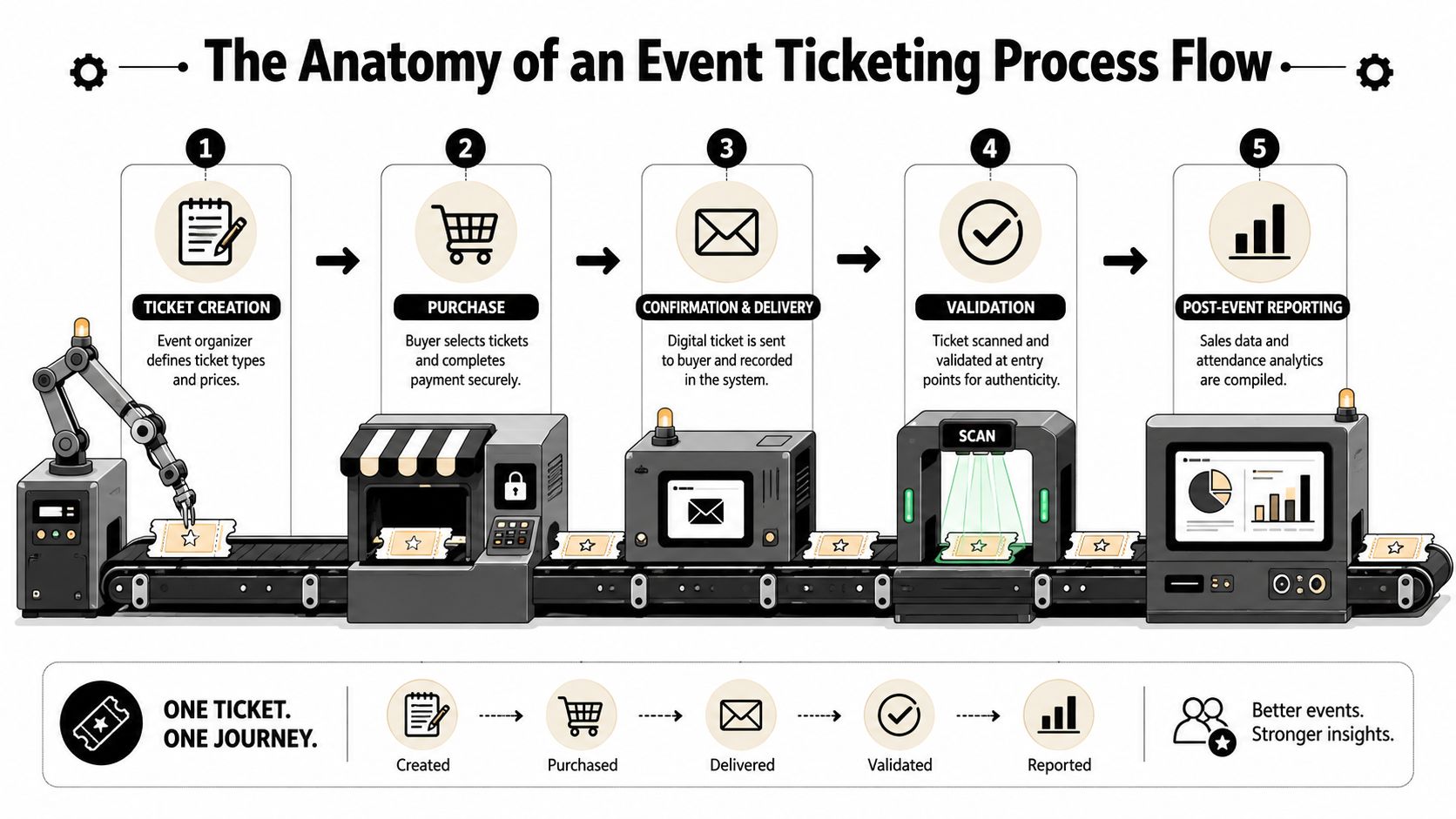
The flow begins when the organizer defines ticket types, pricing rules, availability windows, and registration fields. Then the buyer chooses a path and completes payment or registration.
Many teams often create future problems. If your form doesn't collect the information needed for check-in, access control, invoicing, or badge printing, the missing work comes back as support later.
After purchase, the ticket should be classified automatically. General admission, VIP, sponsor, speaker, student, member, and group organizer shouldn't all trigger the same downstream actions.
A good workflow routes based on what the buyer selected and what the event needs next. That can include:
Once routed, the system delivers the ticket, usually with a digital credential such as a QR code. On event day, staff validate the ticket at entry and confirm that the person arriving matches the access level purchased.
Closure doesn't happen at purchase. For events, closure usually happens after successful check-in, after attendance is recorded, or after any post-event issue is resolved.
Operational rule: Don't define “done” as payment received. Define “done” as the attendee completing the journey you promised.
That small shift changes the entire workflow. It forces you to design for reminders, access instructions, onsite validation, and post-event follow-up instead of stopping at the receipt.
One ticket can look perfectly organized in the backend and still feel broken to the people using it. That's why event teams should map the same ticket from three viewpoints: buyer, attendee, and organizer.
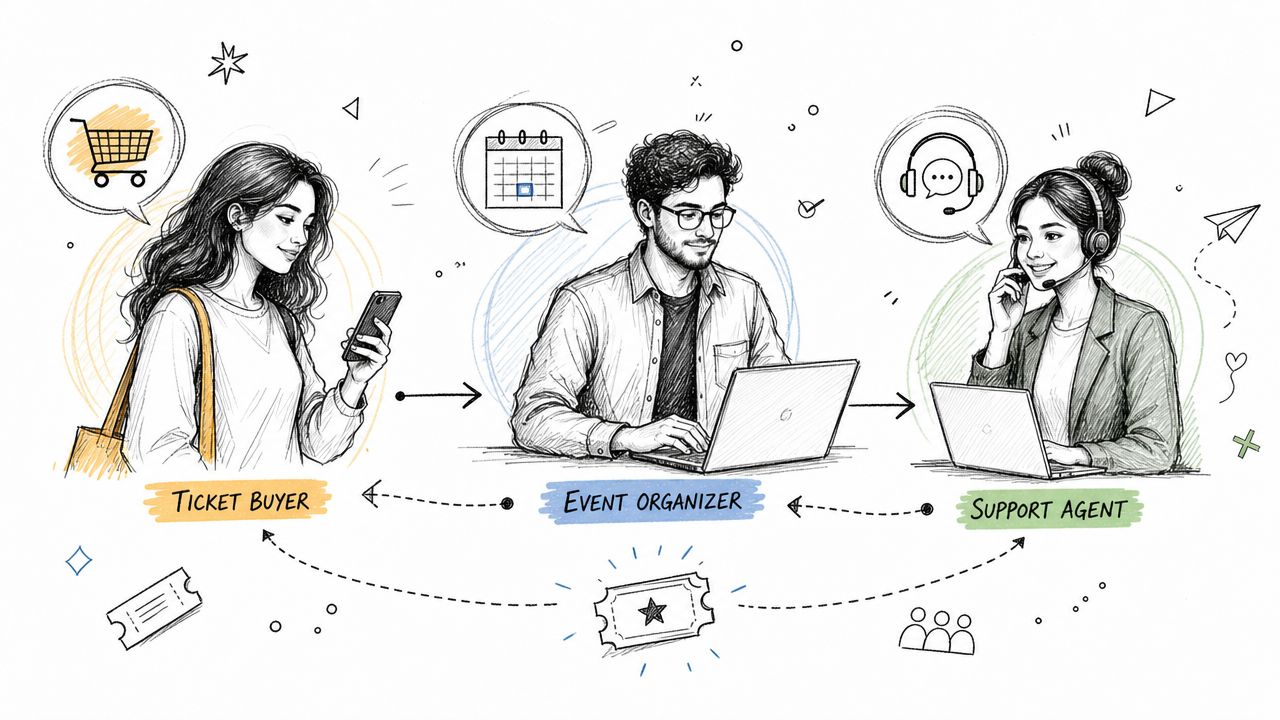
If you're comparing tools while thinking through these journeys, this overview of an online event ticketing system helps frame what the platform should support.
The buyer wants confidence. They need to understand what they're buying, what's included, how much it costs, and what happens after payment.
A weak flow creates uncertainty immediately. The page has vague ticket descriptions. The checkout form asks for too much too soon. The confirmation email arrives late, lacks key details, or doesn't clearly show what was purchased.
A strong buyer journey does a few things well:
The attendee's experience starts before they reach the venue. Reminder emails, calendar holds, QR code access, parking instructions, venue map, and arrival time guidance all affect entry speed.
Onsite, the process needs to be brutally simple. Scan. Validate. Admit. Redirect if needed.
Many event teams tend to overcomplicate things. They build too many edge cases into the front line. Your check-in crew shouldn't need to interpret pricing rules or hunt through old messages to decide whether someone belongs in the VIP lane.
If an attendee reaches the desk and your team has to investigate their history manually, the process flow failed upstream.
Good event operations separate front-desk actions from exception-desk actions. The scanner line handles normal entry. A smaller staffed lane handles transfers, payment disputes, missing credentials, and access questions.
The organizer sees the whole machine. They need visibility across sales, capacity, check-in status, special access, and support volume.
For them, the same ticket should function as a working record. It should show purchase details, category, status, communication history, and any operational notes tied to that registrant. That's what lets teams work quickly without creating duplicate tasks.
The organizer also needs a calm way to manage exceptions:
Those aren't unusual. They're normal. The process flow has to assume they'll happen and route them without collapsing the main queue.
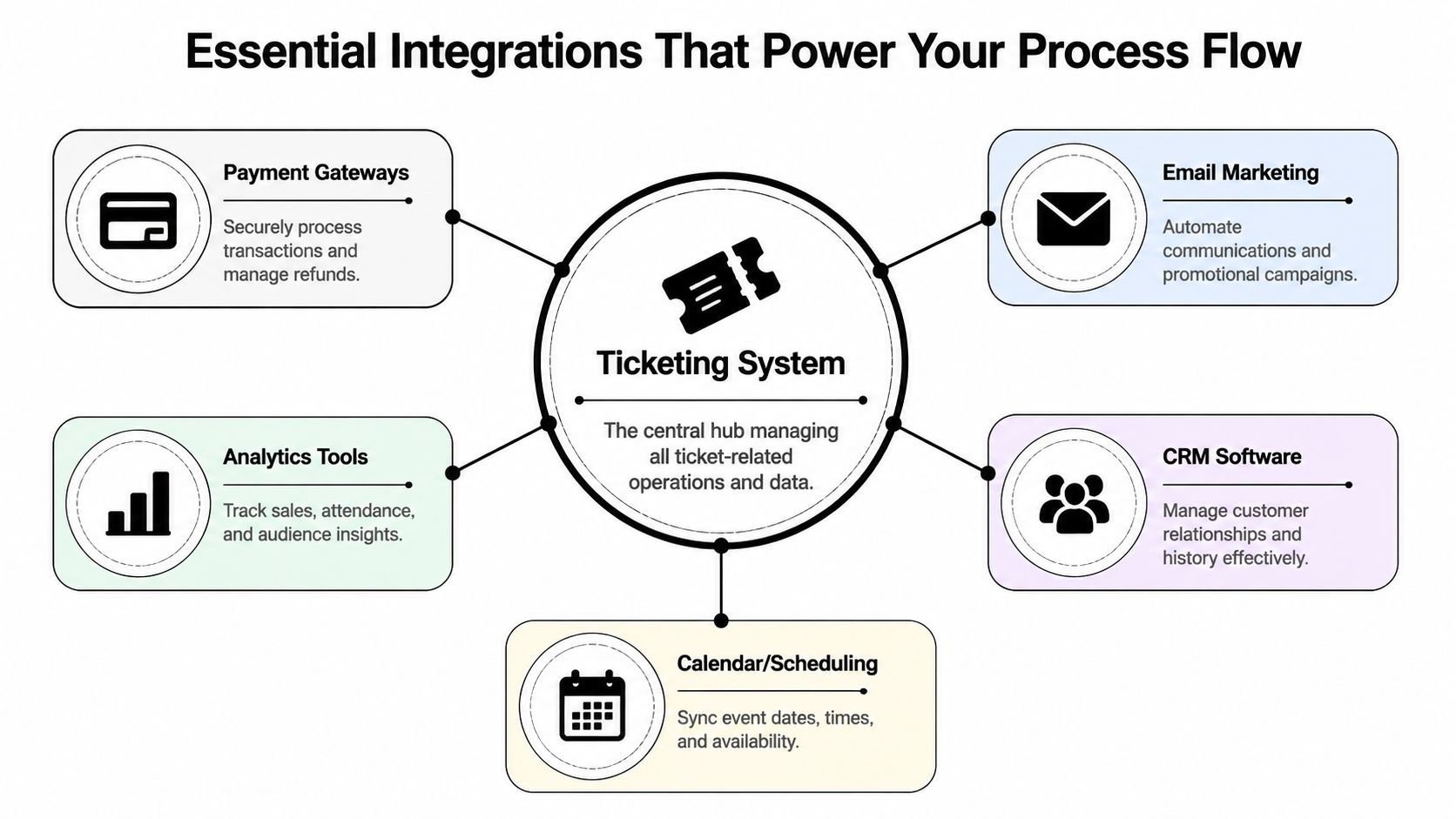
A ticketing system process flow only works if it can pass clean information to the rest of your event stack. If payments, attendee records, emails, analytics, and check-in all live in separate silos, your team ends up reconciling the same person multiple times.
A robust ticketing system process flow should treat each ticket as a structured record created from multiple intake channels, then routed through categorization, prioritization, assignment, escalation, resolution, and closure. That design reduces manual handling because the system can automatically capture the issue, attach context, and preserve the full interaction history, as described in DNSstuff's explanation of ticketing software process design.
If you're evaluating how systems exchange this data, a practical API documentation template example is useful because integration quality often comes down to how well fields, triggers, and status updates are defined.
Payment integration does more than charge a card. It determines whether a registration is confirmed, pending, failed, refunded, or partially adjusted.
When payment data doesn't sync cleanly, teams create manual work in the worst places. Support starts answering “Did my payment go through?” Finance starts chasing records. Attendees arrive believing they're confirmed when the order is incomplete.
The right setup should let the payment event trigger the next action automatically. Confirmation, receipt, internal visibility, and refund status should all follow from one source of truth.
For community-led events, ticketing isn't separate from relationship management. One registration might need to update member status, organization affiliation, engagement history, or sponsor visibility.
This matters most for professional associations and invite-based communities. A member discount, a chapter affiliation, or a renewal prompt shouldn't sit outside the ticketing record if it affects pricing or access.
A CRM integration turns a one-time registration into part of a longer participant history. That's valuable after the event when you're segmenting attendees for renewals, future offers, or sponsor reporting.
Email integration is where many process flows either feel polished or amateur. Buyers notice timing, clarity, and relevance. If everyone gets the same generic sequence, your VIPs feel ignored and your general attendees get overloaded with information they don't need.
Three communication moments deserve special attention:
Check-in tools complete the loop. They should read the live ticket status, validate access, and write the result back into the attendee record. If check-in is disconnected, your post-event reporting is weaker and your support team can't answer basic attendance questions with confidence.
The basic flow is easy. The edge cases define whether your system is useful.
A frequently underserved angle is how to design ticketing flow for omnichannel, community-facing operations. Most explainers don't answer how to preserve context when requests originate from multiple channels, or how to decide whether a request should become a support ticket, a membership task, or an event-service action. That distinction matters for associations, networks, and conference teams where support, registration, membership, and sponsor inquiries often land in one queue, as noted in Zendesk's discussion of ticketing systems.
VIP ticketing breaks when teams treat it as just a higher price point. It's really a different service path.
Core principle: Every premium ticket should trigger premium operations, not just premium branding.
That means defining separate confirmation content, access entitlements, check-in treatment, and support ownership. If VIPs need lounge access, priority seating, concierge support, or private sessions, those rights should be attached to the ticket record early.
What doesn't work is adding VIP perks in notes fields and expecting the onsite team to remember them.
Group flows need two buyers in mind. The person paying and the people attending are not always the same.
A better workflow separates these actions:
This avoids a common mess where one invoice exists, but the attendee roster is incomplete until the final days before the event.
Discount logic needs governance. Event teams often create too many codes, hand them out loosely, and then lose track of who should get what.
Use codes for a clear reason: member pricing, partner promotions, speaker comps, exhibitor allocation, or targeted outreach. Then decide whether the code changes price, reveals a hidden ticket type, or triggers a special workflow.
What doesn't scale is a patchwork of overlapping discounts with no ownership.
Keep promotional logic separate from access logic. A discount changes price. An access code changes eligibility. Mixing them creates support headaches.
This is where attendee trust gets tested. People don't judge you only when things go smoothly. They judge you when plans change.
Your refund process should answer four questions fast:
Transfers need the same discipline. Don't overwrite the original buyer blindly. Preserve the record of the original transaction and create a clean new attendee identity for check-in and communication. Otherwise badge printing, reporting, and follow-up become unreliable.
You can feel when a registration operation is messy. You can only fix it consistently when you measure where the friction sits.
Modern ticketing workflows commonly track ticket status, queue size, resolution time, response time, and customer interactions so managers can measure performance and tune workflows. This data-centric flow is the foundation for scaling service quality across channels such as portal, email, chat, and chatbot intake, according to EasyDesk's ticket queue management guide.
For event teams, the most useful KPIs combine support health with attendee movement.
| KPI | What It Measures | Why It Matters |
|---|---|---|
| Ticket status | Where registrations or support cases sit in the workflow | Shows whether requests are moving cleanly or stalling at approval, payment, or fulfillment stages |
| Queue size | How many open issues or requests are waiting | Helps staffing decisions before launch, before reminders go out, and during event week |
| Response time | How quickly the team replies to attendee questions | Signals whether buyers and attendees are getting timely reassurance |
| Resolution time | How long it takes to fully solve an issue | Exposes friction in refunds, transfers, access fixes, and group registration cleanup |
| Customer interactions | The volume and pattern of back-and-forth communication | Reveals which parts of the workflow confuse people and create repeat contacts |
A metric only matters if it changes behavior.
If queue size climbs before the event, your issue may not be staffing alone. It may mean a registration email created confusion or a form required information people don't have ready. If response time is fine but resolution time is poor, the team is acknowledging requests quickly but can't complete them because approvals, finance checks, or ownership rules are fuzzy.
If one event repeatedly generates more attendee interactions than another, look at the design, not just the support team. Was pricing unclear? Were group instructions buried? Did the check-in process require too many special cases?
The cleanest event operations teams don't just answer faster. They redesign the workflow so fewer people need to ask.
That's the core value of a measured ticketing system process flow. It gives you evidence for simplification.
The hardest part of event ticketing isn't defining the ideal process on a whiteboard. It's getting the platform to enforce it without constant manual cleanup.
Operationally, the most impactful optimization is ticket triage. Systems that assign by agent expertise, workload, and shift availability improve first-line resolution efficiency. Modern process flows emphasize rule-based routing, automated multi-department workflows, and post-resolution feedback collection to continuously improve throughput and customer satisfaction, as explained in InvGate's help desk process flow guide.
That logic matters for event teams too. You need the system to send the right work to the right people automatically. A sponsor package shouldn't sit with general attendee support. A membership pricing issue shouldn't be resolved by the check-in crew. A VIP upgrade shouldn't depend on someone noticing a note in an inbox.

For event and community operations, the biggest operational advantage is having registration, payments, communication, membership context, and check-in connected inside one working environment.
That reduces a few common failure points:
This is especially important when your event is part of a broader community program. Associations, member networks, and enterprise communities rarely run isolated events. Registration often depends on membership tier, chapter role, sponsor relationship, or prior participation.
A workable setup usually follows this sequence:
If you're comparing software options before building this stack, this roundup of ticketing platforms for events is a practical starting point.
The goal isn't to automate everything for the sake of automation. It's to remove the repetitive decisions that drain your team right before the doors open.
If you want one place to run registrations, ticketing, membership context, communications, and onsite check-in without stitching together a patchwork of tools, GroupOS is worth a close look. It gives event and community teams a centralized system to design cleaner workflows, reduce manual handoffs, and create a more reliable attendee experience from purchase to post-event follow-up.







