June 30, 2026

Your registration list says one thing. Your email platform says another. Your CRM still shows last year's title for a sponsor contact who already renewed under a different company. Then a member replies, “I never got the event updates,” while your team insists they were sent.
That usually isn't an email problem or a staff problem. It's a data flow problem.
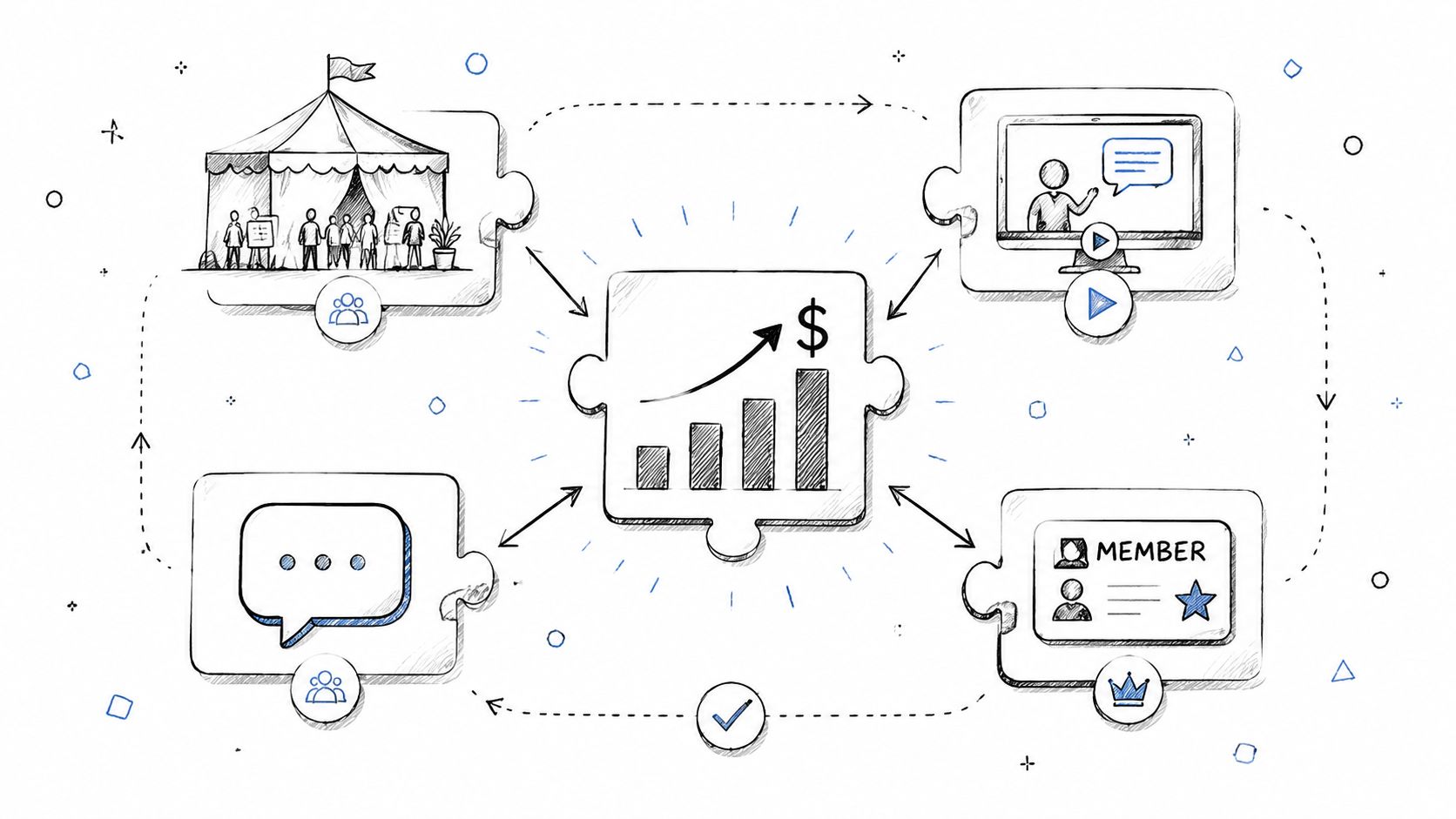
In community and event operations, information changes constantly. People upgrade ticket types, renew memberships, cancel registrations, change employers, update dietary preferences, opt out of marketing, and reappear later as sponsors, speakers, or buyers. If those changes stay trapped inside separate tools, your staff starts working from competing versions of the truth. That's when check-in gets messy, follow-up gets delayed, and reporting becomes an argument.
CRM synchronization is the process of keeping customer and member data aligned across the systems your organization uses. In practice, that often means your CRM, event platform, email tool, payment system, support inbox, and community platform all reflect the same core information without staff re-entering it by hand.
For community teams, that matters because one person rarely plays one role. A contact might be a member, attendee, sponsor lead, committee volunteer, and course buyer over time. If those identities live in separate systems, no team sees the full relationship.
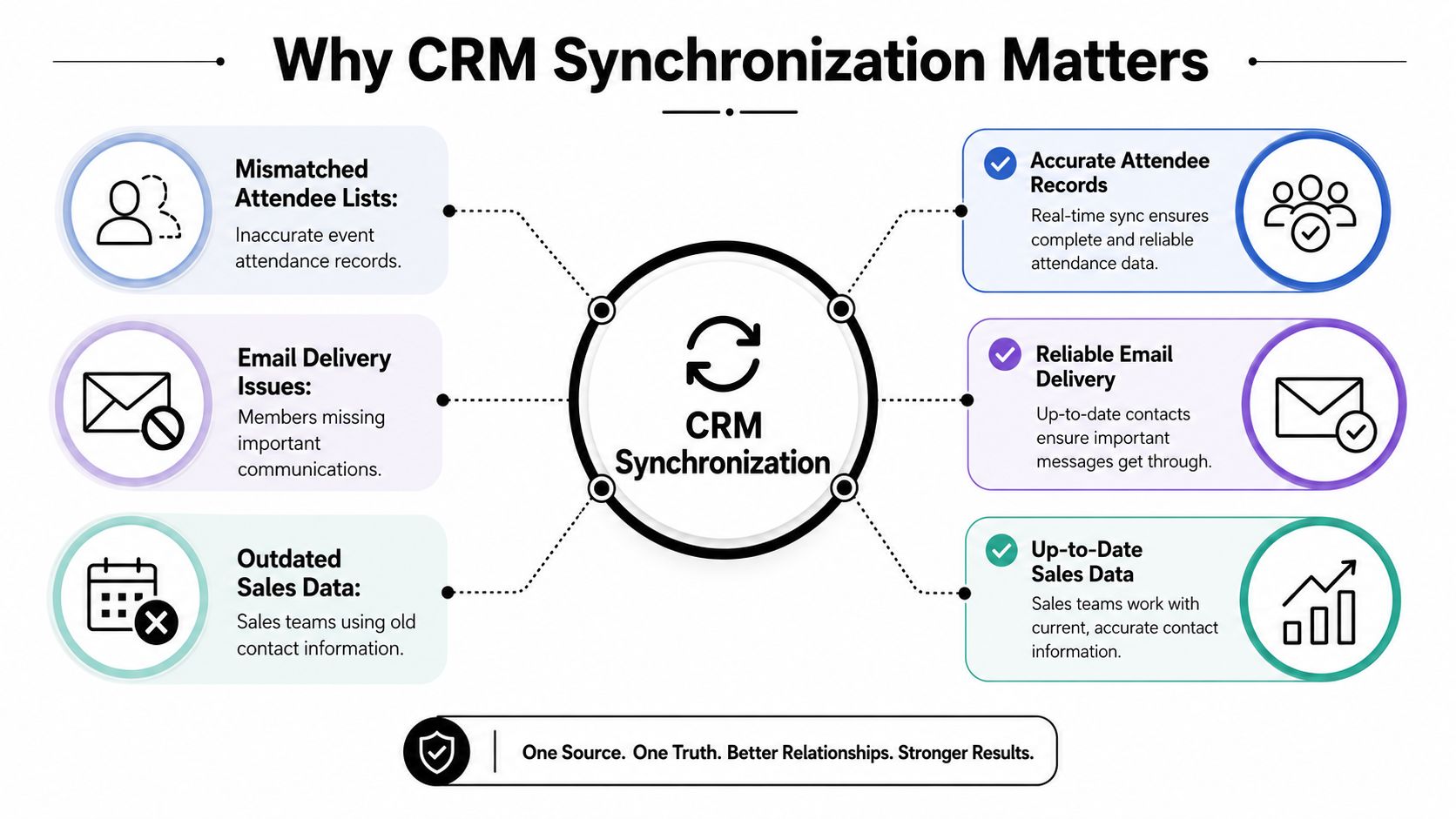
A good sync setup creates a single operating picture. It doesn't mean every tool becomes identical. It means each tool gets the data it needs, in the right format, at the right time, from a trusted source. That's what stops attendee lists from drifting apart and keeps marketing, membership, and sales from stepping on each other.
The cost of getting this wrong is real. Without synchronized data, 37% of CRM users report losing revenue directly due to poor data quality (OfficeClip CRM statistics). In community and event work, poor data quality usually shows up as outdated contact details, incomplete activity history, duplicate profiles, and broken segmentation.
Practical rule: If your staff has to ask which system is correct, you don't have a software issue. You have an ownership and synchronization issue.
The strongest teams treat sync as an operational discipline, not a one-time technical project. They decide where truth lives, what should move between systems, and what should stay local to a tool. If you're comparing platforms that shape member journeys across channels, this broader view of customer engagement platforms for organizations and communities helps frame why sync matters far beyond the CRM itself.
Community and event operations break down faster than many teams expect because they sit at the intersection of marketing, membership, registration, finance, and sponsorship. Each function often uses a different tool. Without synchronization, every handoff becomes manual, and every manual handoff introduces delay or error.
A generic B2B company can sometimes tolerate stale data for a while. A conference launch or membership renewal cycle usually can't. Event communication depends on timing. Member engagement depends on context. Sponsors expect clean lead handling. Staff need to know who registered, who attended, who upgraded, who requested an invoice, and who should never receive another promotional email.
When a new member joins, the downstream actions should happen quickly and consistently. The person should receive the right welcome path, land in the right audience segment, and appear in the CRM with enough context for the next conversation. If any of that requires a coordinator to export a CSV and upload it later, the experience already feels fragmented.
The same applies to event operations:
That's why lead intake quality matters at the front end too. Strong lead capture forms for community and event programs don't just collect names. They shape the data your sync has to move and maintain.
A common struggle isn't due to a lack of software. It arises because each tool works well in isolation and poorly together. Staff then become the integration layer, copying notes, reconciling duplicates, and trying to remember which field was updated last.
That burden hits revenue teams as well. Sellers who feel overwhelmed by too many disconnected tools are 45% less likely to attain quota (Wave CRM statistics). Community organizations feel that pressure in a similar way even when the title isn't “seller.” Sponsorship managers, membership directors, and event marketers all lose speed when they can't trust the handoff between systems.
Communities don't scale on features alone. They scale when every team works from the same member record.
A synchronized setup improves more than execution. It improves judgment. When event, membership, and CRM data line up, teams can answer practical questions without guesswork:
| Operational question | Why sync matters |
|---|---|
| Who should get the renewal reminder? | Membership status and communication preferences must match |
| Which sponsors deserve follow-up first? | Sales sees attendance, booth activity, and prior relationship history together |
| Who needs support outreach? | Service teams can spot high-value members with unresolved issues |
| Which campaigns should stop? | Registration or purchase activity can suppress unnecessary promotion |
In this environment, CRM synchronization isn't a back-office convenience. It's part of the member experience itself.
Not every sync should work the same way. That's one of the first mistakes teams make. They assume every connected system needs full two-way communication, all the time. Usually it doesn't.
The simplest way to think about sync models is traffic flow. Some connections are one-way streets. Some are two-way roads. Some run almost continuously, while others move in scheduled bursts.
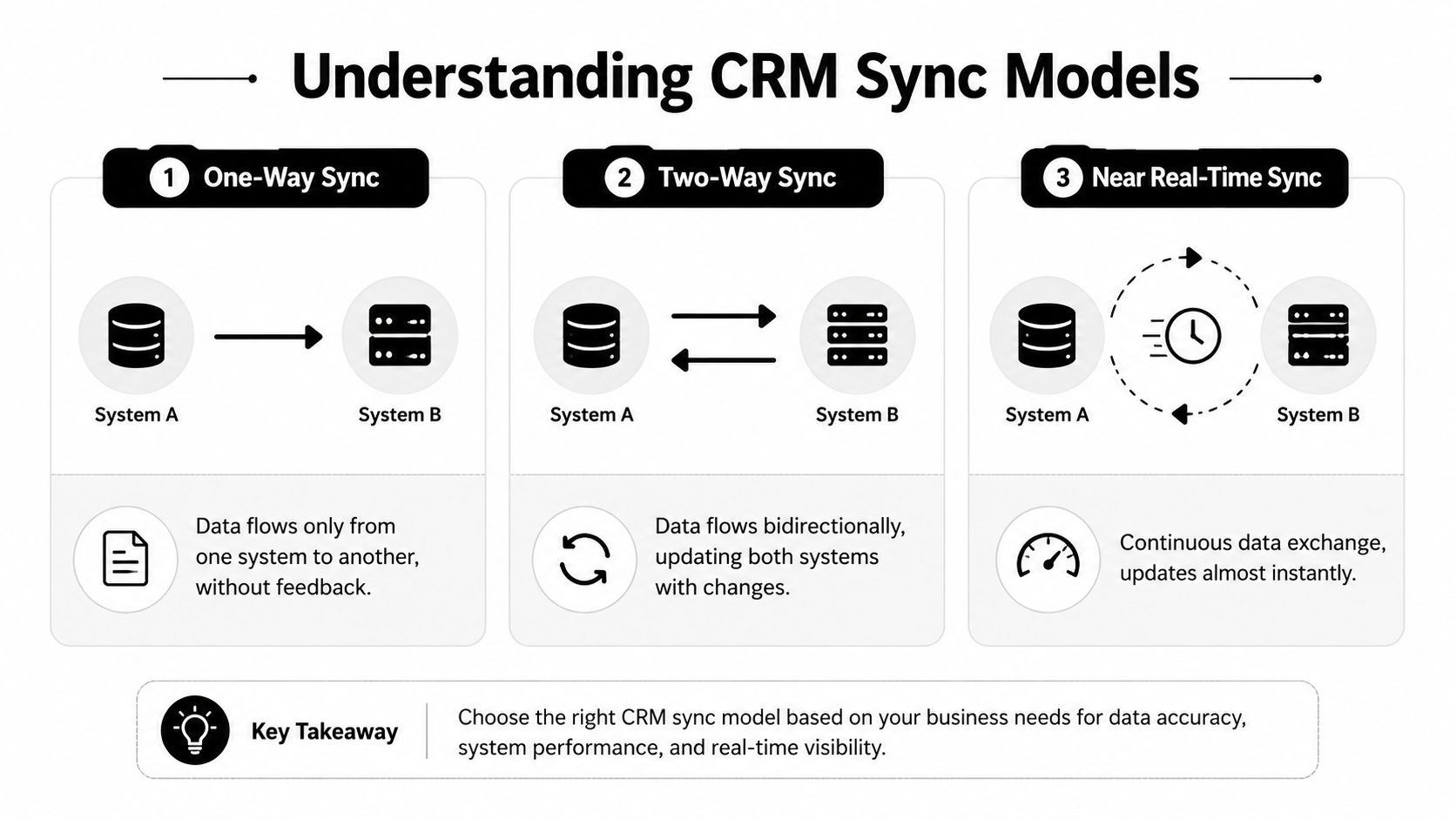
A one-way sync pushes data from one system into another, but not back again.
This is the safest model for many community workflows. If your event platform is the source of truth for registrations, you might send new registrations into the CRM so sales and marketing can see them there. But you don't want the CRM editing registration records and pushing those changes back into the event system.
One-way sync works well when:
A two-way sync allows updates in either system to flow to the other. That's useful when both systems legitimately need to maintain shared fields, such as name, title, company, phone number, or consent status.
But this model requires discipline. If two systems can edit the same field, you need a clear answer to “who wins” when both change the record.
The harder part of two-way sync isn't the connection. It's the policy behind the connection.
Use two-way sync only for fields where shared maintenance makes sense. Don't turn it on broadly just because the connector supports it.
Some updates need to move fast. Others don't.
Near real-time sync is useful for event and community moments where timing changes the experience. A recent registration may need to trigger access, email confirmation, internal alerts, or a sponsor notification quickly. In those cases, delays create visible friction.
Scheduled or batch sync fits workflows where immediacy doesn't matter. Historical engagement data, periodic exports to a warehouse, or lower-priority enrichment fields often move perfectly well on a schedule.
Here's the practical trade-off:
| Model | Best for | Main risk |
|---|---|---|
| One-way | Controlled operational handoffs | Data may become incomplete if users expect edits in both places |
| Two-way | Shared profile fields across teams | Conflicts and accidental overwrites |
| Near real-time | Registration, access, urgent alerts | More complexity and tighter monitoring needs |
| Batch or scheduled | Reporting and lower-urgency updates | Teams may act on stale information |
You'll also hear people describe syncs by how they start.
A trigger-based sync runs when something happens, such as a registration, payment, cancellation, or profile update. A scheduled sync runs at defined intervals. Trigger-based flows are excellent for member journeys. Scheduled flows are often better for cleanup, enrichment, or less time-sensitive data movement.
If your team is documenting these decisions, a solid API documentation template example for integration projects can keep the logic, field ownership, and exception rules from disappearing into someone's memory.
Once the sync model is clear, the next question is how to connect the systems. Connecting systems typically involves choosing among three patterns: native integrations, middleware, or custom API work. The right choice depends less on trend and more on operational fit.
A native integration is built by one of the platform vendors. If it exists and matches your use case, start there. Native integrations usually handle authentication, basic mappings, and standard objects with less setup.
A middleware platform such as Zapier or Workato sits between systems and moves data according to rules you define. This approach is useful when you need flexibility across several tools, or when the native integration is too limited.
Custom API development makes sense when your data model is unusual, your workflow is tightly controlled, or your organization needs logic that off-the-shelf connectors won't support.
Here's the practical comparison:
| Pattern | Best fit | Watch for |
|---|---|---|
| Native integration | Standard CRM and event or community workflows | Limited custom logic |
| Middleware | Cross-tool automation with moderate complexity | Sprawl if too many automations accumulate |
| Custom API | Complex rules, custom objects, strict control | Ongoing maintenance and testing burden |
For teams evaluating that third path, Bruce and Eddy's CRM expertise is a useful reference point for what custom CRM development typically involves when native and low-code options stop fitting the business.
A connection alone doesn't solve much. The hard part is data mapping. That's where you decide how one system's fields translate into another's.
Community and event teams usually have custom fields that matter operationally. Membership tier. Chapter affiliation. Dietary preference. Sponsorship status. Ticket type. Session interest. Volunteer role. Those fields don't always have clean equivalents in a CRM out of the box.
Field rule: If a field drives outreach, access, billing, or reporting, map it deliberately. Don't leave it as a note field because it was faster during setup.
Before anyone turns on a sync, get the people who own the workflows into one room and answer these questions:
If your team has already felt the pain of misaligned schemas, this breakdown of common data integration challenges in growing organizations mirrors many of the issues that surface in community and event stacks.
Teams often want a single source of truth for everything. In reality, a healthier model is source of truth by domain. The CRM might own account and relationship data. The event system might own ticketing and attendance. The billing platform might own payment status. The sync should respect those boundaries.
That's what makes the ecosystem stable. Without that discipline, synchronization turns into cross-system editing, and cross-system editing turns into confusion.
Most CRM synchronization problems don't come from the connector itself. They come from assumptions made before launch. Teams often assume records will match cleanly, old data will merge nicely, and everyone agrees on ownership. In live environments, none of that happens automatically.
Treat implementation like a pre-flight check. The setup work feels slower at first, but it prevents the kind of errors that are painful to clean up when members, attendees, and sponsors are already moving through the system.
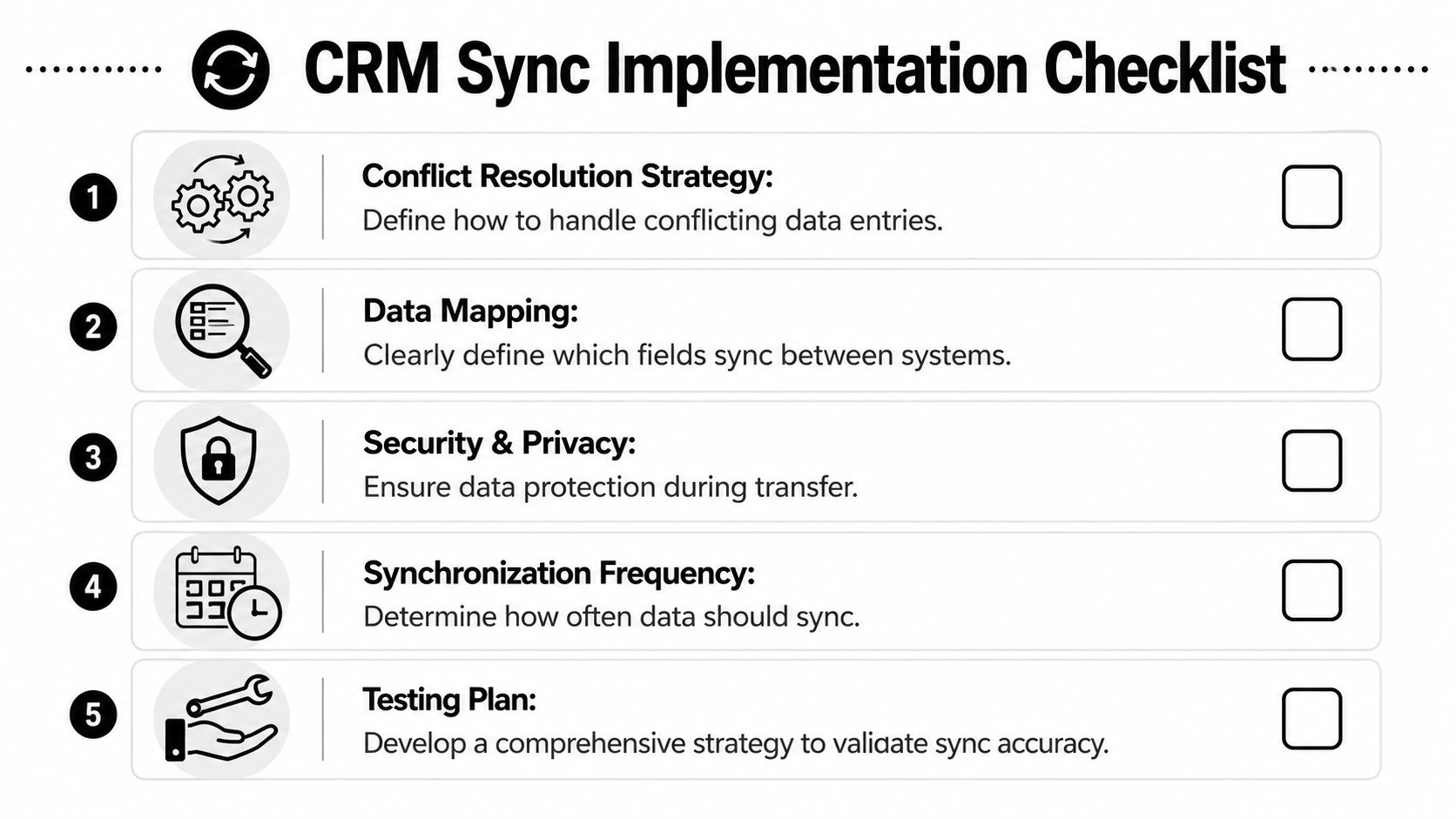
If a person updates their profile in the community platform while a staff member edits the CRM record at nearly the same time, what should happen?
You need a rule set, not a hope. Common patterns include system priority, field-level ownership, or a review queue for sensitive records. The right answer depends on the field. A marketing opt-out should usually follow the latest valid consent signal. A manually assigned account owner in the CRM shouldn't be overwritten by a generic app sync.
A practical policy often looks like this:
Community and event data produces duplicates constantly. A person registers with a personal email, later joins as a member with a work email, and then appears in the CRM through a sponsor referral. If your matching logic is weak, the sync will multiply records instead of unifying them.
Use matching criteria that reflect your real-world audience. Email may be the primary key, but many organizations also need rules around name, company, or external platform IDs. Be careful with over-aggressive matching, though. Merging two different people is worse than leaving a duplicate for review.
Clean syncs depend on clean identity rules. “We'll dedupe later” usually becomes “we're fixing reports for the next six months.”
The initial load deserves more caution than the ongoing sync. Historical records often contain outdated values, inconsistent formats, and legacy custom fields no one remembers creating. If you import everything at once, you can pollute the CRM before the team notices what happened.
A safer approach is staged rollout:
Many teams ask for instant sync everywhere because it sounds safer. It usually isn't. Immediate updates are valuable when they affect access, attendee messaging, or staff response. Other data can move on a schedule without harming the experience.
Choose frequency by consequence. If a delayed update would confuse a member or create a bad handoff, sync it faster. If the data only supports internal reporting, a scheduled sync may be cleaner and easier to monitor.
Data moving between systems needs the same care as data stored inside them. That means protected transmission, controlled access, and thoughtful handling of permission-related fields.
For community organizations, consent is especially important. If someone opts out in one system, that preference can't stay trapped there while another tool keeps sending messages. The same goes for deletion requests, membership status changes tied to access, and records that should no longer be shared with sponsors or partners.
Don't test only the happy path. Test changes, cancellations, duplicate entries, bad values, missing required fields, and expired credentials. Then test what staff sees when something fails.
A useful test set includes:
If the sync fails, the team needs visible logs, clear error states, and a defined owner for fixes. Silent failure is the most expensive kind because people trust the data until a public mistake exposes the problem.
The easiest way to evaluate CRM synchronization is to walk one workflow from beginning to end. Consider a common event scenario: a person buys a VIP ticket inside your community or event platform, and the sales CRM needs that information quickly enough for follow-up and service.
The visual below reflects the kind of event-management environment where that flow starts.

A member purchases a VIP Ticket for an annual conference. During checkout, they update their job title, mobile number, dietary preference, and company name. They also agree to event communications but decline sponsor outreach.
At this point, the platform owns the registration transaction. That includes ticket type, payment status, event-specific preferences, and access entitlements. Those fields should not be guessed or recreated later in the CRM.
A native integration or middleware trigger watches for the completed registration. Once the purchase is confirmed, it checks whether the person already exists in the CRM.
The sync then performs one of two actions:
The mapping matters here. “VIP Ticket” may map into a CRM custom field such as Event Ticket Category. Consent values may map to separate communication preference fields. Dietary preference may stay local if the CRM doesn't need it, while company and title may update shared profile fields.
A well-built workflow also tags the record with the event identifier so the CRM doesn't just know who the person is. It knows which event generated the activity.
Once the record lands in the CRM, automation can act on it. A sponsorship or member success team might see that a known contact has upgraded to VIP. Marketing might suppress that person from standard ticket promotion and place them into a premium attendee sequence. Account owners might receive a task to reach out before the event.
Synchronization creates value. Not because data moved, but because the right teams can respond with context.
A short product walkthrough can help if you're evaluating how event and community actions connect with downstream operations:
Every sync process needs a habit of review. When a registrant doesn't appear in the CRM, there are usually a handful of likely causes:
If your team only checks sync logs after someone complains, you're already operating reactively.
The fix isn't just technical. Someone should own the operational health of the integration. That person doesn't need to build the connector, but they do need to review failures, understand the mappings, and know which workflow owner to involve when the issue is business logic rather than software.
The goal of CRM synchronization isn't to connect apps for the sake of it. It's to create a working system where member, attendee, sponsor, and customer data supports the people using it every day.
In community and event operations, that changes everything. Staff stop reconciling spreadsheets and start acting on current information. Marketing sends the right message because segmentation reflects reality. Sales and sponsorship teams see the latest activity without waiting for manual updates. Support and membership teams can respond based on a fuller relationship history.
The strongest setups share a few traits. They define why the sync exists. They choose the right model for each workflow instead of forcing one pattern everywhere. They map fields carefully, assign ownership clearly, and test edge cases before launch. Then they keep monitoring, because a healthy sync is maintained, not installed and forgotten.
That's what turns separate tools into a unified data ecosystem. Each system still has its role, but the data moves with intention. For communities and events, that's often the difference between operating with confidence and constantly second-guessing what your systems are telling you.
If you're trying to bring memberships, events, communication, and engagement into one connected operating model, GroupOS is worth a look. It gives organizations a single place to manage community and event experiences, which makes the path to cleaner CRM synchronization far more practical than stitching together disconnected tools after the fact.