February 26, 2026
When it's time to handle a Stripe subscription cancellation, you're doing more than just flipping a switch. You're making a key decision: do you end it immediately, or let it run until the end of the current billing period? This choice is crucial for a smooth member experience and keeping your billing accurate.
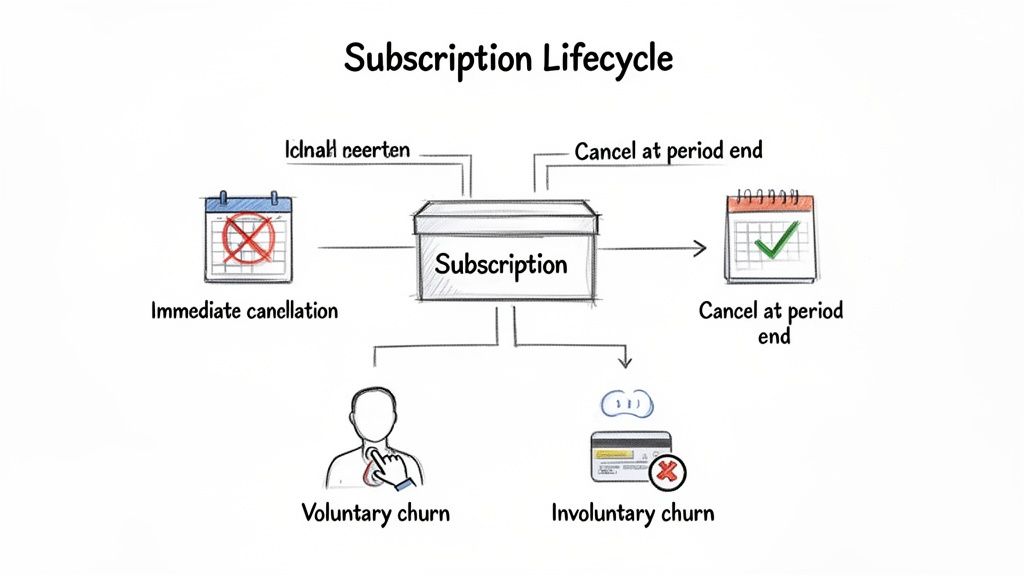
When a member decides to part ways, their final interaction with your community is defined by how you manage their departure. This process has distinct stages that directly affect your revenue and the member's access to your services. You essentially have two paths, and they lead to very different outcomes.
For platforms like GroupOS that manage annual memberships, this choice is even more significant. An abrupt cancellation can flood your support team with confused and frustrated emails. A graceful exit, on the other hand, maintains goodwill.
To help you decide which path to take, here’s a quick comparison of the two primary cancellation methods.
Ultimately, letting a subscription run its course is almost always the better choice for maintaining a positive relationship with your audience.
Understanding why a subscription is ending is just as important as knowing how to end it. Cancellations really boil down to two types, and each requires a completely different approach.
Voluntary churn is when a member makes a conscious decision to leave. They log into their account and hit the "Cancel" button. This is direct feedback—they're telling you something about your service or their own changing needs.
On the flip side, involuntary churn is passive and often accidental. This happens when a payment fails because of an expired credit card, not enough funds, or a bank decline. The member didn't actually want to leave, but a technical snag pushed them out. It's a silent revenue killer but is often entirely preventable with the right dunning strategy.
Customer churn is one of the biggest hurdles for any subscription business. With the subscription market projected to hit an incredible $1.5 trillion by 2025, even a 1% reduction in churn can unlock a massive amount of revenue.
Choosing from the best membership site platforms is a critical first step, as the right tool will have built-in features to manage the entire subscription lifecycle effectively. Getting the beginning right is half the battle; if you know how to start a subscription service properly, you'll be far better equipped to manage its end.
For anyone running a community or association, the Stripe Dashboard is your go-to for handling a quick cancellation. It's the fastest, no-code way to manage a member's request without having to pull in a developer. This is perfect for those one-off situations, like when a member calls in asking to end their plan.
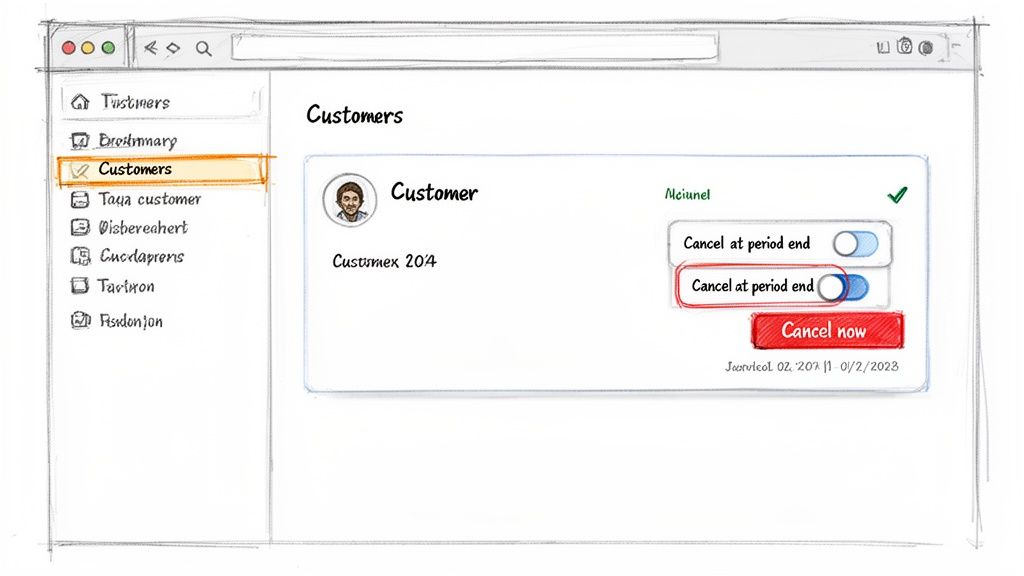
First things first, you need to find the member. The easiest way is to just pop their name or email into the main search bar at the top of the Dashboard. Once you land on their customer profile, you’ll see a clear overview of all their subscriptions—both active and past.
From there, spot the subscription you need to end and click the three-dot menu icon over on the right. A dropdown will appear, and you’ll see the option to “Cancel subscription.” Clicking that brings up a simple but powerful set of choices that directly shape what happens next for that member.
This is where you make the call between pulling the plug immediately or letting their subscription ride out until the end of the billing cycle.
The choice you make here really matters. Let’s walk through a common scenario: a member with an annual plan emails you. They love the community but have decided not to renew next year. They've already paid for the full 12 months, so they rightfully expect to keep their access until it expires.
Once you’ve picked an option, Stripe will ask you to confirm your decision. After you do, the subscription’s status in the Dashboard will either switch to “Canceled” or display a “Cancels on...” date. This little visual cue is your confirmation that the job is done.
Here’s a pro tip from experience: always double-check the subscription status after you cancel. Make sure it reflects the correct end date. Taking those extra five seconds can save you from a future billing dispute or an accidental renewal, which is a headache for everyone involved.
Getting comfortable with this manual process is a core skill for any community manager. It gives you the control to handle individual member requests with a personal touch. This is especially true when you're just getting started with a membership-based website builder and find yourself wearing many hats. Mastering the Dashboard ensures every member’s departure is handled just as professionally as their arrival.
Once your platform grows beyond a handful of members, manually clicking around in the Stripe Dashboard to cancel subscriptions just isn't scalable. The real power comes from integrating cancellation logic directly into your platform using the Stripe API. This is how you build a professional, self-service portal where your members can manage their own subscriptions without ever needing to contact support.
Getting this right is all about knowing which API call to use and, more importantly, when to use it. When a member clicks that "Cancel My Membership" button on your site, your backend code will need to make a choice.
Most of the time, when a member decides to cancel, they aren't expecting to lose access immediately. They've paid for the month (or year), and they rightly expect to be able to use your service until that paid-for period is over. This is the most common and member-friendly way to handle things.
Instead of outright deleting the subscription, you simply update it. You’ll make an API call that sets the cancel_at_period_end parameter to true.
This little flag tells Stripe, "Hey, this person is all paid up for the current cycle. Just don't charge them again when it ends." The subscription's status stays active until the very last day of their billing period, at which point it automatically flips to canceled. It’s clean, fair, and avoids any "you cut me off early!" complaints.
Here’s a quick look at what that looks like in a Node.js environment:
// Node.js example for period-end cancellation
const stripe = require('stripe')('your_secret_key');
async function scheduleCancellation(subscriptionId) {
const subscription = await stripe.subscriptions.update(subscriptionId, {
cancel_at_period_end: true,
});
console.log('Subscription scheduled to cancel at period end:', subscription.id);
return subscription;
}
That one simple call handles everything, ensuring your members get exactly what they paid for.
Every so often, you'll need to pull the plug on a subscription right now. This is where you use a different API endpoint to completely delete the subscription. This is a much heavier action because it stops everything in its tracks and can trigger proration, which might mean issuing a credit or even a partial refund.
Be careful with this one. Deleting a subscription is permanent and can't be undone. You should only use it for specific situations, like confirmed fraud, a GDPR "right to be forgotten" request, or if a user explicitly asks for an immediate stop and refund. For your self-service portal,
cancel_at_period_endshould almost always be the default.
Here’s how you could implement an immediate cancellation using Python:
import stripe
stripe.api_key = 'your_secret_key'
def immediate_cancel(subscription_id):
try:
deleted_subscription = stripe.Subscription.delete(subscription_id)
print(f"Subscription {deleted_subscription.id} has been canceled immediately.")
return deleted_subscription
except stripe.error.StripeError as e:
print(f"Error: {e}")
When you're building automated systems, you have to plan for the unexpected. What happens if a user with a slow connection gets impatient and double-clicks the "Cancel" button? Your system might fire off two API requests to Stripe to cancel the same subscription. The first one will work, but the second one will fail with an error because the subscription is already gone.
This is where the idempotency key comes in. It's basically a unique fingerprint you attach to your API request.
If Stripe sees another request with the exact same key within 24 hours, it recognizes it as a duplicate. Instead of trying to run the action a second time and causing an error, it will just send back the successful result from the original request. It’s a simple but incredibly powerful way to make your automation more robust and prevent messy errors.
Ending a Stripe subscription correctly goes beyond just stopping payments. It's about closing the loop, ensuring your internal records match Stripe's, and making sure the financial side is tidy. This is where you need to get comfortable with proration and webhooks—they’re the tools that make every cancellation clean and conflict-free.
Think of proration as Stripe's way of fairly calculating what a customer owes—or what you owe them—when their subscription changes partway through a billing cycle. If you cancel a subscription immediately, Stripe will often generate a credit for the unused portion of the service. You have a choice here: apply that credit to the customer's account for a future purchase or issue a direct refund.
Let's say a member is on a $30 monthly plan and cancels 10 days into the cycle. They’ve only used about a third of the month they paid for. Proration logic kicks in and calculates that they have $20 of unused time. It's up to you to decide how to handle that credit.
You can also use the invoice_now parameter in an API call to force an immediate final invoice. This is really handy when you want to close the books on that customer right then and there, without any lingering credits or charges.
While proration handles the money, webhooks handle the data. I like to think of them as real-time alerts that Stripe pings your application with whenever something important happens. For a platform like GroupOS, webhooks are the absolute key to keeping our member database and Stripe's billing records perfectly aligned.
The process is pretty straightforward: your code tells the API to do something, the API tells Stripe, and Stripe sends a confirmation back.
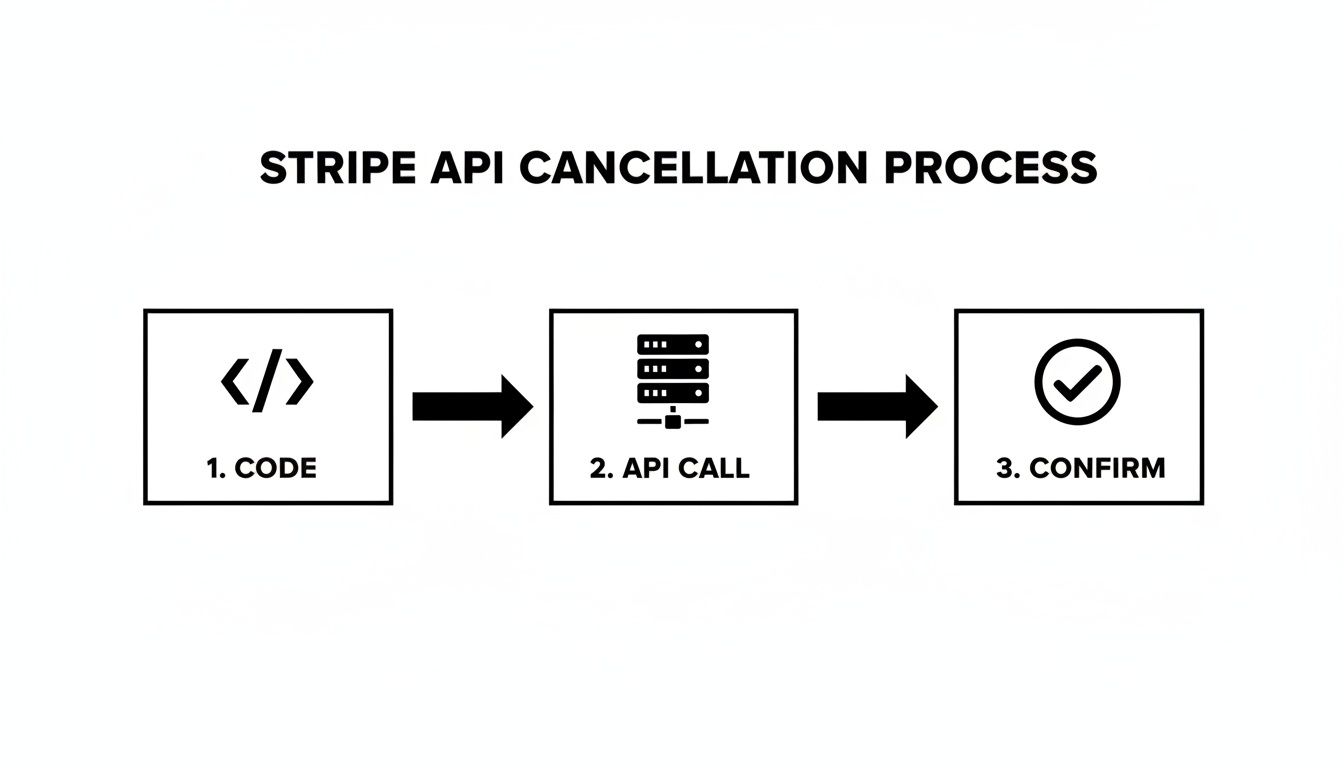
This simple back-and-forth ensures that when your code triggers a cancellation, both your system and Stripe are on the same page.
To make this work, you have to "listen" for specific webhook events. These are the two most critical ones for managing cancellations:
customer.subscription.deleted: This is your signal that a subscription has been canceled immediately. Your application should listen for this to revoke the member's access right away.customer.subscription.updated: You'll see this one when you schedule a subscription to cancel at the end of the billing period (by setting cancel_at_period_end to true). You get this event once to confirm the cancellation is scheduled, and then a final time when the subscription's status officially becomes canceled.Real-World Example: By setting up a webhook listener, you can automate actions inside your own platform. When the
customer.subscription.deletedevent comes through, your system can instantly remove the user from your member directory and revoke their access to private content or community spaces. No manual intervention needed.
It's also a reminder that the tools we rely on are always evolving. For instance, Stripe's own Revenue Recognition product is moving to a new subscription model by August 2025, requiring users to update their plans by August 2026 to avoid issues.
Changes like this underscore how vital it is to have a deep understanding of your billing system, especially as you experiment with different subscription pricing strategies for your own community or platform.
The absolute best way to handle a Stripe end subscription request is to prevent it from ever happening. Instead of just reacting to cancellations as they come in, taking a proactive approach to member retention will do wonders for your bottom line and build a stronger, more stable community. It all starts with learning to spot at-risk members before they've made up their mind to leave.
By keeping an eye on engagement data within your platform, you can pick up on subtle clues. Are certain members logging in less frequently? Have they gone quiet in the forums or stopped RSVPing to events? These are the early warning signs that a cancellation could be coming, and it’s your golden opportunity to re-engage them with a personal check-in or some highly relevant content.
When a member does decide to hit that cancel button, the process itself is your last, best chance to change their mind. Don't just give them a simple, one-click exit. Instead, build an intelligent cancellation flow that presents compelling alternatives based on common reasons for leaving.
For an even deeper look at keeping your members happy, check out this actionable guide to reducing churn from the team at FeedbackRobot.
Some of the most frustrating churn has nothing to do with member satisfaction. Involuntary churn—when a subscription ends because of a failed payment from an expired card, not because the member wanted to leave—is a silent killer for any membership platform.
Involuntary churn is responsible for a staggering 10% of all subscription revenue losses, which balloons to over $440 billion across the industry each year. Considering it's 5-7 times cheaper to keep a subscriber than to acquire a new one, focusing on payment recovery is one of the highest-impact things you can do.
Thankfully, Stripe gives you some powerful, built-in tools to fight back. Their Smart Retries feature is a game-changer; it uses machine learning to re-attempt failed payments at the most optimal times, which can recover an additional 9% of failed transactions on its own.
You also have full control over your dunning emails—the automated messages Stripe sends after a payment fails. Take the time to customize them. Make them friendly, helpful, and crystal clear about how the member can update their billing info. A well-written dunning sequence can single-handedly rescue a huge chunk of revenue you'd otherwise lose. These are fantastic starting points, and you can learn even more about how to reduce churn rate in our comprehensive guide.
Here's a quick look at some proven retention strategies and the kind of impact you can realistically expect.
Implementing even one or two of these tactics can make a noticeable difference. By combining a proactive mindset with the right tools, you can turn the tide on churn and build a more resilient membership business.
When you're running a membership, handling a Stripe end subscription request brings up a handful of very practical questions. Knowing the answers ahead of time will save you a ton of headaches when a member inevitably reaches out.
Let's walk through some of the most common queries I see community managers grapple with.
This is easily one of the most frequent questions, and the answer is crucial. Once a subscription is fully canceled in Stripe, you can't just flip a switch to turn it back on. It's gone for good.
There's a key distinction here, though. If you've scheduled a subscription to cancel at the end of the billing period, it's still technically active. You can absolutely go in and "un-cancel" it. But the moment its status flips to canceled, that specific subscription ID is retired forever.
To bring that member back into the fold, you'll need to create a brand-new subscription for them. Think of it as a clean slate—it ensures their new billing cycle and terms start fresh without any baggage from the old subscription.
Here's the thing: Stripe doesn't automatically issue refunds when a subscription is canceled. The refund process is entirely up to you and your business policies.
How you handle it usually depends on when the cancellation takes effect:
My Advice: Be crystal clear about your refund policy in your terms of service, especially for early cancellations. If someone on an annual plan wants out after three months, your policy should spell out whether they get a prorated refund or not. That upfront clarity prevents a lot of painful disputes later on.
Rest assured, Stripe doesn't just delete all of a customer's information when their subscription ends. The Customer object itself—along with their saved payment methods, invoice history, and other details—remains securely stored in your Stripe account.
This is incredibly useful for a few reasons. First, you have a complete historical record for accounting and reporting. More importantly, it makes re-engaging that person down the line a breeze. If they decide to come back, you can simply spin up a new subscription under their existing Customer profile without making them re-enter all their payment details.
This data retention is also a goldmine for analytics. You can dig into the behavior of past customers to spot churn patterns, which is absolutely essential for sharpening your retention strategies.
Managing every step of the member lifecycle—from that initial sign-up to a potential Stripe end subscription—is so much simpler with the right platform. GroupOS pulls all these functions together, letting you focus on what really matters: building your community, not just managing its billing. Explore how GroupOS can streamline your operations.







