June 21, 2026
You're probably looking at a messy operating stack right now. Leases live in email threads, rent tracking happens in spreadsheets, maintenance requests arrive through calls and WhatsApp, and accounting sits in a separate tool nobody fully trusts. That setup works until the portfolio grows, staff changes, or owners start asking for reporting that takes three people two days to assemble.
At that point, property management software development stops being a nice idea and becomes an operational decision. The hard part isn't naming features. It's defining a product that survives real usage, integrates with the systems your team already depends on, and doesn't collapse under edge cases in billing, permissions, or data migration.
A lot of teams reach custom development after they've already tried patching the problem. They've added one tool for rent collection, another for maintenance tickets, and a shared drive for lease documents. The result is more software, not better operations.
That's why the move from manual workflows to a centralized platform matters. Modern property management systems now handle leasing, maintenance, accounting, tenant communication, and portfolio tracking in one place, as described in this guide to property management software. The shift isn't cosmetic. It changes how teams work day to day.
This isn't a tiny category chasing a short-term trend. The property management software market was valued at USD 3.61 billion in 2025 and is projected to reach USD 5.89 billion by 2033, growing at a 6.4% CAGR, according to Grand View Research's property management software market analysis.
That matters for product strategy. A growing category gives you room to win with a narrower product, especially if you solve one painful workflow better than broader incumbents.
Custom development also makes more sense than many founders assume. If your target user has unusual requirements, mixed-use assets, owner-specific reporting rules, field teams with mobile needs, or workflow logic that off-the-shelf tools can't model cleanly, buying a generic platform often creates more process debt than it removes.
Practical rule: Build custom software when your operating model is the differentiator, not when you just want a prettier dashboard.
There's also a packaging decision early on. Some companies want a single branded product they can resell across associations, franchises, or local operators. In those cases, understanding the trade-offs in white-label software models helps frame whether you're building a proprietary SaaS product, a configurable platform, or something in between.
Most articles about property management software development spend too much time on feature lists. Tenant portals. Rent payments. Maintenance logs. Reporting. Those are table stakes.
The harder question is this: how do you scope and architect a product so it doesn't fail in production?
That's where SaaS thinking matters more than property terminology. Good product teams define tenancy, permissions, billing boundaries, onboarding, upgrade paths, and support flows before they obsess over nice-to-have modules. If you want a solid framing for those decisions, Cleffex has a useful set of expert insights on SaaS development that maps well to B2B niche platforms like this.
Custom property management products usually fail for boring reasons. Poor discovery. Undefined roles. Weak testing. Integration surprises. Bad migration planning. Not because someone forgot to add a chart widget.
The planning phase is short, but it carries most of the project risk. The Discovery and Planning phase typically takes 1 to 2 weeks and determines 80% of long-term project success. Projects that don't map user roles and core workflows can fail at rates as high as 35% within the first six months, based on the verified benchmark data provided.
Before anyone opens an IDE, define who the product is for and what a successful day in the system looks like for each role. Property managers, owners, tenants, accountants, maintenance staff, and admins do not need the same product. They need different views into the same operating model.
A visual blueprint helps keep that distinction clear.
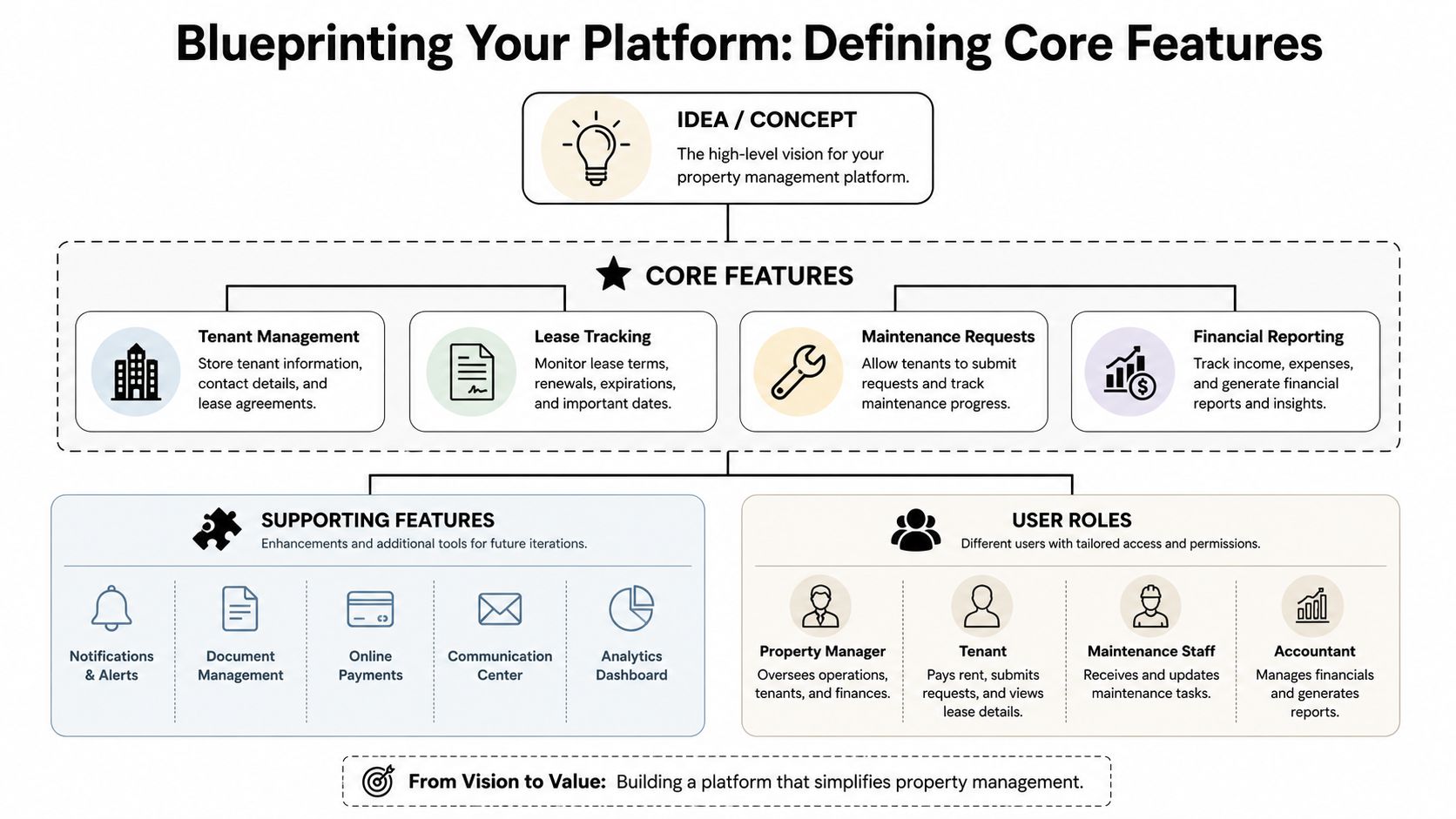
Founders often begin with interface ideas. That's backwards. Start with actions and dependencies.
Ask these questions first:
If you want a market view of what smaller operators prioritize in packaged tools, this roundup of the best property management software for small landlords is useful as a comparison baseline. It helps separate common expectations from features that justify custom work.
If you can't describe the workflow in plain language, the team won't build it correctly in code.
For most products, the first release should solve the core operating loop. Not every possible edge case. Not every future integration. The core loop.
MVP baseline: listings or unit records, tenant and lease management, rental tracking, maintenance requests, role-based access, and a tenant-facing portal.
Here's how those modules usually break down.
This is the spine of the system. Every other module touches it.
You need:
The business reason is simple. If the lease model is weak, billing, notices, renewals, and reporting become unreliable. Teams often underestimate lease complexity because they think in terms of “monthly rent due,” while actual operations involve prorations, renewals, concessions, add-on fees, and exceptions.
If the product includes leasing or occupancy management, property and unit structure needs to be modeled cleanly from the start.
This usually means:
The common mistake is flattening this model too much. A system that treats every record like a single unit with one tenant won't adapt well to mixed portfolios.
This module is less about “accept online payments” and more about ledger accuracy.
You need to define:
Payment features become dangerous when they look polished but hide accounting ambiguity underneath. If your app says a tenant is current while the ledger says otherwise, support costs spike fast.
To ground the planning discussion, this walkthrough gives a good product-level overview of the space:
Maintenance is where many “good enough” systems break. The full workload isn't just ticket intake. It's assignment, status changes, notes, attachments, approvals, vendor coordination, and communication back to the tenant.
A lean but usable workflow usually includes:
This is one of the best places to simplify an MVP. Don't start with predictive maintenance or IoT unless you already have a stable field operations process.
Founders love dashboards. Users need answers.
The first reporting layer should focus on operational decisions:
Avoid a giant analytics build in version one. Exportable reports and a few trusted summary views usually beat an impressive but fragile BI layer.
There's nothing wrong with wanting automation, AI, advanced portfolio analytics, document OCR, or owner self-service billing logic. Those can all be good decisions later.
But supporting features should follow proven workflow adoption, not precede it.
A good first release leaves room for:
The teams that ship successfully usually cut more than they add during planning.
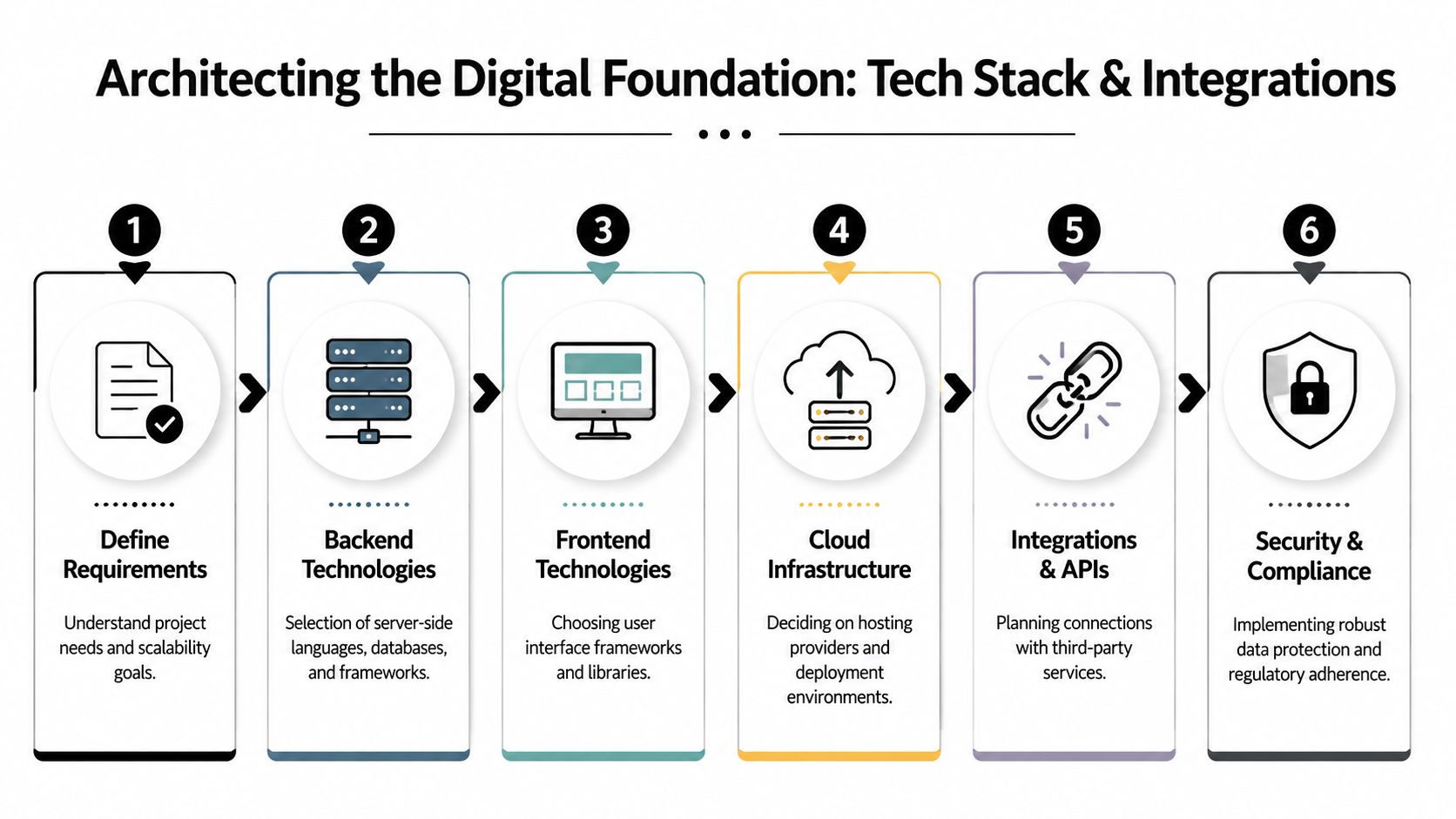
Most failed products don't fail because of the language choice. They fail because the team avoided decisions that felt too technical for early planning. Concurrency. tenancy. deployment model. integration boundaries. access rules. security model. Those decisions shape every sprint after them.
One of the most undercovered realities in property management software development is that teams must define concurrency targets, architecture, integrations, and security before development starts, not later, as noted in this implementation-focused property software guide.
If you plan to sell this product to multiple organizations, a multi-tenant SaaS model is usually the right default. It gives you one codebase, shared infrastructure, centralized updates, and a cleaner support model.
A single-tenant setup can still make sense when clients demand stronger data isolation, custom integration logic, or private deployment. The trade-off is operational overhead. Every exception becomes a maintenance multiplier.
Use this simple filter:
| Option | Best fit | Main downside |
|---|---|---|
| Multi-tenant SaaS | Standardized product, repeatable onboarding, faster release cycles | Harder permission and data isolation design up front |
| Single-tenant | Large clients with custom needs or strict deployment requirements | Higher support, hosting, and release complexity |
If you're documenting external connections early, a practical API documentation template example helps align product, engineering, and partner expectations before anyone starts integrating.
For most new products, start with a modular monolith. That's usually the fastest path to a stable release.
Microservices sound attractive because they imply scale and flexibility. In practice, they introduce service boundaries, deployment complexity, observability overhead, and more failure points. Property management software has many connected workflows. Billing touches leases. Maintenance touches tenants and units. Notifications touch everything.
A modular monolith gives you:
Move pieces into separate services only when boundaries become obvious. Payments, reporting pipelines, and document processing are common later candidates.
Architecture test: If your team can't clearly explain why a module must be isolated, it probably shouldn't be a separate service yet.
The verified benchmark data specifies a 3-tier architecture with frontend, API, and database layers, plus RESTful or GraphQL endpoints, as a technical baseline. That's less about fashion and more about maintainability.
The exact stack can vary. Teams commonly evaluate combinations like:
The right choice depends less on internet debates and more on hiring, deployment maturity, and integration needs.
A few grounded rules help:
Payment gateways, accounting tools, e-signature providers, booking platforms, communication services, and CRM systems aren't side quests. They're part of the product.
Integration planning should answer:
Teams often underestimate integration complexity. The verified benchmark data notes that underestimating integrations with payment gateways or booking platforms can create 20% to 30% timeline delays during sprint development.
That's not surprising. Payment failures, duplicate webhooks, inconsistent field mapping, and API rate limits show up late if you treat integrations as “just wiring.”
Property systems handle tenant information, financial records, lease documents, and internal notes. That means permissions and auditability can't be bolted on.
At minimum, define:
Cloud deployment is usually the practical default because it simplifies updates, monitoring, and managed infrastructure. On-site deployment still appears in some enterprise deals, but it raises support and release complexity. If a buyer asks for it, make them justify the requirement in operational terms, not vague security assumptions.
Most founders don't fail because they aim too low. They fail because version one tries to satisfy every stakeholder at once.
A property manager wants speed. An owner wants financial clarity. An accountant wants ledger precision. A leasing team wants smoother occupancy workflows. A founder hears all of that and greenlights a product with tenant apps, owner portals, AI recommendations, custom reports, mobile field tools, and accounting sync before the first production user exists.
That's how budgets get burned.
The strongest MVPs in this category focus on one primary operating loop and support roles around it. A good first cut might be:
The verified benchmark data supports that sequencing. Success rates rise to 75%+ when MVPs stay scoped to core functions like listings, tenant management, and rental tracking before teams add AI or IoT features.
Broad scope feels safer. It usually creates a weaker launch.
The economics of property management software development are fairly clear in the verified benchmarks. Basic systems typically cost USD 30,000 to 60,000 and take 3 to 4 months, while enterprise-grade builds start at USD 120,000+ and often take 8 to 12+ months, according to this property management software cost guide.
Here's the planning view most buyers need:
| Complexity | Estimated Cost (USD) | Estimated Timeline |
|---|---|---|
| Basic system | 30,000 to 60,000 | 3 to 4 months |
| Mid-complex system | 60,000 to 120,000 | 5 to 7 months |
| Enterprise-grade build | 120,000+ | 8 to 12+ months |
Those ranges are useful, but only if your scope is honest. A “basic” product with custom accounting logic, migration tooling, owner statements, advanced permissions, and several integrations is not a basic product.
You don't need a giant team. You need the right functions covered.
For most projects, that means:
A single full-stack developer can build a prototype. That's not the same as shipping a reliable B2B SaaS product.
Three common staffing models each have trade-offs:
Freelancers can work well for narrow deliverables or when you already have strong internal product leadership. They struggle when discovery is vague and dependencies are tightly coupled.
This is the best long-term model if property software will become a core product line. It gives you continuity and product memory. It also requires more management discipline than most first-time founders expect.
A solid agency helps when you need structured discovery, delivery process, and cross-functional coverage quickly. The downside is dependency risk if they own too much of the architecture without documenting it well.
The best setup often starts with a partner, then transitions critical knowledge in-house after launch. Whatever model you choose, make sure one person owns product scope and says no to expansion.
Don't prioritize features by demo appeal. Prioritize by operational risk.
Build the pieces that answer:
That's what gets you to launch with a product people can run their business on.
Once scope is locked, the project turns into execution discipline, a phase where teams either build steady momentum or start accumulating silent defects that surface right before launch.
The verified benchmark data is blunt here. 45% of property management software failures come from poor testing strategy. In basic projects, deferring QA can push failure rates to 25%, while continuous testing in more complex builds reduces that risk to 10%.
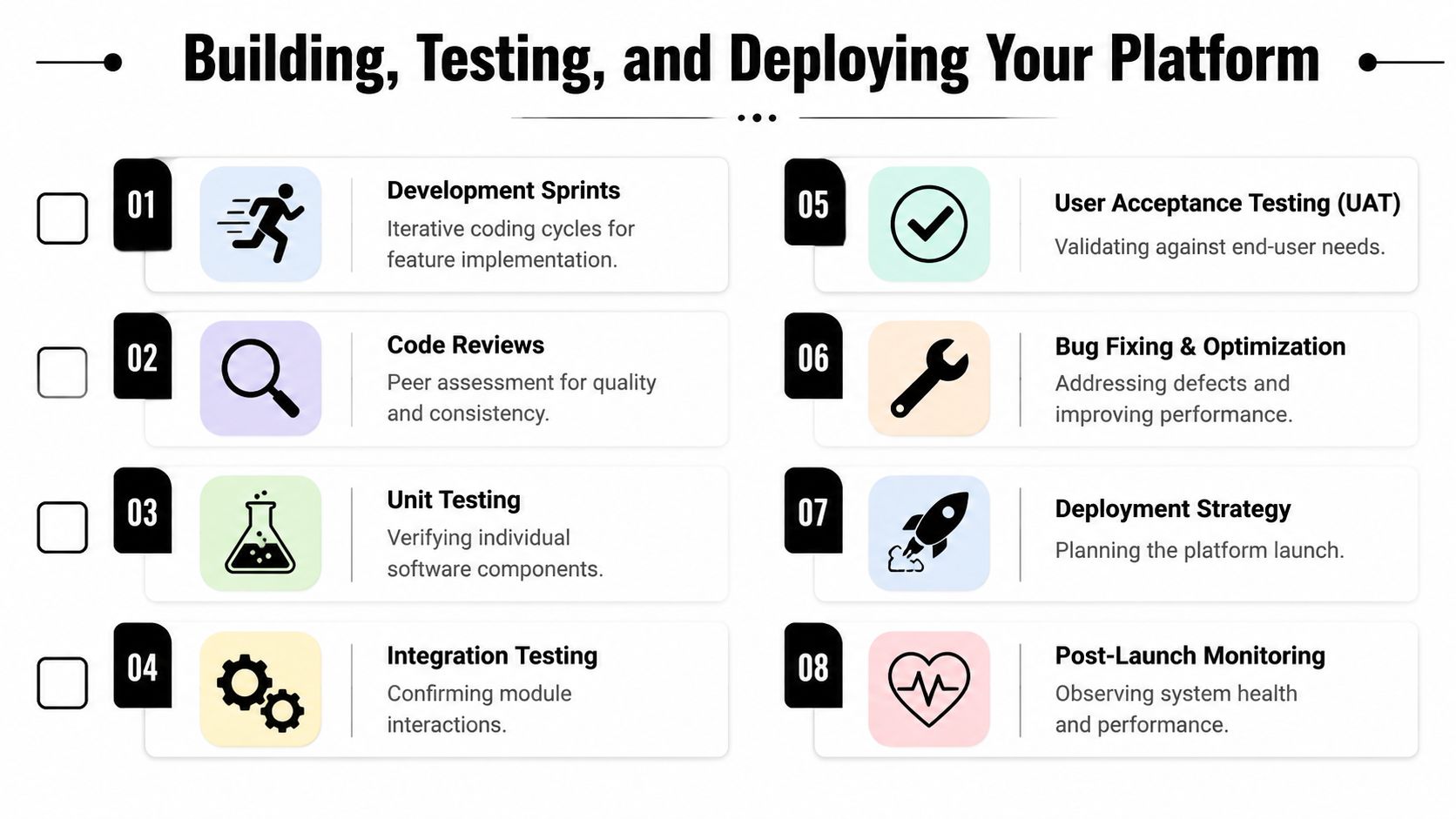
The verified methodology data also notes that 1 to 2 week Agile sprints are standard. That cadence works well for this type of product because stakeholders can review real workflows instead of abstract specs.
Each sprint should end with something testable:
What doesn't work is sprinting on backend fragments nobody outside engineering can validate. In property software, value appears in connected workflows.
You need unit testing, integration testing, and user acceptance testing, but they serve different purposes.
Use unit tests for business rules that fail subtly. Rent schedules, charge generation, status transitions, and permission logic belong here.
Use integration tests where systems meet. Payment provider callbacks, accounting sync, document uploads, notification triggers, and role-based data access are common fault lines.
UAT answers a different question. Can a real property manager, tenant, or admin complete the task without confusion or hidden steps?
Testing should mirror production behavior, not developer assumptions.
The verified data also points to automated test suites for critical workflows and manual validation for edge cases such as multi-property portfolio splits. That's exactly right. Automation catches regressions. Manual testing catches operational weirdness.
A launch-ready product needs more than working features. It needs deployment preparation.
A practical release checklist includes:
If you're moving data from spreadsheets or an older platform, migration deserves its own workstream. This guide to database migration best practices is a useful planning reference because migration failures rarely come from SQL mechanics alone. They come from bad mapping, unclear ownership, and weak validation.
You don't need to turn an MVP into a compliance theater project. You do need to treat security as product behavior.
That means:
Teams often postpone these decisions because they don't look like visible features. Users notice when they go wrong.
The verified benchmark data notes that success rates improve to 80%+ when deployment includes cloud migration setup, data migration if needed, and initial production monitoring. That tracks with what strong teams do in practice.
The first production release should not be a black box. Watch failed jobs, unusual response times, payment exceptions, and user drop-offs in key workflows. The launch period tells you where product friction lives.
Launch isn't the end of property management software development. It's the point where your assumptions finally meet real operational behavior.
A stable version one gives you something more valuable than a polished roadmap. It gives you evidence. You can see where managers hesitate, which reports they export repeatedly, which maintenance states cause confusion, and where tenants abandon actions halfway through.
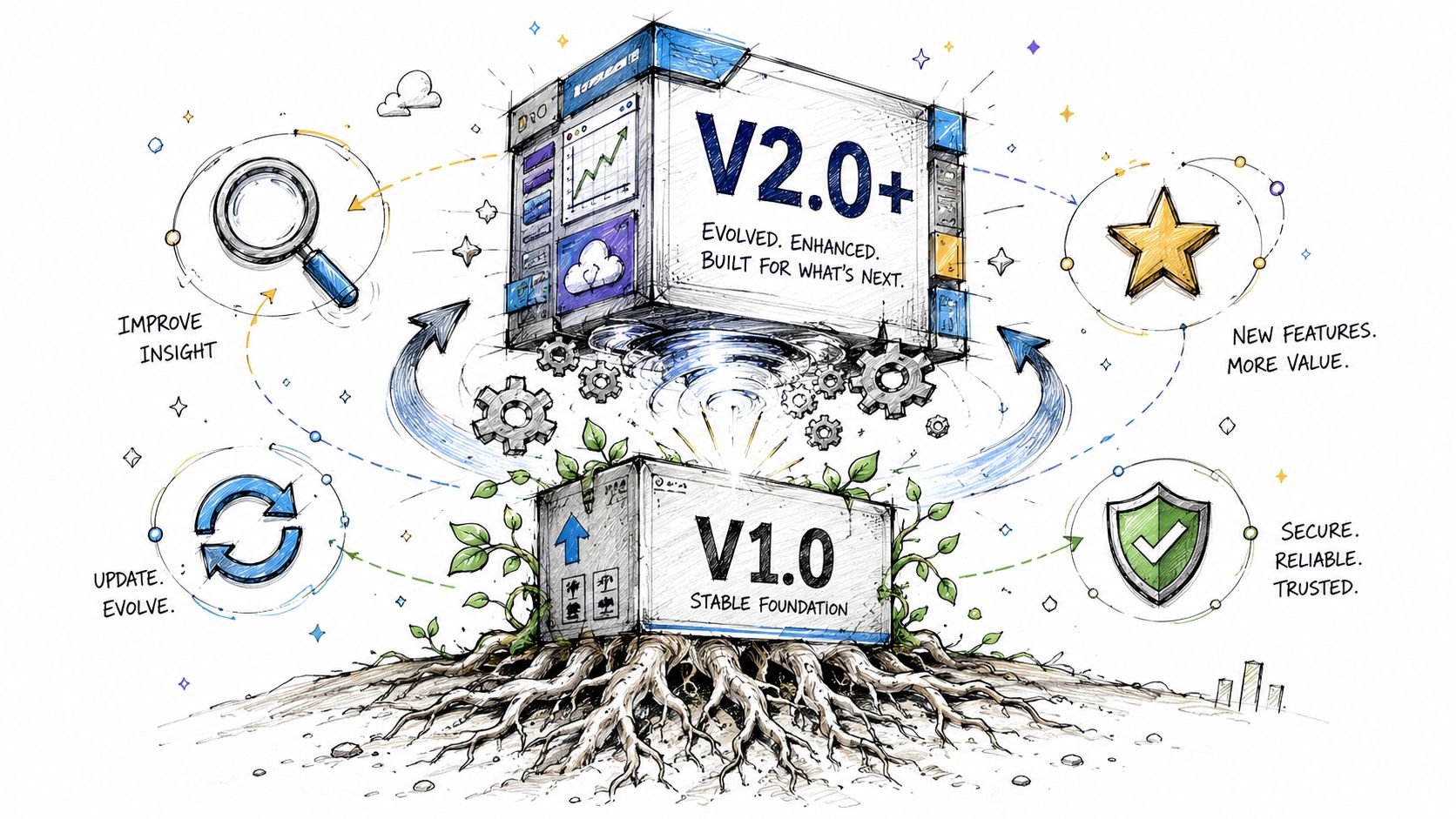
Don't rely only on feature requests. Support tickets, onboarding friction, manual workarounds, and repeated data corrections tell you more about roadmap priority than enthusiastic customer calls do.
Look for these signals:
The point isn't to build everything customers ask for. It's to identify which requests reveal structural product gaps.
Stable products grow by removing friction first, then adding differentiation.
After launch, engineering effort shifts. You still add features, but a good portion of work becomes maintenance in the healthy sense of the word.
That includes:
Many teams get impatient. They want to jump to AI while the billing reconciliation job still needs manual review. That's a mistake. Advanced features on top of unstable fundamentals create more demos, not more value.
The broader proptech market is projected to grow from USD 3.2 billion in 2023 to USD 7.8 billion by 2033, driven by cloud and SaaS adoption plus more complex portfolio needs, according to Allied Market Research's property management software market outlook. The same verified data also points to a more important strategic takeaway: differentiation now comes from automation, analytics, and AI integrations, not basic rent collection.
That doesn't mean every product needs a broad AI suite. It means the winning layer is usually smarter operations.
Good post-launch differentiation often takes one of these forms:
Automate approvals, reminders, recurring tasks, owner notifications, or maintenance routing. These improvements often create immediate user value because they reduce manual follow-up.
Once the underlying data is clean, analytics become useful. Owners and operators start caring about trends across assets, exceptions, and operational bottlenecks rather than static summaries.
AI can help with document search, message drafting, triage, or anomaly detection. It works best when applied to a constrained problem with clear context. It works poorly as a vague “assistant” layer slapped across a messy product.
The best roadmap discipline after launch is simple. Expand only after the current layer is stable, adopted, and understood.
A practical order looks like this:
That sequence keeps the product credible. It also keeps the team from rebuilding the same mistakes with more advanced technology.
If your organization needs a branded platform to manage members, events, content, and communication in one place, GroupOS is worth a look. It gives associations, communities, and event-driven organizations a practical way to centralize operations without stitching together disconnected tools.







