June 17, 2026

Stop Chasing Rent Checks and Start Managing Smarter
If you're a small landlord, you're probably doing too much in too many places. Listings live on one site, applications come through email, maintenance requests show up by text, and rent collection somehow still depends on reminders you have to send yourself. That setup works for a while, until one missed payment, one repair dispute, or one tax-season scramble turns a side business into a mess.
The best property management software for small landlords fixes that by putting the routine work in one place. You get cleaner leasing, better payment tracking, fewer back-and-forth messages, and a more professional tenant experience. Just as important, you stop relying on memory.
If you're also dealing with payment issues, it's worth reviewing this guidance on Texas late rent issues so your software setup matches your legal process.
For small landlords managing fewer than 50 units, a 2026 roundup identified TurboTenant and Innago as the strongest free options, and noted that both include rent collection, tenant screening, maintenance tracking, and basic accounting. That tells you something useful right away. For small portfolios, the winning software often isn't the one with the longest feature list. It's the one that handles the daily basics cleanly without forcing you into enterprise pricing.
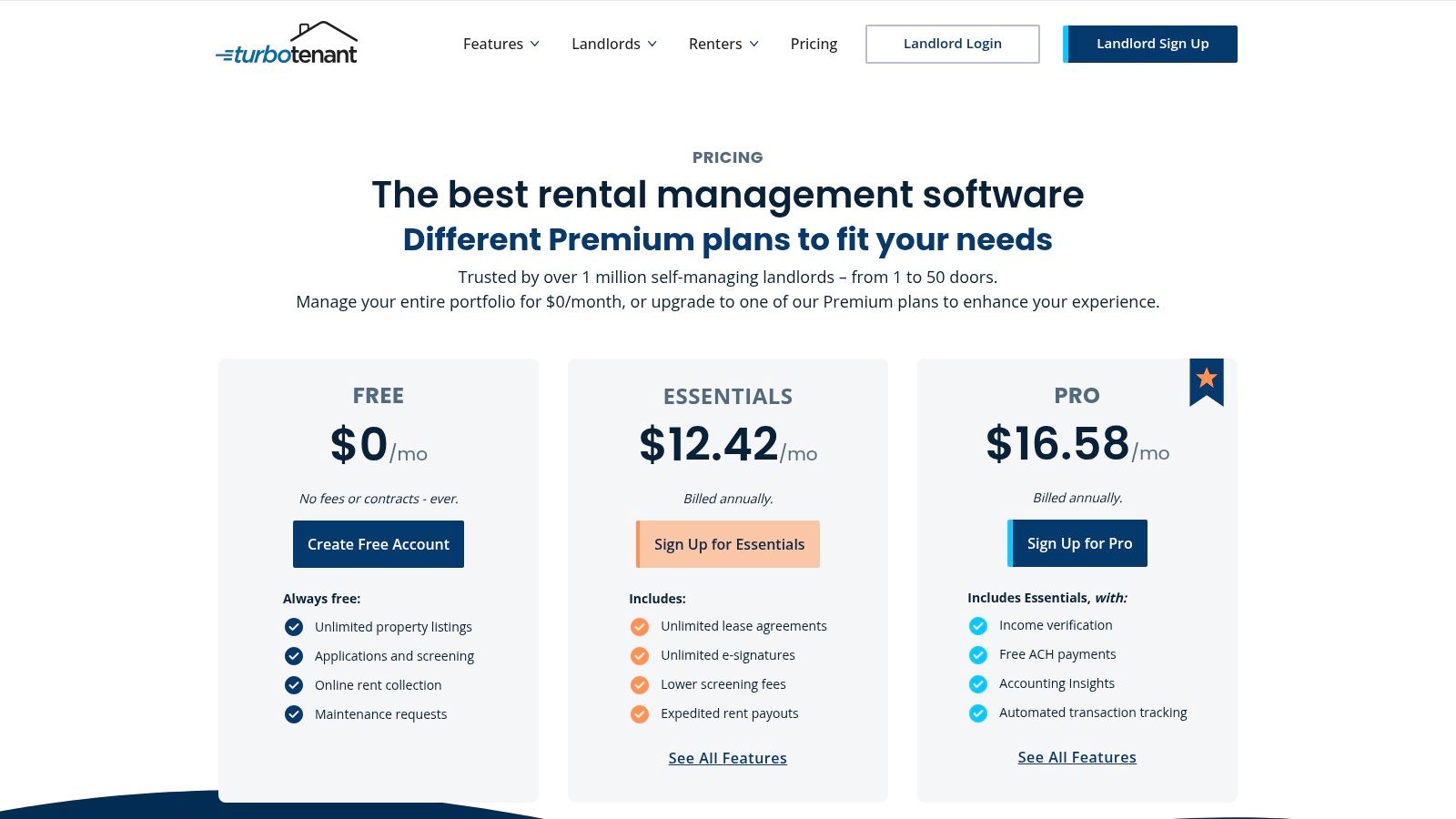
A vacancy sitting for three weeks costs more than most small landlords expect. Lost rent piles up fast, and the admin work around showings, applications, screening, and lease signing usually lands on the owner. TurboTenant is strongest for that stage of the job. If your main problem is getting units filled without stitching together five separate tools, it deserves a close look.
TurboTenant fits landlords who want to improve the front end of the rental process first. Listings, applications, screening, lease signing, and online rent collection all sit in one system, which cuts down on the usual handoff problems between advertising, tenant selection, and move-in paperwork.
That matters more than feature-count comparisons suggest. Small landlords rarely need the broadest platform on day one. They need software that removes the bottleneck they feel every month. With TurboTenant, that bottleneck is usually leasing speed and tenant onboarding.
I also like that it feels built for self-managing owners. The setup is approachable, and the workflow is closer to a practical operating system for a few rentals than a platform designed around large PM teams.
For landlords who like recurring systems that reduce manual follow-up, the same logic shows up in subscription management software for small business. The simpler the repeatable workflow, the less time you waste chasing routine tasks.
TurboTenant is not the best pick for every landlord. Its weak spot is what happens after the lease is signed. If you want more detailed accounting controls, owner-level reporting, or a tighter financial workflow, you may outgrow it faster than you expect.
Payments are another place to check closely. Standard bank-transfer timing can matter if cash flow is tight, and tenant-paid card fees can create friction with renters who expect the same payment experience they get from consumer finance apps. Those are not deal-breakers, but they are real trade-offs for a small portfolio where every late deposit is noticeable.
My rule is simple. Choose TurboTenant if leasing is the pain point. Choose an accounting-first platform if bookkeeping, reconciliation, and reporting are what slow you down.
You can review current plan details on the TurboTenant pricing page.
A lot of small landlords reach the same point. Rent is coming in from one app, lease files sit in email, maintenance requests arrive by text, and bookkeeping lives in a spreadsheet that only makes sense to the person who built it. Innago is one of the few tools that can pull those basics into one place without adding another monthly software bill for the landlord.
That makes its best-fit use case pretty clear. Innago is best for budget-conscious landlords who need the core workflow covered first, then can decide later whether they need deeper accounting or reporting.
Innago covers online rent collection, applications, tenant screening, e-sign leases, maintenance tracking, and tenant or owner portals. For a small portfolio, that usually handles the daily friction points that waste the most time.
The mobile app matters too. Small landlords are rarely sitting at a property management desk all day. They are approving a repair between jobs, checking rent status from the truck, or sending a lease from the kitchen table at night.
Its interface is also easier to learn than many systems built for larger operators. That is a real advantage when adoption is the bigger problem than feature depth. A clean portal often does more to reduce back-and-forth than another reporting tab, which is the same lesson behind strong customer self-service portal tools.
Innago works well when your main goal is to centralize leasing, rent collection, and maintenance without increasing overhead. The trade-off shows up later if your portfolio grows and your financial workflow gets more demanding.
Reporting and accounting are where some owners start to feel the ceiling. If you want more detailed bookkeeping controls, tighter reconciliation, or reports that replace dedicated accounting software, you may outgrow it. That does not make Innago a weak product. It means it is optimized for simplicity and low software cost, not finance-heavy operations.
Tenant payment costs deserve a close look too. ACH or eCheck fees on the tenant side can create resistance, especially in price-sensitive rentals where small fees get noticed fast.
My view is simple. Choose Innago if you want the most useful day-to-day functions in one place and need to keep software spend low. If your next priority is accounting depth, pick a platform built around financial control from the start.
You can explore the platform on the Innago website.
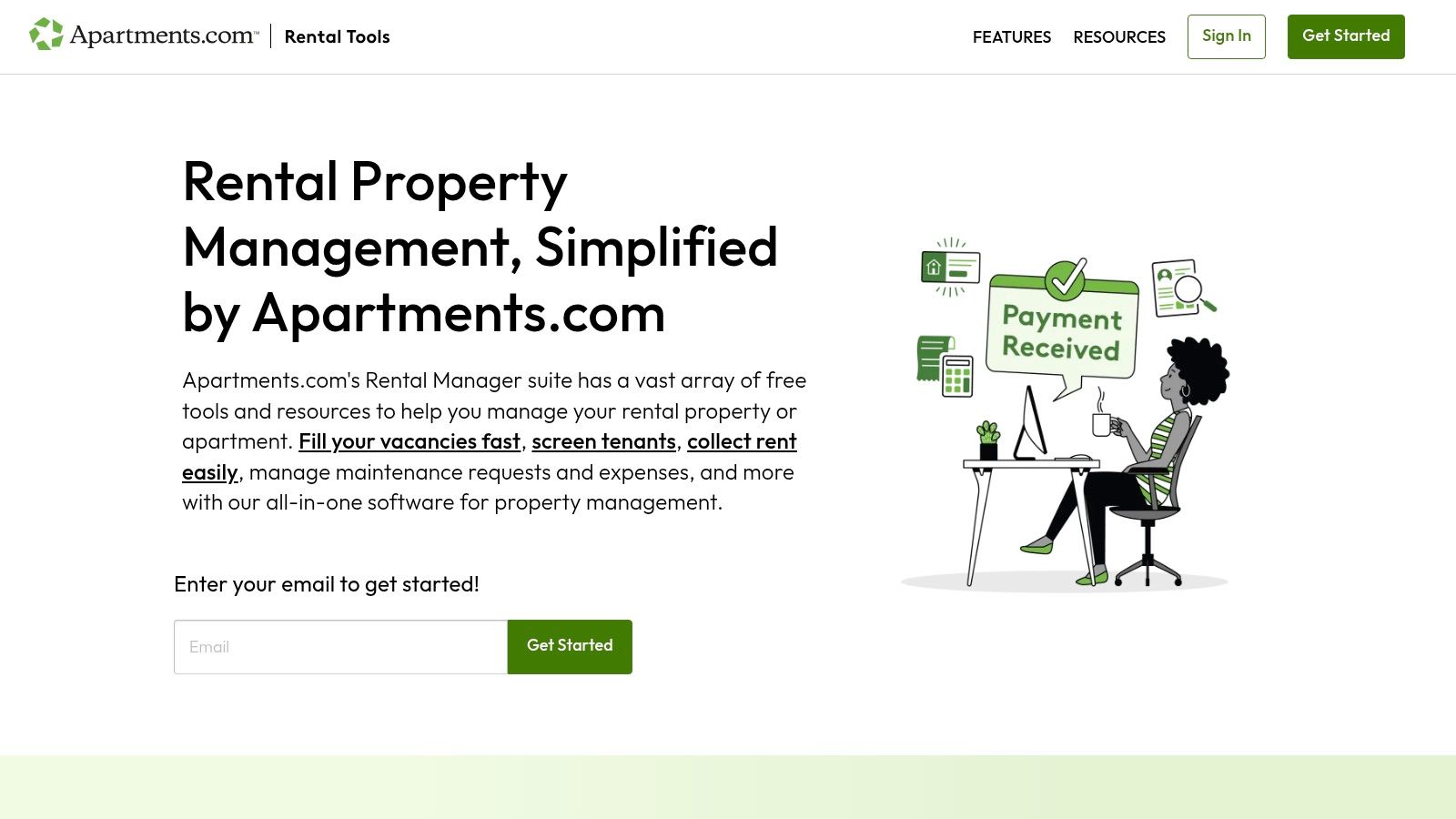
Apartments.com Rental Manager makes the most sense if you already rely on Apartments.com for listing exposure and want your leasing and rent collection tied to that ecosystem. For independent landlords, that can remove a lot of duplicated work.
Its appeal is straightforward. You can list a vacancy, collect applications, run screening, sign state-specific e-leases, and take rent online without adding another subscription line item.
This platform is easy to recommend to owners who want a simple owner and tenant portal without buying into a broader property operations suite. The rent collection setup includes autopay and reminders, and the application flow is built to feel familiar to renters who already shop on major listing platforms.
That tenant-facing familiarity matters more than many landlords expect. Adoption goes up when tenants don't feel like they're being pushed into a clunky portal no one has heard of.
There's also a broader lesson here for landlords who care about communication and transparency. Clean self-service experiences tend to reduce repetitive admin work, much like strong customer portal services do in other industries.
The software is strongest for leasing and basic rent operations. It isn't the platform I'd choose first if you need richer maintenance workflows, accounting depth, or more customizable reporting.
Payment method flexibility is good for tenants, but card-related fees can still create pushback. New users may also run into some setup friction around bank verification and deposit timing.
See the platform at Apartments.com Rental Manager.
Avail is one of the easiest tools for a hands-on landlord to learn. If you're managing a small portfolio yourself and want software that walks you through leasing, screening, rent collection, and maintenance without much confusion, it does that job well.
I usually think of Avail as the practical middle ground between a free starter tool and a more operationally dense platform. It doesn't feel stripped down, but it also doesn't overwhelm you at setup.
Avail's strength is workflow clarity. Listings, online applications, TransUnion screening, rent collection, maintenance tracking, and lease templates all fit together in a way that feels landlord-centric. That's important if you're the one writing the listing, approving the application, sending the lease, and answering the maintenance request.
The paid tier is where the platform becomes more compelling. That's where customization improves and landlords can remove tenant ACH fees, which can make online payments easier to encourage.
If your rental business is built around predictable monthly income and retention, there's a useful parallel with recurring revenue business models. Consistency often matters more than squeezing every workflow into one advanced platform.
Avail is best when you want guidance and straightforward execution. It's less compelling when you want deep accounting, more advanced reporting, or the sort of scalability that supports a more complex operation.
The free path is good, but some of the features landlords care about most sit behind the paid tier. Card payment fees also remain a tenant experience issue.
If you want software that teaches you a cleaner process while you use it, Avail is a good fit. If you already have a mature process and want more customization, you may outgrow it.
You can compare plans on the Avail pricing page.
A common small-landlord problem looks like this: you add a few units, rent starts coming in from different properties, and suddenly every new door seems to bring another software cost with it. RentRedi appeals to landlords who want to avoid that pattern. Its flat-fee approach is the main reason it makes this list.
RentRedi works well for owners who manage from their phone and want to keep software spend predictable as the portfolio grows. You get the core functions most small landlords use day to day: online rent collection, listings, tenant screening, e-signing, maintenance requests, and basic reporting.
The mobile experience is the differentiator.
If you approve maintenance, answer tenant messages, and check payment status between other work, RentRedi is easier to live with than platforms that feel built mainly for desktop admins. That matters for self-managing landlords with a handful of units, and it still matters at 10 or 20 units if you stay hands-on.
RentRedi is not the pick I would make for accounting-first management. It handles operating tasks well, but landlords who want bookkeeping and financial reporting to sit at the center of the platform may find it lighter than they want. In that case, the better question is not whether RentRedi has enough features. It is whether you want your property software to be your accounting system, too.
Payment fees also deserve a quick look before you commit. Card payments can create tenant friction if residents do not want to absorb extra transaction costs, so it is smart to check how your renters are most likely to pay before making this your standard system.
For many small landlords, that is a fair trade. RentRedi keeps the day-to-day work organized without pushing you into a more complex system too early.
You can check current plan options on the RentRedi website.

A small portfolio gets complicated fast once you add more leases, more maintenance requests, and more vendors to coordinate. DoorLoop fits landlords who can already see that coming and would rather set up one stronger system now than patch together three lighter tools later.
That is why I put DoorLoop in the "best for scaling workflows" bucket, not the budget-first bucket.
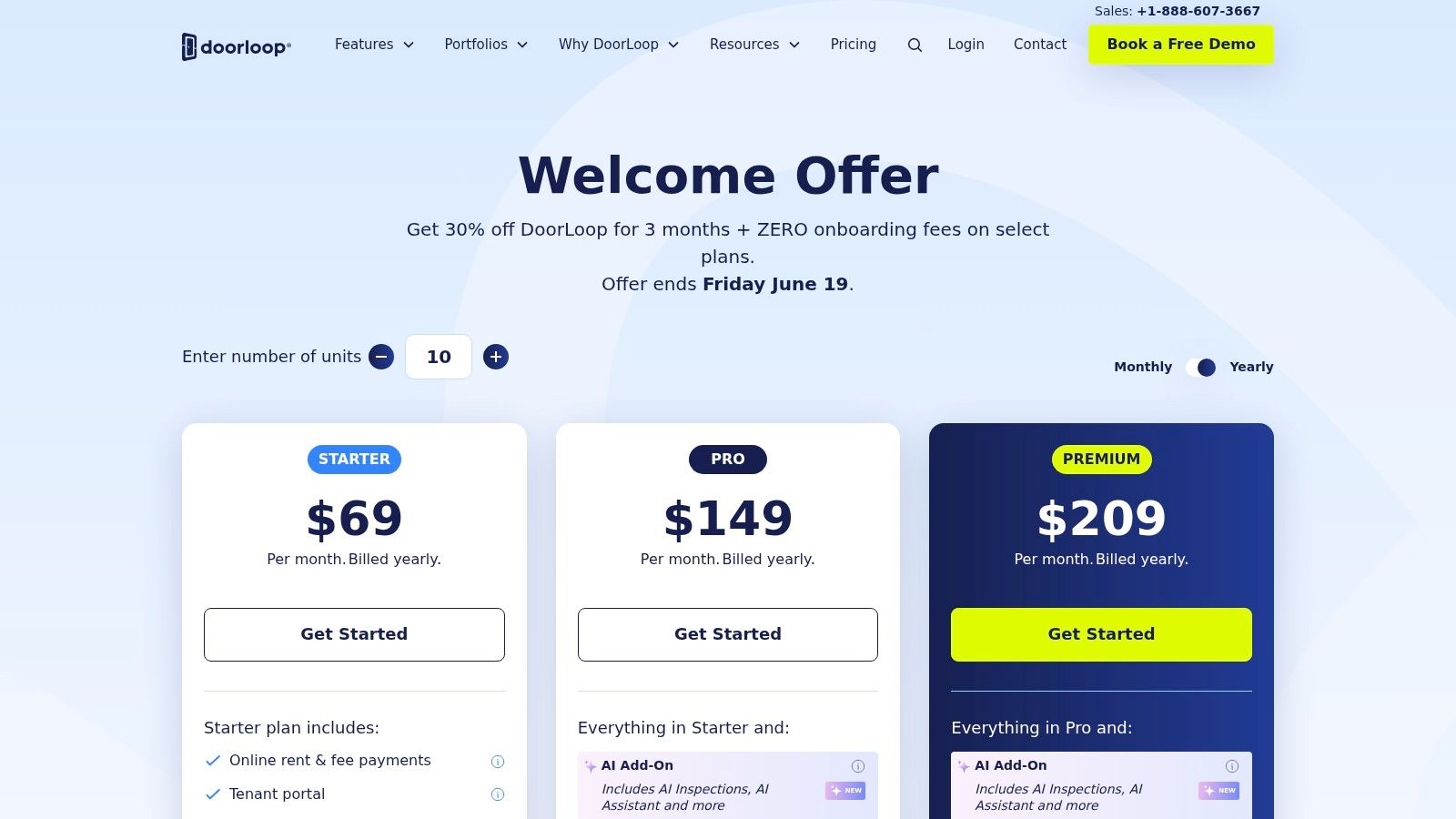
DoorLoop pulls rent collection, maintenance tracking, reporting, tenant communication, screening, and portal access into one place. For a landlord planning to grow, that matters because the actual problem is usually not missing one feature. It is losing time across too many tabs, inboxes, and side systems.
If you are actively adding units, this is the kind of software that supports scaling a rental business with better systems instead of forcing a messy migration after your processes break.
Choose DoorLoop if you want tighter operating control before your portfolio feels chaotic.
DoorLoop makes more sense at the point where you are thinking about repeatable processes. Who logged the repair request? Did the vendor get assigned? Was the tenant updated? Can you pull the report without exporting data into another tool? Those questions show up earlier than many landlords expect.
That said, small landlords with only one or two uncomplicated units may find it heavier than they need. The setup takes more intention, and the monthly cost will be harder to justify if you mainly want online rent payments and basic screening.
DoorLoop covers a lot of operational ground, but that depth has a cost. You will spend more time on setup than you would with simpler tools, and pricing can rise as your unit count and plan needs increase.
For the right landlord, that is a fair trade. For the wrong one, it is paying early for structure you will not use yet.
Visit the DoorLoop pricing page to see how its plans are structured.
TenantCloud sits in a useful middle lane. It isn't as bare-bones as some rent-first tools, and it isn't as heavy as platforms built for more complex management operations. For many small landlords, that's exactly the appeal.
If you want listings, screening, rent collection, maintenance tracking, and some built-in accounting that can expand with you, TenantCloud deserves a look.
What TenantCloud gets right is gradation. You can start with simpler workflows and move into stronger reporting, accounting, and automation as your needs grow. That makes it a practical fit for landlords who know they want more than rent collection, but aren't ready for enterprise-style software.
The downside is that some of the stronger reports and automations are reserved for higher tiers. That's common in this category, but it matters more when accounting is one of the reasons you're shopping in the first place.
Landlords in growth mode usually need better systems before they think they do. That's true for rentals just as much as it is for teams focused on scaling with systems.
Very small landlords may find the interface heavier than they need. If you only have one or two units and want a minimal learning curve, simpler apps will feel faster. TenantCloud starts to make more sense when your workflow is broad enough to justify a slightly denser dashboard.
TenantCloud works well when you want a platform that can mature with you, but you don't want to jump straight to a fully loaded management suite.
You can compare plan details on the TenantCloud pricing page.
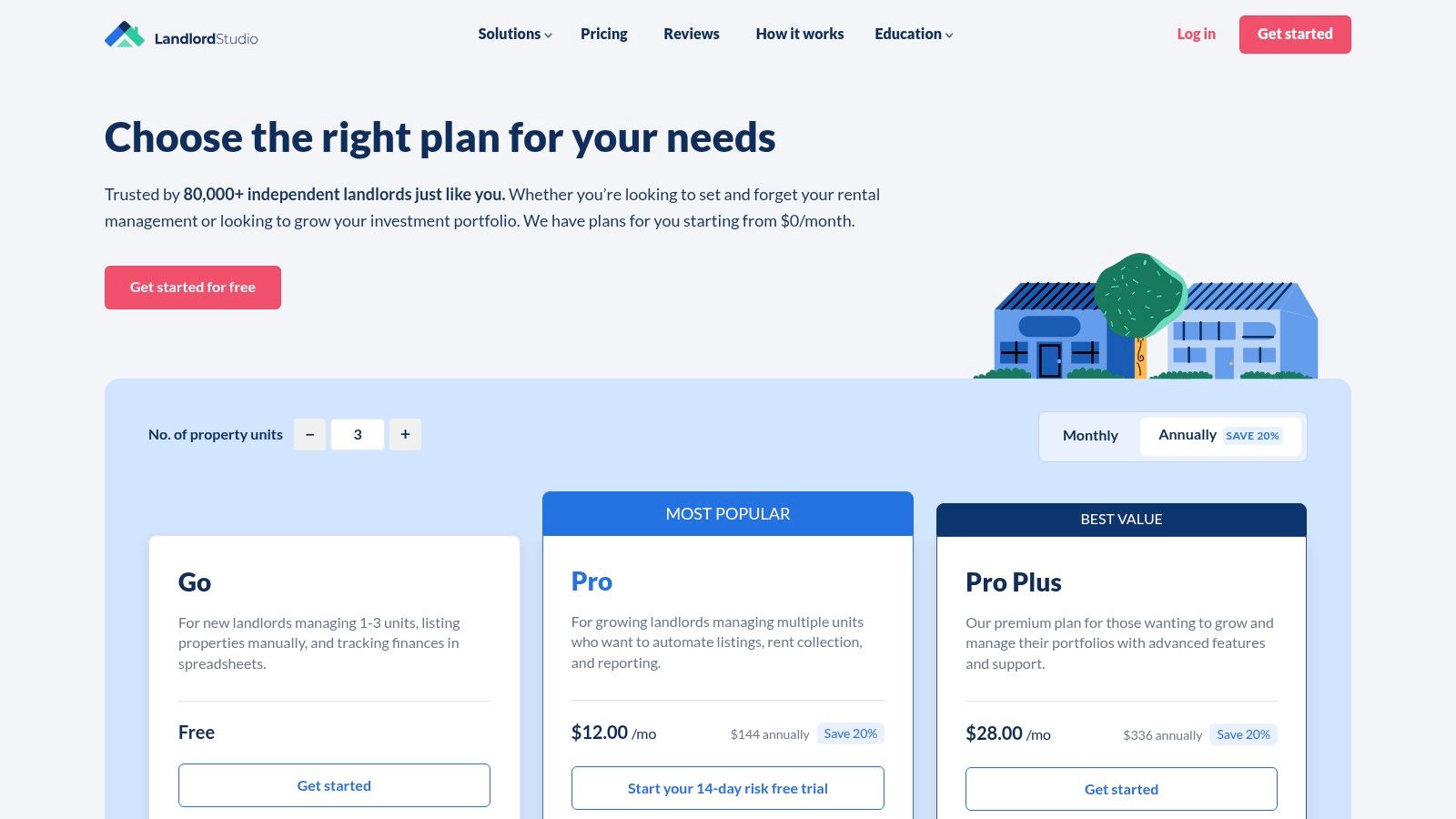
Tax season exposes weak systems fast. If receipts are scattered across email, a notes app, and a shoebox in the truck, Landlord Studio solves a real problem for small landlords. It is the clearest fit on this list for owners who care as much about clean books as they do about collecting rent.
Landlord Studio stands out because the accounting tools are not treated like an afterthought. You get expense tracking, receipt capture, bank transaction syncing on paid plans, document storage, maintenance request tracking, and reports built for rental owners. For a landlord with a small portfolio that is starting to grow, that mix usually matters more than flashy leasing features.
I like it best for the owner who has already outgrown a free rent collection app and now wants cleaner monthly bookkeeping without stepping up to a heavier system. That is a specific use case, and this guide works better when software is matched to the job it does best, not just to a long feature grid.
The trade-off is clear. Landlord Studio is stronger on bookkeeping than on deep operational workflows. If your biggest pain point is coordinating vendors, handling more complex team permissions, or producing layered owner statements, you will hit the edge of what it does well sooner than you would with a broader platform.
Landlord Studio highlights features such as receipt scanning, income and expense tracking, and tax reports for landlords on the Landlord Studio pricing page. That positioning lines up with how many small landlords buy software. They do not need every feature. They need fewer bookkeeping headaches.
A separate review from Rentastic's comparison of landlord software also places Landlord Studio among the stronger options for landlords who prioritize tracking income, expenses, and reporting over full-service property operations.
Stessa is best for landlords who think like investors first. If your main question is not "How do I manage maintenance tickets?" but "How cleanly can I track property performance, expenses, and cash flow?" Stessa stands out.
Its dashboard is finance-forward. That means less emphasis on full operational management and more emphasis on understanding where the property business stands.
Stessa offers rent collection, expense tracking, tax-time reporting, and performance dashboards. If your current process involves bouncing between bank accounts, spreadsheets, and accounting exports just to understand what a property earned, that focus is valuable.
I tend to recommend Stessa to landlords who already have decent leasing and communication habits but poor financial visibility. It sharpens the money side of the business.
The trade-off is simple. Stessa is more finance-centric than full-suite property management software. If maintenance coordination, vendor tracking, and day-to-day operations are your biggest sources of chaos, you'll likely need a broader tool.
Its best setup may also depend on using the financial ecosystem the platform prefers, especially if you're trying to maximize payment convenience and fee structure.
You can explore account options on the Stessa pricing page.
Hemlane fills a niche most software tools don't. It's for landlords who want software, but also want optional human help without fully handing the property over to a traditional manager.
That hybrid model is especially useful for owners who self-manage most of the time but occasionally need support with showings, inspections, repair coordination, or local boots on the ground.
Hemlane includes rent collection, leasing workflows, maintenance coordination, a repair hotline, centralized messaging, and access to a local agent network for certain tasks. If you live far from your rentals or don't want to personally coordinate every field issue, that's where the platform becomes more than just another dashboard.
This isn't the cheapest route, and it isn't trying to be. Hemlane earns its place when convenience and selective delegation matter more than getting the lowest monthly software cost.
If you have a very small local portfolio and you're comfortable handling every showing, lease, and maintenance issue yourself, Hemlane may feel like extra machinery. Higher tiers are where its most differentiated support features show up, so landlords who only need software may find better value elsewhere.
The right reason to choose Hemlane is not "I need software." It's "I need software plus occasional operational backup."
You can see how its service levels are packaged on the Hemlane pricing page.
One unit turns into three, then five, and suddenly the software that felt fine for collecting rent is also supposed to handle applications, maintenance, bookkeeping, and owner-level reporting. That is usually the point where small landlords stop asking, "Which platform has the most features?" and start asking, "Which one fits the way I run my rentals?"
This comparison is built around that decision. Instead of treating every product like a generic all-in-one, it groups each option by the job it does best, because a landlord trying to fill vacancies has different needs than one trying to clean up books before tax season.
| Product | Core features | Quality (★) | Price / Value (💰) | Target (👥) | USP (✨ / 🏆) |
|---|---|---|---|---|---|
| TurboTenant | Listings, screening, e-sign, rent collection, late fees | ★★★★ | 💰 Free core; tenant card fee 3.49%; Premium for faster payouts | 👥 New/small landlords | ✨ Free-to-start + strong marketing/docs · 🏆 Best Free Platform with Add‑ons |
| Innago | ACH/card rent, e-leases, portals, maintenance | ★★★★ | 💰 No landlord subscription; tenant ACH fee (~$2) | 👥 Cost-conscious owners (1–20 units) | ✨ Truly free landlord tier · 🏆 Best Truly Free Option |
| Apartments.com Rental Manager | Listings exposure, screening, e-sign, rent collection | ★★★★ | 💰 $0 subscription; tenant-paid app/card fees | 👥 Independent landlords seeking listing reach | ✨ Built-in listing network · 🏆 Best for No‑Cost Listings |
| Avail (by Realtor.com) | Syndicated listings, TransUnion screening, rent collection | ★★★★☆ | 💰 Free tier; paid for customization & fee waivers | 👥 DIY landlords with a few units | ✨ Clear onboarding + templates · 🏆 Best for DIY Landlords |
| RentRedi | ACH/card/cash payments, screening, maintenance, QuickBooks | ★★★★ | 💰 Flat pricing with unlimited units | 👥 Growing landlords who want predictable fees | ✨ Unlimited units on flat fee · 🏆 Best for Unlimited Units |
| DoorLoop | Rent, maintenance, accounting, CRM, detailed reporting | ★★★★☆ | 💰 Tiered pricing scales by unit count | 👥 Landlords planning to scale | ✨ Full-featured, replace multiple tools · 🏆 Best All‑in‑One for Scalability |
| TenantCloud | Listings, rent collection, maintenance, accounting | ★★★★ | 💰 Competitive tiered plans | 👥 Owners who need scalable features | ✨ Balanced feature set as you grow · 🏆 Best Scalable Platform |
| Landlord Studio | Bank feeds, receipt scanning, rent, Schedule E reports | ★★★★ | 💰 Simple per‑unit pricing | 👥 Landlords focused on bookkeeping/taxes | ✨ Mobile-first accounting & tax reports · 🏆 Best for Accounting & Tax |
| Stessa | Rent collection, expense tracking, finance dashboards, cash accounts | ★★★★★ | 💰 Fee-free ACH possible via Stessa Cash | 👥 Finance-first landlords/investors | ✨ Exceptional financial clarity & fee-free ACH · 🏆 Best for Finance‑First Landlords |
| Hemlane | Rent, leasing, maintenance coordination, local agent network | ★★★★ | 💰 Higher tiers for agent services | 👥 Landlords wanting on‑demand local help | ✨ Hybrid software + local agents · 🏆 Best Hybrid Model (Software+Agents) |
A few patterns matter more than the star ratings.
Free and low-cost tools tend to be strongest on leasing and rent collection. TurboTenant, Innago, Apartments.com Rental Manager, and Avail make the most sense when keeping overhead low is the priority and you do not need advanced accounting depth. The trade-off is that you may outgrow them if your workflow gets more operational, especially once maintenance tracking, bookkeeping, and portfolio reporting start eating time.
Flat-fee and growth-oriented platforms sit in the middle. RentRedi and TenantCloud are easier to justify for landlords adding doors and wanting fewer pricing surprises. DoorLoop pushes further into all-in-one territory with accounting, CRM, and stronger reporting depth, but the added capability usually means more setup and a higher monthly bill.
Then there are specialist picks. Landlord Studio and Stessa stand out when recordkeeping is the main pain point, not leasing. Hemlane stands apart for owners who want software plus optional field support. Those are different buying decisions, and treating them as direct substitutes usually leads to picking the wrong tool.
For a small landlord, "best" usually means best for the current bottleneck, with a clean upgrade path for the next stage. That is the filter to use before looking at any demo or pricing page.
Choosing the best property management software for small landlords comes down to fit, not hype. Most platforms can collect rent and process applications. The key question is which one matches the way you operate now, and the way you'll operate after a few more leases, a few more repairs, and a few more tax cycles.
Start with the pain point that costs you the most time. If vacancies are your problem, look closely at TurboTenant or Apartments.com Rental Manager. If budget is the issue, Innago is hard to ignore. If your records are messy and tax prep is always painful, Landlord Studio or Stessa may be a better answer than another leasing-heavy app.
A lot of small landlords make the same mistake. They shop for the biggest feature list, then end up paying for complexity they never use. The opposite mistake is just as common. They choose the simplest free tool, then realize a year later that they still need separate systems for accounting, maintenance, or reporting.
Use this checklist before you commit:
Migration deserves more attention than it usually gets. Before switching, clean up unit names, tenant contact records, lease dates, and recurring charges. Importing bad data into better software doesn't solve anything. It just gives you a cleaner-looking mess.
It also helps to run one property through the new platform first. Test rent collection, maintenance requests, lease storage, and a few basic reports before moving the entire portfolio. That trial period will show you whether the software fits your actual workflow or only looked good on a pricing page.
Support matters too. Watch a demo. Open a help article. Send a question. Small landlords often need responsive guidance more than advanced features, especially in the first month after setup.
The best choice is usually the one that removes the most friction with the least disruption. For some landlords, that's a free platform that replaces spreadsheets and text-message chaos. For others, it's a paid system that finally brings leasing, accounting, and maintenance into one process. Either can be the right decision if it fits the way you run your rentals.
If your organization also needs a better way to manage members, events, subscriptions, and communications, GroupOS is worth a look. It brings community operations into one branded platform with ticketing, membership management, content delivery, messaging, analytics, and migration support, which is especially useful for associations, networks, and event-driven groups that have outgrown disconnected tools.







