May 4, 2026

If you're running an association, member community, or event series, your workday probably lives in too many tabs. Member records sit in a spreadsheet. Renewals happen in a billing tool. Event registrations run through another system. Conversations drift into email, Slack, Facebook groups, and text messages. Then someone asks a simple question like, "Which members attended last month's workshop but still haven't renewed?" and the answer takes an afternoon.
That mess is common. It also gets expensive in quiet ways. Staff re-enter the same data. Sponsors get vague reports instead of clear visibility. Members miss features they already paid for because no one sees the full picture of their journey. A membership platform fixes that by turning scattered tasks into one operating system for your community.
Maria manages a professional association that hosts conferences, webinars, and local meetups. Her team uses one tool for ticket sales, another for invoices, a newsletter platform for announcements, and a private social group for conversation. Every event creates the same cleanup project. Export attendee lists. Match them to member records. Chase payment issues. Send follow-ups from a different system. Then update sponsor reports by hand.
Nothing is broken enough to force change today. But everything is broken enough to waste time every week.
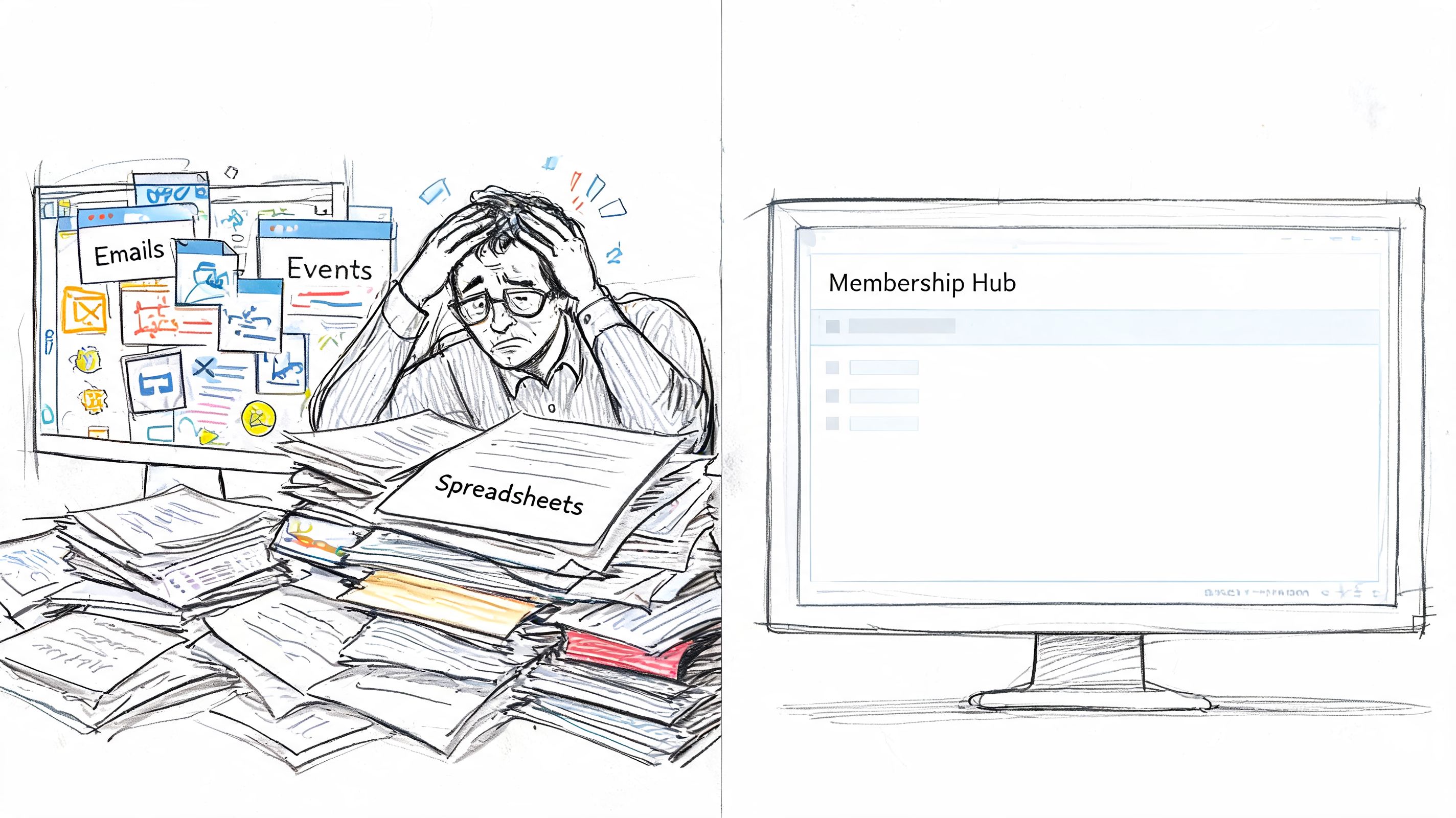
A membership platform replaces that patchwork with a central hub, much like moving from a kitchen drawer full of mismatched utensils to a properly organized workstation. The work still matters, but now every tool has a place and works with the others.
That shift is bigger than convenience. The Membership Management Software Market was valued at USD 10.6 billion in 2025 and is projected to reach USD 28.9 billion by 2034, growing at a CAGR of 11.7%, driven by organizations replacing fragmented tools with centralized systems for digital transformation, according to membership management software market outlook.
When organizations move to a central platform, a few things usually happen first:
For event-driven groups, this matters even more. Events create bursts of attention, but attention fades fast if the follow-up lives in disconnected systems. A modern member hub helps you carry event energy forward into discussion, content access, renewals, and sponsor engagement.
Practical rule: If your team has to export a CSV just to understand member activity, you don't have a real system. You have a workaround.
Many organizations start by improving a member-facing front end, such as customer portal services for associations and communities, then realize the bigger win is operational. A true membership platform doesn't just make things look tidier. It changes how the organization runs day to day.
A membership platform is your organization's digital headquarters. It isn't just a website with a paywall. It isn't just event software. And it isn't only a member database. It's the place where your member records, communications, payments, events, and engagement history connect.
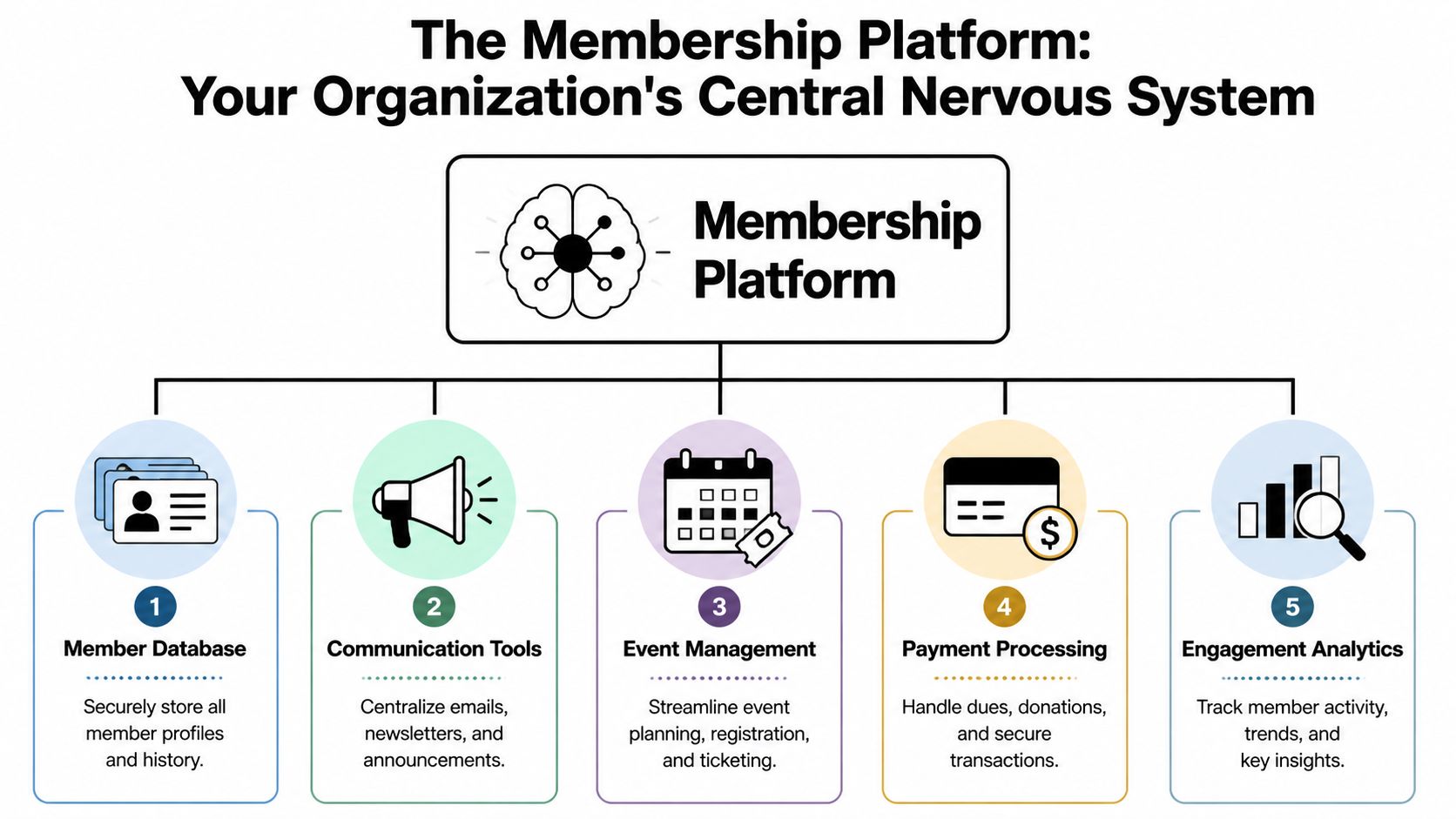
That "headquarters" idea helps because readers often confuse a membership platform with older admin software. Traditional systems often focused on dues, directories, and back-office records. Modern platforms still handle those jobs, but they also support ongoing participation. They track what members attend, read, click, join, and ignore. That means the platform can support both operations and engagement.
A useful mental model is to picture five connected parts.
Member database
This is the core record for each person. It stores profile details, membership status, payment history, event attendance, and often communication history.
Communication layer
Email announcements, targeted updates, private messages, and community discussion tools sit here. The point isn't just sending messages. It's sending the right message based on what someone has done.
Event management
Registration, ticketing, check-in, attendee segmentation, and post-event follow-up belong in the same environment as your member records.
Payments and access
Dues, subscription billing, donations, paid events, and gated content all depend on this layer working cleanly.
Analytics and engagement signals
This is what turns software into strategy. You see who attends repeatedly, who signed up but never returned, which topics pull people in, and where value is being missed.
A short explainer can help if your board or staff still thinks in older categories.
Event teams often buy tools one at a time because the immediate need is obvious. They need registration now. Then email. Then surveys. Then a member portal. The result is a stack of point solutions that behave like separate buildings on different streets.
A membership platform brings those buildings onto one campus.
That matters after the event, not just before it. If a member attends a conference session on certification, the platform should make it easy to show related resources, invite them into a topic channel, and flag them for follow-up. If a sponsor wants visibility with attendees interested in a specific track, the platform should support that path too.
A platform earns its keep after the event ends. Registration is only the first transaction. Ongoing engagement is the real product.
You'll also hear people ask whether a "membership site" is enough. Sometimes it is. Sometimes it isn't. If you need a clearer distinction, this guide on what a membership site is and how it differs from a broader member system is useful.
The idea of a unified digital experience shows up outside associations too. For example, products that offer flexible cash and crypto payouts make sense to users because rewards, identity, and transactions live in one connected flow instead of bouncing across separate tools. Membership organizations need the same kind of coherence, even if the use case is very different.
Features only matter if they solve a real problem. That's where many membership platform evaluations go sideways. Teams compare long product checklists without connecting them to the daily pain of running events, retaining members, and proving sponsor value.
A better way to evaluate features is to ask, "What job does this feature remove, improve, or enable?"
Administrative drag usually hides in repeat tasks. Manual renewals. Duplicate profile updates. Separate attendee imports. Staff answering the same access question over and over.
Useful platform features in this category include:
The direct benefit is simpler than it sounds. Staff spend less time reconciling systems and more time serving members.
Most events have a strong opening and a weak ending. People register, attend, maybe receive one thank-you email, then the experience goes flat. A good membership platform keeps the event alive.
Look for features like:
This is also where mobile experiences matter. In some communities, a lightweight extension such as a telegram mini app for community engagement can complement the main system by making participation feel more immediate. The key is that these touchpoints should support the core platform, not replace it.
If your event follow-up starts and ends with "Thanks for attending," you're leaving most of the value on the table.
Associations often think about revenue in separate buckets. Membership dues over here. Ticket sales over there. Sponsorship somewhere else. A strong platform helps those streams support one another.
Features that help:
One platform option used by professional networks and event teams is GroupOS, which combines memberships, ticket sales, content delivery, messaging, sponsor pages, and branded app experiences in one environment. Whether you choose that route or another vendor, the important point is to connect transactions to the wider member journey.
Sponsors rarely want "exposure" in the abstract. They want relevant visibility and useful leads. A membership platform can support that better than a disconnected event stack.
Features worth prioritizing include:
| Feature | What it helps sponsors do |
|---|---|
| Dedicated sponsor profiles | Present offers, team details, and resources in one place |
| Banner placements and showcases | Stay visible beyond the event day |
| Tagged content areas | Reach members interested in a specific topic |
| Event-specific pages | Connect sponsorship to sessions, tracks, or exhibitor experiences |
| Lead capture tied to activity | See who engaged, downloaded, or visited |
The practical outcome is stronger sponsor reporting. Instead of saying, "Your logo was included," you can talk about where members encountered sponsor content across the broader community experience.
Buying a membership platform isn't mainly a software decision. It's an operating model decision. You're choosing how your staff will work, how members will interact with your organization, and how much friction you'll tolerate for the next few years.
That's why polished demos can be misleading. Almost every platform looks clean for ten minutes. Actual questions show up in month three, when your team is running a live event, onboarding new members, updating sponsor content, and fixing a billing issue at the same time.
Before you compare vendors, map what happens today.
Write down the tasks your team repeats most often. Include renewals, event setup, speaker pages, sponsor reporting, member onboarding, chapter communications, and post-event follow-up. Then circle the handoffs where work breaks down. Those are the places a platform needs to remove friction.
Three questions usually expose the truth fast:
If you skip this step, you'll shop for features in the abstract and miss the operational bottlenecks that are costing you the most.
Many buyers focus on the member-facing side and forget the admin side. That's a mistake. A platform can look elegant to members and still create constant work for staff.
Review both sides during a demo.
For members, look at sign-in, profile updates, event discovery, payments, and mobile usability. For administrators, inspect workflows like building a registration form, segmenting attendees, editing permissions, and generating sponsor-ready reports.
Buy for the day after launch, not the demo day. Staff live in the admin side. Members live in the front end. Both have to work.
Here is a practical vendor scorecard you can use with your team.
| Evaluation Criterion | What to Look For | Importance |
|---|---|---|
| User experience for members | Clear navigation, simple sign-in, easy event registration, intuitive profile management | High |
| User experience for staff | Admin tasks should be manageable without constant workarounds or developer help | High |
| Event management fit | Registration, ticketing, check-in, attendee communication, and follow-up should feel native | High |
| Member data structure | Unified records that connect membership, events, communications, and payments | High |
| Sponsor support | Dedicated spaces, content visibility options, and reporting that helps prove value | High |
| Communication tools | Segmentation, announcements, reminders, and community messaging in one flow | High |
| Payment handling | Dues, paid events, subscriptions, and access controls should connect cleanly | High |
| Integration options | The platform should connect with the tools you need to keep | High |
| Customization | Branding, page layouts, and access rules should reflect your organization's model | Medium |
| Upgrade resilience | Existing settings should stay intact when the platform updates | High |
| Training and onboarding | Vendor support should help staff migrate and adopt the system | High |
| Scalability | The platform should support new programs, chapters, sponsors, or events without a rebuild | High |
A separate comparison of membership website builders for different use cases can also help if your shortlist includes tools that started as website builders rather than full member systems.
Sales teams expect broad questions. Ask specific ones instead.
Try prompts like these:
These requests force the vendor to demonstrate real workflows instead of generic capability.
A platform can have many features and still create long-term pain. Complexity often hides in four places:
Rigid data models
If your organization has chapters, certification paths, exhibitor packages, or mixed free and paid access, the data structure needs to flex.
Weak reporting paths
If useful answers require exports every time, your team will stop using the analytics.
Shallow event support
Some tools can publish an event page but struggle with upgrades, segmented communications, or post-event journeys.
Poor onboarding
Even good software fails when migration support is weak and staff training is thin.
A strong choice makes ordinary work easier. It shouldn't require your team to become part-time system translators.
Implementation makes people nervous for a reason. Member data is sensitive, event schedules can't slip, and staff already have full workloads. The good news is that migration becomes manageable when you treat it like a phased move, not a dramatic overnight switch.

Start with an audit. List every system that currently touches member data. That usually includes billing, email, events, forms, spreadsheets, community spaces, and sponsor records. Then mark which system is the current source of truth for each kind of data.
This step matters because enterprise membership platforms need deep connections with accounting, email marketing, and other tools to eliminate manual transfer. A critical benchmark is whether the platform preserves configurations during upgrades, since manual reapplication raises total cost of ownership, as explained in this review of how to evaluate membership software integrations and upgrade handling.
From there, focus on sequence.
If your team needs a practical checklist for the transfer itself, these database migration best practices for structured transitions are worth reviewing.
A migration can fail even when the data imports correctly. Members get confused. Staff cling to old habits. Volunteers keep using the side tools they're comfortable with.
Use a plain communication plan:
Tell members what is changing
Keep it simple. New login, new hub, clearer access to events and resources.
Explain what's better for them
Don't talk like a software buyer. Talk like a member. Easier registration. One place for event materials. Cleaner communication.
Train staff by role
Event managers need different training than finance staff or chapter leaders.
Support the first few weeks closely
Expect password resets, profile questions, and process confusion. That's normal.
Migration succeeds when people know where to go, what to click, and why the change helps them.
A calm rollout beats a flashy one. The goal isn't to impress people on day one. It's to reduce friction by day thirty.
A membership platform earns trust after launch, not at contract signing. Leaders eventually ask two questions. Is this saving time, and is it helping us grow? You need answers for both.

ROI in this context isn't only about direct revenue. It also includes the work your team no longer has to do manually, the member confusion you prevent, and the sponsor reporting you can finally deliver without assembling five exports.
The first wins are often the easiest to observe.
Look for signs like:
These gains don't always show up as a line item on a finance sheet, but they show up in staff capacity. That's real return.
The deeper value comes from behavior data. A modern platform should build 360-degree member profiles by tracking interactions across events, content, and communications. That kind of behavioral record supports predictive analytics for churn prevention and goes beyond basic operational support, as described in this guide to member engagement data architecture and 360-degree profiles.
In plain terms, this means the platform can help you spot patterns such as:
That changes how you manage growth. Instead of guessing who needs attention, you can build outreach around actual behavior.
If you're an event-heavy organization, review results through four lenses.
| Area | Questions worth asking |
|---|---|
| Staff efficiency | Which recurring tasks now take less coordination or fewer handoffs |
| Member retention signals | Which member groups engage after events and which fade out |
| Revenue pathways | Which events, content areas, or offers lead to renewals or upgrades |
| Sponsor outcomes | Which placements, profiles, or pages generated meaningful activity |
This approach is especially useful because event teams often overfocus on registration totals and underfocus on what happens later. A sold ticket is not the end of the relationship. It's the beginning of a richer data trail.
The best analytics don't just describe activity. They tell your team where to intervene next.
One of the most overlooked problems in membership communities is underuse. Members may pay for access but only touch a small portion of what's available. When that happens, they don't feel the platform's full value, even if you invested heavily in content and features.
Good analytics help you surface that hidden gap. If members register for events but never open resources, or visit a sponsor area once and never return, the platform should make that visible. Then you can respond with targeted recommendations, onboarding prompts, better navigation, or more relevant follow-up.
For associations and professional networks, this is often where growth really happens. Not from adding more tools, but from helping members use the tools they already have access to.
Most organizations don't need more software. They need fewer disconnected systems and a clearer member journey. That's what a strong membership platform provides. One place for records, events, content, communication, and insight.
The biggest mistake is waiting until the current setup becomes unbearable. By that point, staff are tired, members are trained to expect confusion, and sponsors have learned not to ask for much. It's better to move while your organization still has the attention to do it well.
Audit your current stack
List every tool used for memberships, events, payments, communication, sponsor management, and content delivery.
Identify your top three pain points
Don't choose ten. Pick the problems causing the most operational drag or member confusion.
Separate must-haves from nice-to-haves
A clean migration and solid event workflows usually matter more than flashy extras.
Shortlist a few platforms for demos
Ask each vendor to walk through your actual workflows, not generic use cases.
Plan adoption from the member side
A platform only works if members understand where the value lives and how to use it.
That last point matters more than many teams expect. A major challenge is invisible value, where members use only about 20% of a platform's features, which can contribute to churn. Modern platforms need to move beyond static repositories and surface value through personalized recommendations and engagement nudges, according to this analysis of the risk of invisible value in membership products.
Don't measure success by whether the platform is live. Measure it by whether members do more inside it.
That means guiding first actions carefully:
A membership platform should feel less like a storage locker and more like a staffed venue. People should know where to go, what to do next, and why it matters.
If you're evaluating a unified system for memberships, events, content, and sponsor experiences, GroupOS is one option to review. It brings member management, ticketing, communication, content delivery, and branded community tools into a single platform, which can help associations and event-driven organizations reduce tool sprawl and create a more connected member experience.







