April 29, 2026

Your board approves the annual conference. Your team opens the same files it used last year. One spreadsheet for registrations. Another for sponsors. An email tool for reminders. A survey form for feedback. A shared drive folder for speaker bios. A social group where members ask questions that staff may or may not see.
By the second week, small problems start stacking up. A member gets charged nonmember pricing. A sponsor asks for lead data that lives in three places. The education team needs attendance records, but check-in data sits with the events team. After the conference ends, nobody has a clean way to turn attendees into more active members.
That’s the moment many association leaders realize they’re not shopping for a better registration form. They’re shopping for infrastructure.
A new association director usually inherits a process before they choose one. That process often looks functional from a distance. Registrations come in. Badges get printed. Sessions happen. But behind the scenes, staff members are copying names between systems, reconciling payment records by hand, and answering member complaints caused by disconnected tools.

The pain usually shows up in ordinary moments. A chapter leader wants a list of attendees from her region. The membership manager wants to know whether first-time conference attendees renewed. The sponsor relations team needs proof that partner packages delivered value. If your systems don’t talk to each other, every answer becomes a manual project.
That’s why event management software for associations has become a bigger category. The global event management software market was valued at about $7.2 billion in 2023 and is projected to reach $15.5 billion by 2030, according to GetApp’s event software market analysis. That same analysis notes that growth is tied to the need for platforms that streamline operations and capture attendee data, with some associations reporting boosts to membership renewals and sponsorship revenue of up to 25%.
The biggest cost isn’t only staff time. It’s lost continuity.
When event tools sit apart from your member database and communication channels, the attendee journey breaks right after the event. Your team may know who registered. Your community manager may know who posted questions. Your education staff may know who attended sessions. But the association as a whole doesn’t see one complete member record.
Most software problems in associations aren’t feature problems. They’re handoff problems.
If you’re still comparing separate tools for registration, logistics, and communications, it helps to first find your event coordination tools and identify what’s missing between them. For many associations, the gap isn’t event execution. It’s data continuity across the full member lifecycle.
A unified platform acts more like an operating system than a single-purpose app. Registration data flows into the member profile. Attendance informs follow-up messaging. Sponsor activity connects to reporting. Staff stop rebuilding the same attendee history after every event.
Associations that have struggled with siloed systems often run into the same technical bottleneck. Data doesn’t move cleanly between tools. If that challenge sounds familiar, this walkthrough on overcoming data integration challenges is worth reading before you evaluate vendors.
A good purchase decision starts with one mindset shift. You’re not buying software for a conference. You’re choosing how your association will recognize, serve, and retain members across every event, message, and touchpoint.
Generic event software treats an attendee as a transaction. Association software has to treat that same person as part of an ongoing relationship.
That difference matters more than many first-time buyers expect. A concert platform mostly needs to sell tickets and scan people through the door. An association platform has to understand member status, pricing rules, learning history, committee roles, chapter affiliation, and the fact that one event may be only one step in a multi-year professional journey.
The simplest way to think about event management software for associations is this. It serves as the central nervous system for member engagement.
A central nervous system doesn’t just record what happened. It helps different parts of the body respond together. Association-specific software should do the same. If someone registers for a certification workshop, the system should know whether they’re a current member, whether they qualify for member pricing, which sessions they attended, and what follow-up content they should receive.
That’s very different from a standalone ticketing tool.
Here’s what association-specific software typically needs to understand:
A lot of teams start with broad event platforms because they’re easy to launch. That can work for a single fundraiser, local mixer, or one-off webinar. The trouble starts when your organization runs annual conferences, chapter meetings, webinars, sponsor programs, and member education under one umbrella.
Then the questions become harder:
Generic tools rarely answer those questions well because they weren’t built around membership logic.
Practical rule: If your team has to export event data before it becomes useful to the membership team, the software probably isn’t association-specific enough.
The more your organization depends on renewals, recurring programming, and community participation, the less helpful isolated event records become.
Before you compare vendors, define the identity model the software has to support. In associations, the same person may be a member, volunteer, speaker, donor, exhibitor, learner, and attendee at different times.
That’s why it helps to review a plain-language breakdown of what event management software is before getting into demos. The best systems for associations don’t just help staff run logistics. They connect event activity to the rest of the organization’s work.
When people say they need event software, they often mean they need better registration. In practice, they usually need a better way to manage relationships around events.
Once you understand the category, feature lists become easier to judge. You’re not asking, “Does this platform have registration?” Almost every platform does. You’re asking whether the feature supports association operations without creating more cleanup work later.

The backbone is integration. According to YourMembership’s overview of association event software, integrating event management software with an Association Management System can reduce administrative errors by up to 40% and cut event setup time by 50% through automated data synchronization. The same source notes that this linkage supports real-time member eligibility checks during registration and helps prevent data inaccuracies that can lead to lost revenue.
The process of smart buying starts.
If your event platform doesn’t connect cleanly with your AMS or member database, staff will spend hours correcting records, fixing pricing exceptions, and reconciling who attended. A strong integration means registration, attendance, and ticket details flow directly into the member record.
That has practical value in day-to-day operations:
If you want a deeper sense of how these pieces fit together, this guide to event management software features is a useful companion when building your shortlist.
Associations rarely sell only one kind of ticket.
You may need member pricing, nonmember pricing, speaker access, sponsor passes, student discounts, chapter bundles, early registration windows, and private invitation-only categories. A basic form can collect names. It can’t always manage policy.
A better registration system lets staff shape paths based on who the attendee is and what they need. That matters when someone wants to add a workshop, upgrade to VIP access, register a colleague, or renew membership during checkout.
Look for flexibility in areas such as:
The strategic benefit is reduced friction. The member sees the right options sooner, and staff spend less time correcting registrations manually.
For many associations, sponsor revenue helps fund programming. Yet sponsor workflows often live outside the event platform, which makes fulfillment and reporting harder than they need to be.
A platform with sponsor and exhibitor support should help staff manage packages, visibility, listings, lead capture, and reporting in one place. That could include branded profile pages, digital showcases, ad placements, or lead retrieval tied to event participation.
Sponsor conversations extend beyond initial booth assignments. Sponsors want evidence that the audience engaged. Your team needs a way to show what happened without stitching together reports from separate systems.
A sponsor package is easier to sell when your staff can describe how exposure, leads, and follow-up will be tracked before the event even starts.
Associations need more than attendance totals. They need context.
Which sessions attracted the strongest interest? Where did members drop off during registration? Which content drove the most engagement? Which attendee segments came back for follow-up programs? A capable reporting layer turns event data into management information.
Not every association needs advanced dashboards on day one. But every association benefits when leaders can answer basic questions without waiting for manual exports.
Strong reporting should help you see:
| Reporting need | Why it matters |
|---|---|
| Registration trends | Helps staff adjust outreach before deadlines close |
| Session popularity | Supports room planning and future programming |
| Attendance confirmation | Useful for education records and follow-up |
| Sponsor activity | Strengthens renewal conversations with partners |
| Member engagement patterns | Connects events to broader retention work |
The attendee’s experience becomes real at check-in.
If lines move slowly, badges print incorrectly, or staff can’t verify updates on the spot, the problems are immediately visible. Onsite tools such as QR check-in, badge printing, mobile scanning, and attendance tracking help staff handle arrivals with less confusion.
For associations with credentialing or continuing education requirements, session-level attendance matters too. You may need to verify that people were present at specific sessions, not just that they entered the venue.
Not every feature deserves the same weight in every purchase. A national trade association with large sponsorship programs will score vendors differently from a credentialing body focused on education tracking.
A practical prioritization method looks like this:
When buyers skip this step, they often get distracted by polished demos. The strongest product demonstration isn’t the one with the most buttons. It’s the one that removes the most operational friction for your specific association.
Most association teams don’t set out to build a patchwork system. It happens gradually. One tool handles ticketing. Another handles email. Another hosts webinars. A separate platform runs the member directory. Then someone adds a networking app for the annual conference.
On paper, each tool solves a problem. In practice, the stack starts acting like a Franken-stack.

A point solution can be perfectly good at one task. Many are. Cvent, Whova, PheedLoop, Tradewing, and Accelevents each address important parts of the event experience. The problem appears when your association needs the event to connect cleanly to membership, content, volunteer engagement, and year-round community participation.
According to Tradewing’s discussion of association event management software, a key market gap remains. Most event software focuses heavily on event-day logistics but offers limited support for post-event member retention and ongoing community building. For associations, that disconnect creates friction because the relationship shouldn’t end when the event closes.
Point solutions often shine in a narrow lane. One platform may deliver strong badge printing. Another may offer polished networking during the conference. Another may specialize in webinar production.
That can be enough if your events are isolated from the rest of your member operations. Some organizations run occasional public events where long-term member continuity isn’t the main goal. In those cases, a narrow tool may be fine.
But associations rarely operate that way for long.
The event ends. Members go home. Then what?
Many teams discover their software has created a dead end. Registration data exists, but it doesn’t trigger membership outreach properly. Session participation happened, but it isn’t linked to the learning record. Event discussion was active, but those conversations now live in a closed app no one will revisit.
A unified platform approaches the event differently. It treats the conference, webinar, workshop, and chapter meeting as moments inside a longer engagement cycle.
That means the same environment can support:
The real test of association software isn’t what happens on event day. It’s whether event participation remains useful to the organization six months later.
A short product walkthrough helps make this distinction easier to see in practice:
Associations change. A small annual meeting becomes a multi-track conference. Webinars turn into a learning library. Local chapters want their own events. Sponsors ask for more digital visibility. Staff want fewer manual workarounds.
A unified platform tends to age better because it reduces the number of handoffs between systems. You’re not constantly asking whether one vendor can pass data to another, or whether a useful event interaction will disappear after the program ends.
That doesn’t mean every association needs one giant platform for every function. It means leaders should be careful about buying software that solves the current event while creating future blind spots in engagement, reporting, and retention.
A software purchase gets easier when you stop asking, “Which vendor has the longest feature list?” and start asking, “Which system fits our operating model with the least friction?”
That shift matters because many vendors look similar in demos. Their landing pages all mention registration, engagement, analytics, and ease of use. But associations don’t feel the actual difference until implementation, pricing review, and the first live event.
Bloomerang notes in its discussion of nonprofit event software that buyers need to look beyond feature lists to ROI and total cost of ownership, especially when pricing models and “enterprise overhead” aren’t clear in the sales process. Their perspective is useful when building a comparison framework for associations choosing between larger platforms and more efficient options, as outlined in Bloomerang’s event software guidance for nonprofits.
Write down what your team manages in a year.
Don’t begin with vendor categories like “hybrid platform” or “all-in-one suite.” Begin with your work. How many event types do you run? Are they annual conferences, webinars, chapter meetings, certification workshops, or sponsor-facing events? Do members need special pricing, restricted registration, continuing education tracking, or access to post-event content?
A few practical filters help:
Price is rarely just the subscription.
Ask vendors to walk you through all expected costs, including setup, integrations, support, training, attendee-based fees, admin seats, branded apps, check-in tools, and reporting modules. Associations often underestimate what it costs to maintain a multi-tool stack because each contract looks manageable on its own.
If your team is also rethinking how member data fits with event workflows, it can help to review adjacent buying models. For smaller teams comparing lightweight relationship tools, Scalelist's guide to free CRMs offers a useful lens on how “free” tools can still create tradeoffs in scale, usability, and integration.
A simple rating sheet keeps demos from becoming popularity contests.
| Feature/Consideration | Key Questions to Ask | Your Rating (1-5) |
|---|---|---|
| Membership logic | Can it apply member and nonmember pricing automatically? | |
| AMS or CRM integration | Does attendee data sync cleanly without manual imports? | |
| Registration flexibility | Can we handle add-ons, private tickets, and custom forms? | |
| Sponsor management | Can sponsors be managed and reported on inside the system? | |
| Reporting | Can staff answer business questions without exporting raw data? | |
| Onsite execution | Does it support check-in, badges, and live attendance tracking? | |
| Post-event engagement | Can attendees move into community, content, or renewal workflows? | |
| Admin usability | Can staff learn it without a long ramp-up? | |
| Member experience | Is registration and access intuitive for members? | |
| Total cost of ownership | What will we really pay after year one? |
During demos, don’t only ask what the system can do. Ask what your staff will have to do.
For example:
Buy for your second event, not just your first one. The first launch can run on adrenaline. The repeat cycle reveals whether the system is sustainable.
Many purchases fail because buyers only evaluate the admin interface or only evaluate the attendee experience.
You need both. Ask a staff member to build a sample event. Then ask a member, sponsor, or volunteer to register for it. The friction points will show up quickly. Clunky admin workflows create hidden labor. Confusing front-end flows create abandoned registrations, support emails, and pricing errors.
A good comparison process usually includes one or two realistic use cases. For example:
If you want a broader framework for side-by-side vendor review, this resource on event management software comparison can help structure the shortlist before procurement moves forward.
For associations that want events connected to the rest of their operations, the all-in-one model becomes less of a preference and more of a design requirement. The strongest fit usually comes from a platform that can hold member data, event workflows, communication, content, and community in one environment instead of forcing staff to bridge those pieces manually.
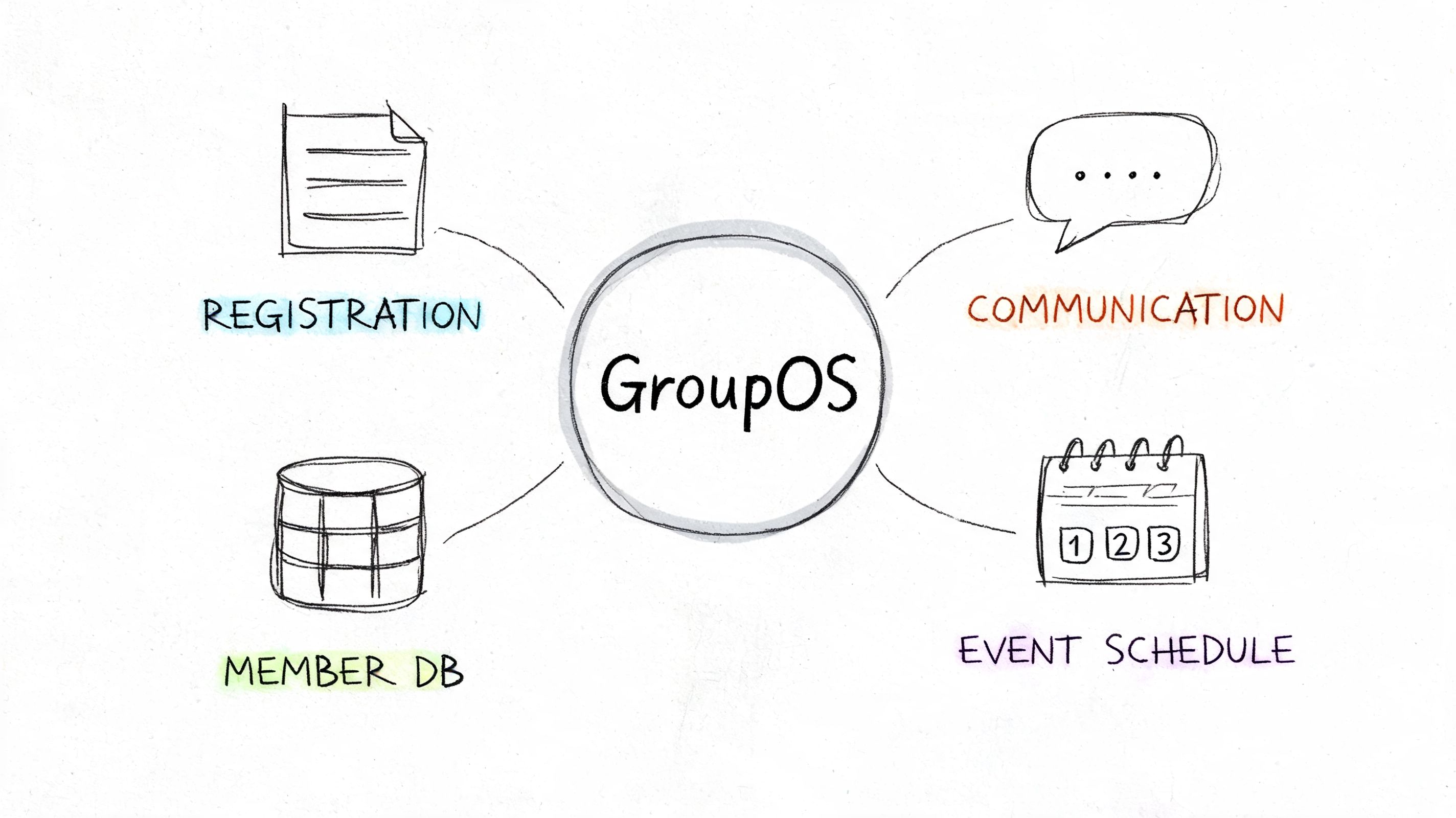
That’s where GroupOS fits the model discussed throughout this article. It combines membership operations, ticket sales, content delivery, sponsor visibility, and communication channels under one branded system. In practical terms, that means an association can manage registrations, member profiles, subscription plans, community interaction, and post-event resources without splitting those workflows across unrelated tools.
The value isn’t that one screen replaces every task. It’s that the same member record can stay relevant across tasks.
For example, dynamic ticketing supports complex event structures such as public and private tickets, custom forms, and VIP upgrades. Built-in communication and community channels help associations continue conversations after a conference instead of letting engagement disappear inside a temporary event app. Sponsor and exhibitor tools support profile pages, showcases, and visibility placements that can live beyond a single event day.
That unified structure matters when you want event participation to feed other goals, such as:
A unified system becomes more valuable when it also shows what members are doing.
According to Cvent’s association solutions overview, real-time analytics and engagement tools can increase attendee participation by 35% to 50%. The same source highlights the value of QR check-ins, live polling, gamification, and AI-driven insights for improving scheduling and resource allocation.
For an association, that kind of reporting is most useful when it doesn’t sit in isolation. Engagement data should help staff decide what content to publish next, which member segments need follow-up, and where sponsor activity is strongest.
Software becomes strategic when the same data supports events, membership, content, and communication decisions together.
The all-in-one approach won’t be the right fit for every organization. Some teams will prefer specialist tools for narrow use cases. But if your biggest problem is fragmentation between events and ongoing member engagement, a unified platform solves a different class of issue than a better ticketing system ever could.
When associations buy event software, they often think they’re solving a scheduling and registration problem. Most are in reality making a decision about member experience, staff workload, sponsor value, and long-term retention.
The strongest event management software for associations doesn’t stop at getting people into a room or onto a livestream. It keeps the relationship moving. It helps staff see one member across many interactions. It reduces the handoffs that create errors, delays, and missed opportunities.
If your current process depends on spreadsheets, disconnected apps, and manual exports, the problem isn’t only inefficiency. It’s that your association can’t easily turn event activity into sustained engagement. A more unified system changes that.
The best next step is simple. Audit your current stack, identify where the member journey breaks, and evaluate platforms based on how well they connect events to the rest of your organization’s work.
If you want one place to manage memberships, registrations, content, communication, and community under a branded experience, explore GroupOS and see how an integrated platform can support your association beyond a single event.







