June 7, 2026

Monday starts with three tabs open before you've finished coffee. The AMS has renewal dates. The email tool has click data. The event platform has attendance records. Someone on staff exported a spreadsheet from the webinar system last week, but nobody is sure whether it includes no-shows or only attendees. Meanwhile, your board wants a clear answer to a simple question: which members are drifting, and what are you doing about it?
That's the point where many organizations start looking at membership engagement software.
The mistake is treating it like one more platform to add to the pile. In practice, the value comes from reducing the pile. Good systems don't just collect activity. They turn scattered member behavior into something staff can act on, then tie that activity back to retention, event revenue, and day-to-day operating effort.
I've seen teams struggle less with software selection than with software sprawl. The issue often isn't a missing feature. It's that the organization can't see the full member relationship in one place, so every outreach effort feels reactive. Membership engagement software works when it gives you a cleaner operating model, not just a prettier dashboard.
A common association setup looks workable until renewal season hits. Membership records live in one system. Event registrations live in another. Volunteer activity is tracked by one staff member in a spreadsheet. Community conversations happen in LinkedIn, Slack, Facebook Groups, or email threads. Nobody's wrong. The stack just grew one urgent fix at a time.
Then a member calls and says, “I've been attending your webinars for months. Why did I get a lapsed-member message?” Staff has to reconstruct the answer by checking four systems and two exports.

That friction is expensive even when you can't neatly quantify it. Staff spend time reconciling records. Members get generic outreach because segmentation is weak. Sponsors and exhibitors get underdeveloped reporting because interactions aren't centralized. Renewal campaigns go out late because the team is still cleaning data.
The hidden cost isn't only labor. It's decision quality.
When activity is split across tools, managers tend to rely on the wrong proxies:
Marketing General's 2022 Membership Marketing Benchmarking Report found that 52% of executives believed lack of engagement was the primary reason members do not renew, which is why engagement tracking belongs inside retention strategy, not off to the side as a reporting extra (Marketing General's membership engagement analysis).
Membership engagement software gives staff a single operating layer for member behavior. It tracks things like email interaction, webinar attendance, event check-ins, social participation, and content consumption, then organizes those signals so the team can spot risk and prioritize follow-up.
Practical rule: If your staff has to export and merge files before they can decide who needs outreach, the process is already too slow.
That's why many organizations start here before they replace anything else. They don't need a perfect all-in-one system on day one. They need a reliable place to see member activity in context.
If you're comparing the engagement layer to a broader operations platform, this overview of membership management software options is useful because it helps separate core recordkeeping from member-facing experience.
The easiest way to evaluate membership engagement software is to think of it as a digital headquarters. Not every team needs every room to be equally large, but the rooms should connect cleanly. If they don't, staff ends up doing the connecting by hand.
Near the front of that headquarters is the member-facing experience.

Older systems mostly stored records. Modern tools go further. Member engagement software has evolved from simple administration tools into dashboard-driven, analytics-focused platforms. Some now show engagement scores on a 0 to 100 scale to classify members by risk level, which marks a real shift from static CRM-style tracking to predictive risk monitoring, as described in Clowder's overview of member engagement software.
The first pillar is the member profile. This isn't just a contact card. It should show status, tier, interests, participation history, and communication history in a way staff can use without opening multiple systems.
For an association manager, this matters in practical moments:
A profile becomes useful when it supports action, not just storage.
The second pillar is the communication layer. That includes announcements, direct messaging, discussion spaces, group conversations, and segmented outreach. Associations often underestimate this piece because they already “have email.” Email alone rarely supports the kind of ongoing participation that keeps a professional community alive between major events.
If your team is also benchmarking community moderation, participation prompts, and conversation design, this guide to managing online communities is a practical companion because software adoption often depends on community operations, not just software configuration.
A platform doesn't create engagement by itself. Staff creates engagement. The platform should make that work easier to repeat.
The third and fourth pillars are event operations and content delivery. Registration, check-in, virtual access, resource libraries, recordings, courses, and sponsor visibility all belong close to the member experience. These functions generate the signals that tell you whether people are involved.
A team evaluating broader tools in this category may also compare customer engagement platforms for communities and memberships, especially when the organization serves members, prospects, sponsors, and event attendees through one brand ecosystem.
Here's what that can look like in practice:
| Pillar | What it handles | Why it matters |
|---|---|---|
| Membership layer | Profiles, status, segments, renewals cues | Gives staff context before outreach |
| Community layer | Forums, chat, groups, member messaging | Keeps interaction going between campaigns |
| Event layer | Registration, check-in, virtual participation | Produces high-value activity signals |
| Content layer | Resource hubs, courses, recordings | Extends value beyond live moments |
| Reporting layer | Dashboards, engagement scoring, risk views | Turns activity into decisions |
Later in the evaluation process, a live product walkthrough can help your staff picture how those parts fit together.
The reporting layer is what makes the rest commercially useful. Without it, you have activity. With it, you have prioritization.
Boards and executive teams rarely approve software because “engagement matters.” They approve it because they believe the system will improve retention, create revenue opportunities, or reduce operating drag. If you can't frame membership engagement software in those terms, the purchase will stay stuck in the “nice to have” bucket.
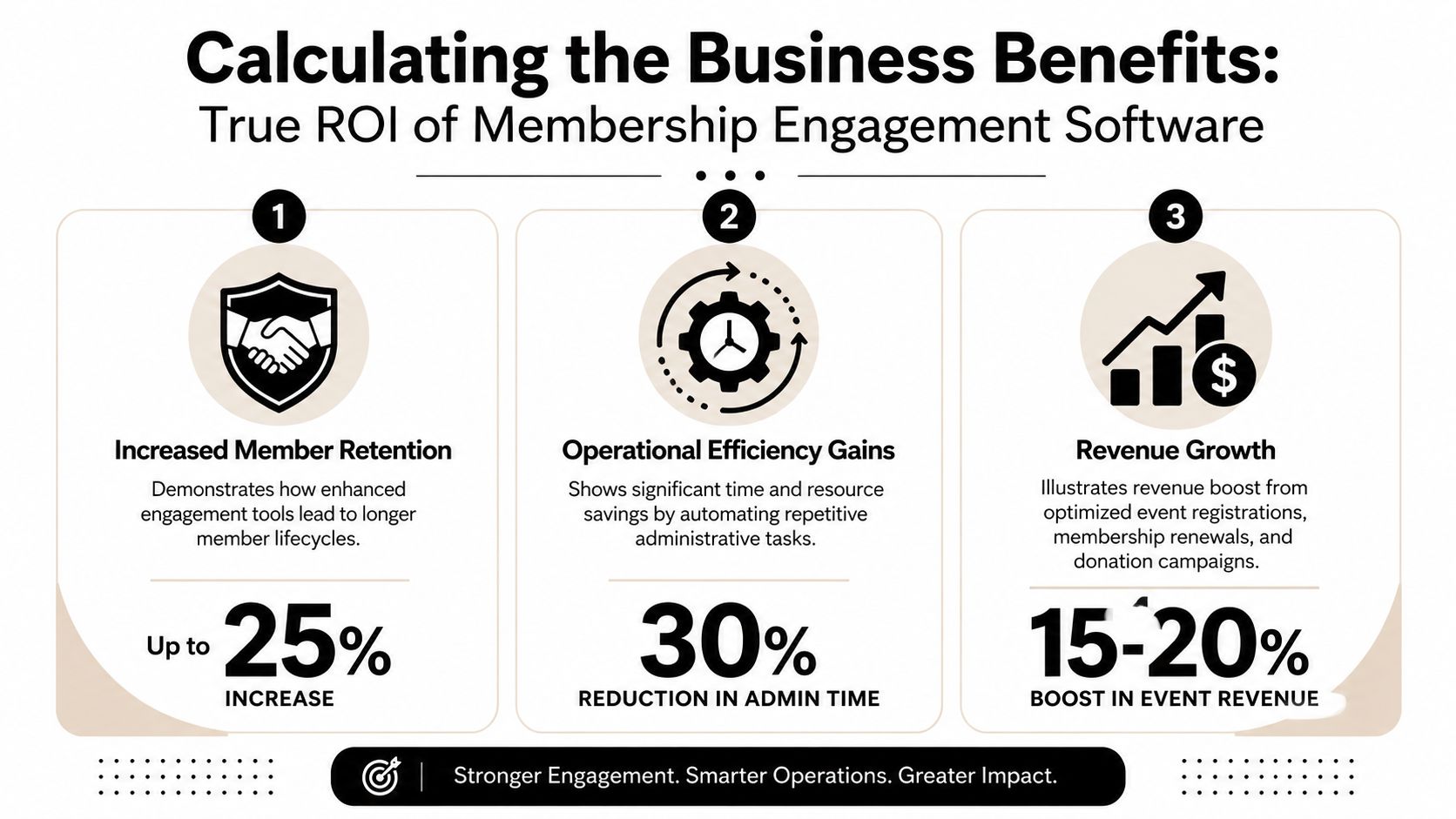
The strongest business case starts with retention. According to Marketing General's 2022 Membership Marketing Benchmarking Report, 52% of executives believe a lack of engagement is the primary reason members do not renew (Marketing General's retention-focused engagement benchmark). That means engagement tracking isn't soft reporting. It's part of financial stability.
The first return comes from catching problems sooner. If a member stops opening email, stops logging in, skips events, and disappears from discussion activity, staff can intervene before the renewal notice becomes the first meaningful touchpoint in months.
That intervention can take several forms:
Without the platform, staff usually sees these patterns too late.
The second return comes from better monetization of engagement that already exists. Event registration pathways become easier to manage. Sponsors get more structured visibility. Content libraries stay active after an event ends. Tiered experiences become easier to deliver because access rules, communications, and participation data sit closer together.
The third return is operational. Staff stops rebuilding reports by hand and chasing status updates across tools. That time doesn't vanish. It gets reassigned to member service, campaign improvement, sponsor fulfillment, and program development.
Board-level test: If your ROI model depends only on “more activity,” it's too weak. If it shows how better visibility changes staff action, it's credible.
You don't need fictional projections to evaluate value. Use a simple framework.
List current manual work
Track what staff does today for renewal reminders, attendance reconciliation, segmentation, sponsor reporting, and member support.
Identify breakpoints
Look for places where poor visibility delays action. Those are usually the true cost centers.
Connect engagement to renewal workflow
Define what happens when a member becomes quiet. If there's no response path, dashboards won't matter.
Estimate gains conservatively
Use internal baselines. Compare current reporting time, campaign turnaround, and outreach consistency after implementation.
If you need a clean way to connect this discussion to board reporting, a practical primer on how to calculate retention ratio helps keep the conversation anchored in renewal outcomes rather than abstract platform excitement.
The wrong buying process starts with demos. The right one starts with operating reality. Before staff compares vendors, the organization should decide what kind of member experience it's trying to run.
Some associations are event-centric. Others are content-heavy. Some depend on committees, chapters, and peer-to-peer networking. Those models don't need the same software emphasis. A flashy platform can still be a poor fit if it's optimized for the wrong behavior.
Higher Logic recommends an approach where the engagement platform acts as the member community layer, while a dedicated AMS handles dues, payments, and administrative records. That separation of concerns helps organizations analyze engagement data without forcing one system to do every job badly (Higher Logic's guidance on engagement platform strategy).
Before you score vendors, answer these questions:
One practical shortcut is to separate must-haves from workflow preferences. A team can adapt to a new navigation style. It can't adapt to missing integrations.
A simple evaluation table keeps the process grounded.
| Feature/Capability | Importance (Low/Med/High) | Vendor A Score (1-5) | Vendor B Score (1-5) | Notes |
|---|---|---|---|---|
| AMS or CRM integration | High | |||
| Event registration and check-in support | High | |||
| Community discussions and messaging | High | |||
| Content library or course delivery | Med | |||
| Engagement analytics and risk views | High | |||
| Mobile app or mobile-responsive experience | Med | |||
| Sponsor and exhibitor features | Med | |||
| Branding and workflow customization | Med | |||
| Data export flexibility | High | |||
| Implementation and support model | High |
Ask vendors to show workflows, not feature menus.
Have them demonstrate:
That's usually where weak products get exposed. If the demo stays abstract, ask them to walk through your exact scenario.
If you're building a shortlist, this comparison resource on membership management software categories and options can help frame where engagement-specific tools fit relative to broader member operations platforms.
Most software projects don't fail because the product is unusable. They fail because the organization underestimates cleanup, ownership, and sequence. Membership engagement software is no different.
The hardest part is rarely moving data. It's deciding what deserves to move, what needs to sync, and what should finally be retired. Feathr notes that implementation often gets complicated by fragmented stacks, where integration across CRM, AMS, email tools, and social channels is necessary for a unified view, but many teams underestimate data synchronization and identity resolution problems (Feathr's guidance on fragmented member engagement stacks).
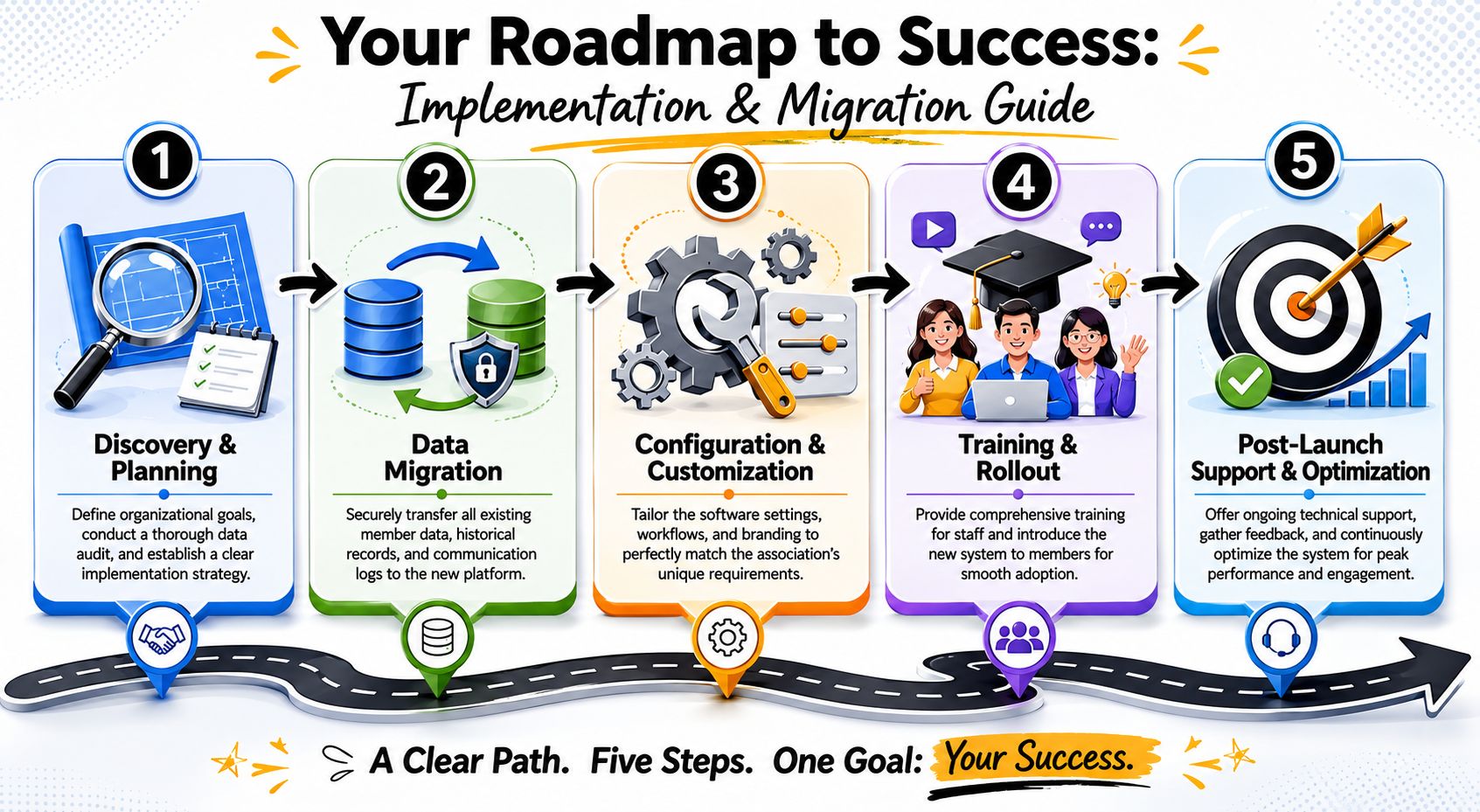
A practical implementation usually follows this order:
Discovery and data audit
Identify source systems, duplicate records, missing fields, and conflicting ownership. Decide which platform is authoritative for each data type.
Migration planning
Map members, organizations, event history, communication preferences, and access rules. Don't move old clutter just because it exists.
Configuration and branding
Set up groups, permissions, navigation, email templates, event flows, and member-facing pages in a way that matches how your organization works.
Pilot and staff training
Start with a limited audience. Test onboarding, event registration, messaging, and reporting before full launch.
Member launch and post-launch cleanup
Communicate clearly, monitor adoption, fix friction points quickly, and retire duplicate processes.
Many teams get tangled. Not every system needs bi-directional sync.
A cleaner approach looks like this:
Clean implementation decisions are often less about integration volume and more about integration boundaries.
If the same field can be edited in three places, staff will eventually create conflicts. Set ownership early and write it down.
After launch, many teams drift into vanity reporting. They present total users, total posts, total pageviews, and app downloads. Those numbers may look busy, but they don't tell leadership whether the software is improving member health.
The more useful question is narrower: which engagement signals should trigger staff action because they're likely to affect renewals or revenue?
AMR Management Services makes this distinction clearly. To prove ROI, organizations need to connect engagement metrics to outcomes. Useful leading indicators include login frequency, time on site, participation in events and forums, and email click-through rates. The goal is to move from dashboards of activity to decision rules based on outcomes (AMR's member engagement analytics guidance).
A strong dashboard usually has five layers.
Behavioral activity
Login frequency, session recurrence, content views, course progress, resource downloads.
Community participation
Forum replies, direct messages, group joins, committee activity, volunteer interactions.
Event behavior
Registrations, check-ins, session participation, repeat attendance patterns.
Communication response
Email click-through behavior, response to campaign prompts, opt-out trends.
Business outcomes
Renewals, upgrades, event purchases, sponsorship engagement, cross-program participation.
The mistake is treating these as separate scoreboards. They're more useful when combined.
A chart tells you what happened. A decision rule tells staff what to do next.
Examples:
That's where membership engagement software earns its keep. It shortens the distance between signal and response.
The best KPI dashboard is the one your staff uses every week. If it doesn't trigger action, simplify it.
Monthly executive dashboards are useful, but operational teams need a tighter rhythm. Weekly review works well for outreach signals. Monthly review works for renewal and program trends. Quarterly review works for board-level ROI discussion.
If your staff is staring at dozens of metrics, cut the list. Keep the ones tied to intervention, conversion, and retention.
Engagement software handles member profiles, communication history, event participation, and often payment-related workflows. That makes security review part of procurement, not a legal cleanup step after the contract is signed.
Start with the basics. Ask where data is stored, how access is controlled, how roles and permissions are managed, and how exports are governed. A platform with flexible features but weak permission controls creates internal risk fast, especially when volunteers, chapter leaders, sponsors, and staff all need different levels of access.
Security and compliance review should include:
Members usually won't ask detailed questions about your data model until something goes wrong. That's why responsible data handling has to be built into the operating process. Train staff on access rules. Document who owns vendor management. Review old admin accounts. Remove duplicate exports from shared drives.
For associations serving members across regions, legal requirements may vary, so your internal policy and your vendor's capabilities need to align with your actual audience footprint. A platform can support compliance, but your team still has to run compliant processes.
A final practical point: don't let convenience override governance. The fastest workaround often becomes the riskiest permanent habit.
If you're evaluating platforms that combine membership operations, events, content delivery, and community features in one environment, GroupOS is one option to review. It's designed for organizations that want a branded member experience while still working within a real-world stack that may include existing social channels, event workflows, and migration needs.







