June 3, 2026
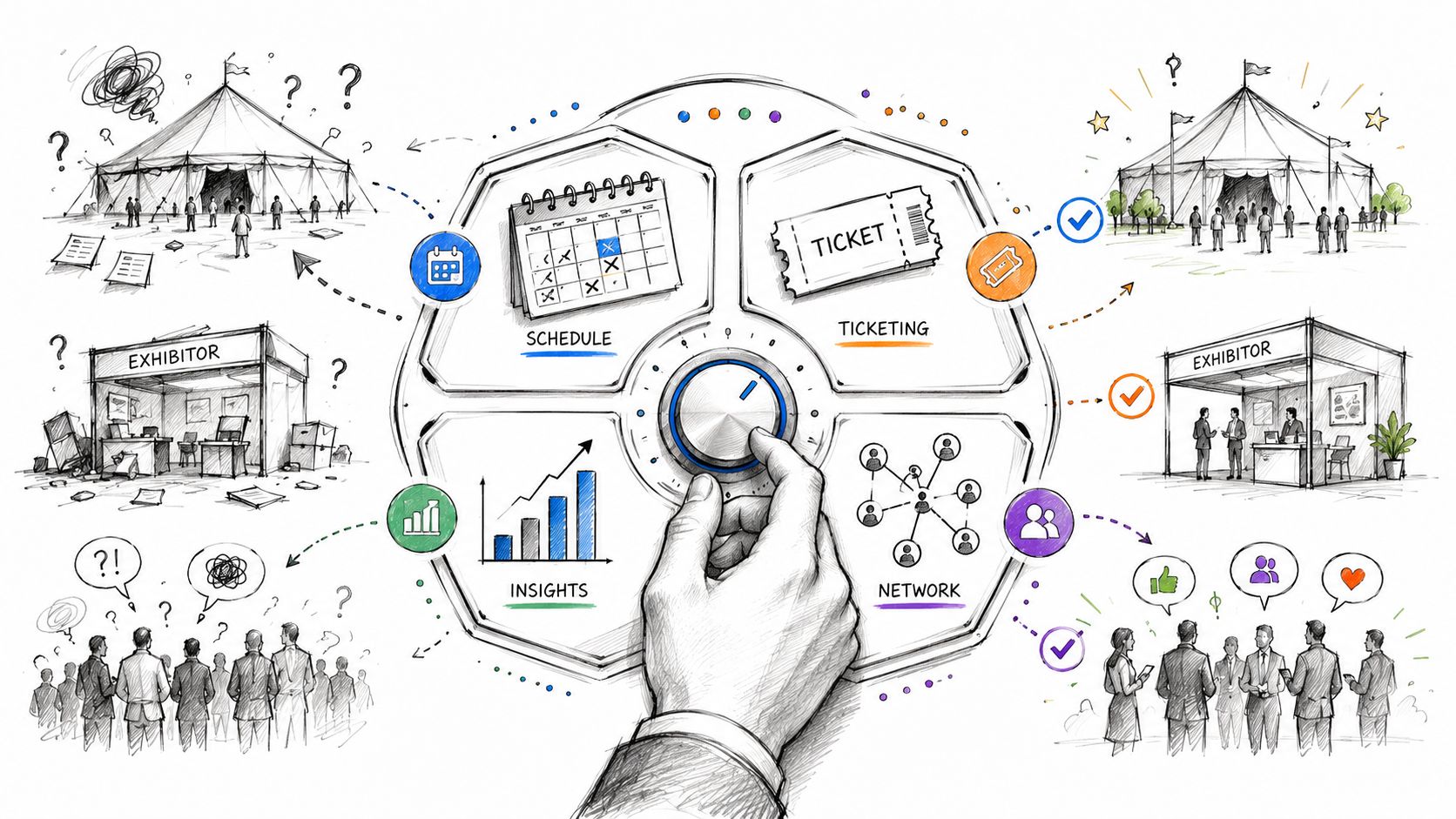
You're probably dealing with some version of the same problem most event teams hit at scale. Registration lives in one tool. Sponsor deliverables sit in a spreadsheet. Session changes move through email. Finance wants a clean revenue view. Marketing wants attendee data in the CRM. Someone on-site is checking names against a CSV because the badge app didn't sync.
That setup can limp through a small event. It breaks once you're running recurring conferences, member programs, sponsor packages, hybrid sessions, or community-driven events that continue long after closing remarks.
Event software management matters because events are no longer isolated projects. They're operational programs with real revenue expectations, data requirements, and post-event accountability. Buyers have noticed. The market for event management software was projected to grow from USD 15.5 billion in 2024 to USD 34.7 billion by 2029, according to MarketsandMarkets. That growth reflects a basic reality. This category has become infrastructure.
The most common failure pattern isn't bad planning. It's fragmented planning.
A team starts with familiar tools because they're easy to adopt. One platform handles ticketing. Another sends event emails. A form builder collects speaker submissions. A shared drive stores sponsor logos. Staff track VIP guests in a spreadsheet because nobody wants to reconfigure the registration flow three weeks before launch. By the time the event opens, the team has created a system that only works because a few people know where everything is.
Then something changes.
A speaker swaps sessions. An attendee transfers a pass. A sponsor asks for lead data. Membership wants to know which nonmembers attended and whether they converted later. Finance asks why ticket totals don't match payment records. None of these are unusual requests. They only feel hard because the data is scattered.
That's where event software management becomes less about tools and more about control. It gives the organization one operating layer for planning, execution, and analysis. Instead of chasing updates across inboxes and disconnected apps, teams work from one system with shared records, defined workflows, and clearer ownership.
Practical rule: If your event depends on one person “knowing how it all fits together,” you don't have a process. You have institutional memory with a deadline.
The shift is important because modern event teams aren't judged only on whether the event happened. They're judged on whether it produced measurable business value, whether sponsors got results, whether members stayed engaged, and whether the team can repeat the process without rebuilding it from scratch.
Think of event software management as the central nervous system for your event operation. It connects signals, records activity, coordinates responses, and keeps every part of the event working from the same source of truth.
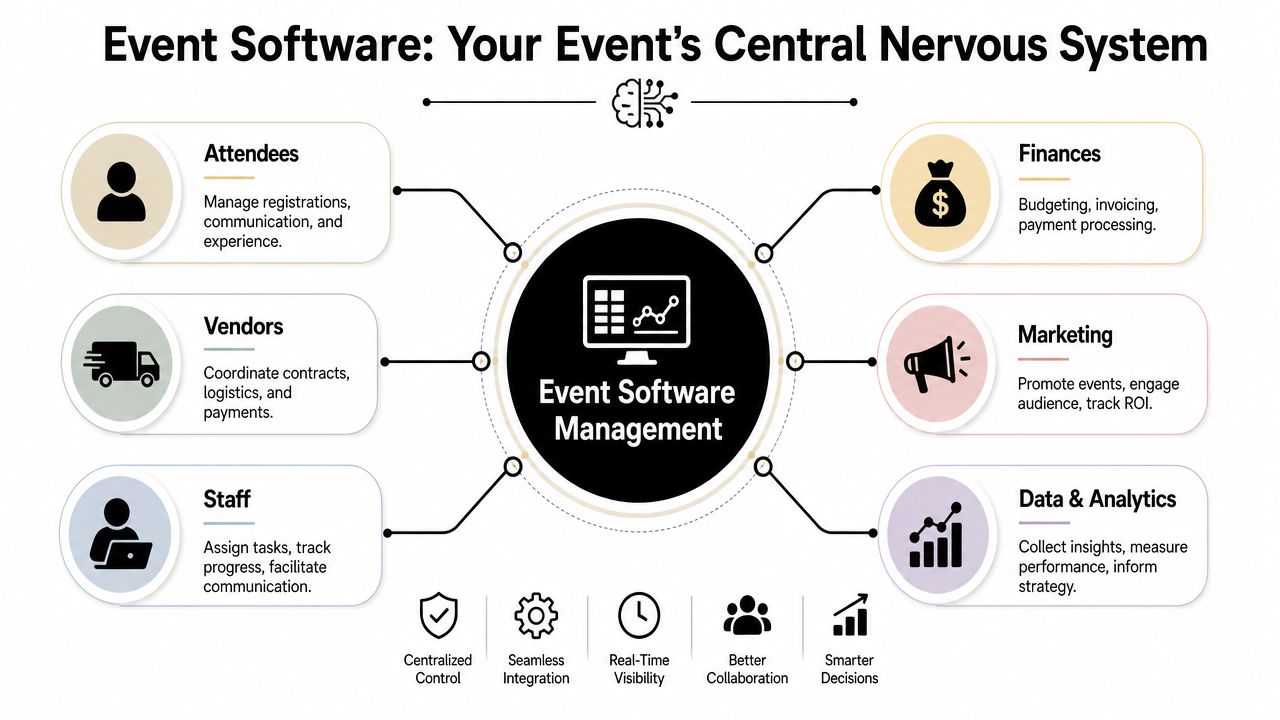
The technical value is straightforward. It replaces fragmented tools with a centralized system, which reduces manual handoffs and improves visibility across the full event lifecycle, as described in Momentus's overview of venue and event management software. That sounds abstract until you see what it changes in practice.
In a well-run platform, registration data doesn't sit apart from check-in. Ticket types connect to payment records. Session attendance can be tied to attendee profiles. Staff don't need to export a list from one system and upload it into another just to send a follow-up message or reconcile attendance.
That centralization also changes how teams work together:
A concise primer on what event management software is is useful here, but the important distinction is this: software alone doesn't create order. The management layer does. That includes how your organization configures data fields, permissions, workflows, integrations, and reporting.
It isn't a feature checklist. It isn't just “registration plus mobile app.” And it isn't solved by buying the platform with the longest demo.
Good event software management means the system supports the event before, during, and after the event without forcing your team into workarounds. If staff still rely on shadow spreadsheets, private Slack messages, or manual attendee reconciliation, the platform may be installed, but it isn't managing the operation.
A strong platform doesn't just collect event data. It makes that data usable by the people who need it while the event is still moving.
Most buyers get distracted by demos because vendors show polished screens, not operational dependencies. The better way to evaluate event software management is by following the event lifecycle and asking what each module solves.
Here's a simple visual breakdown.
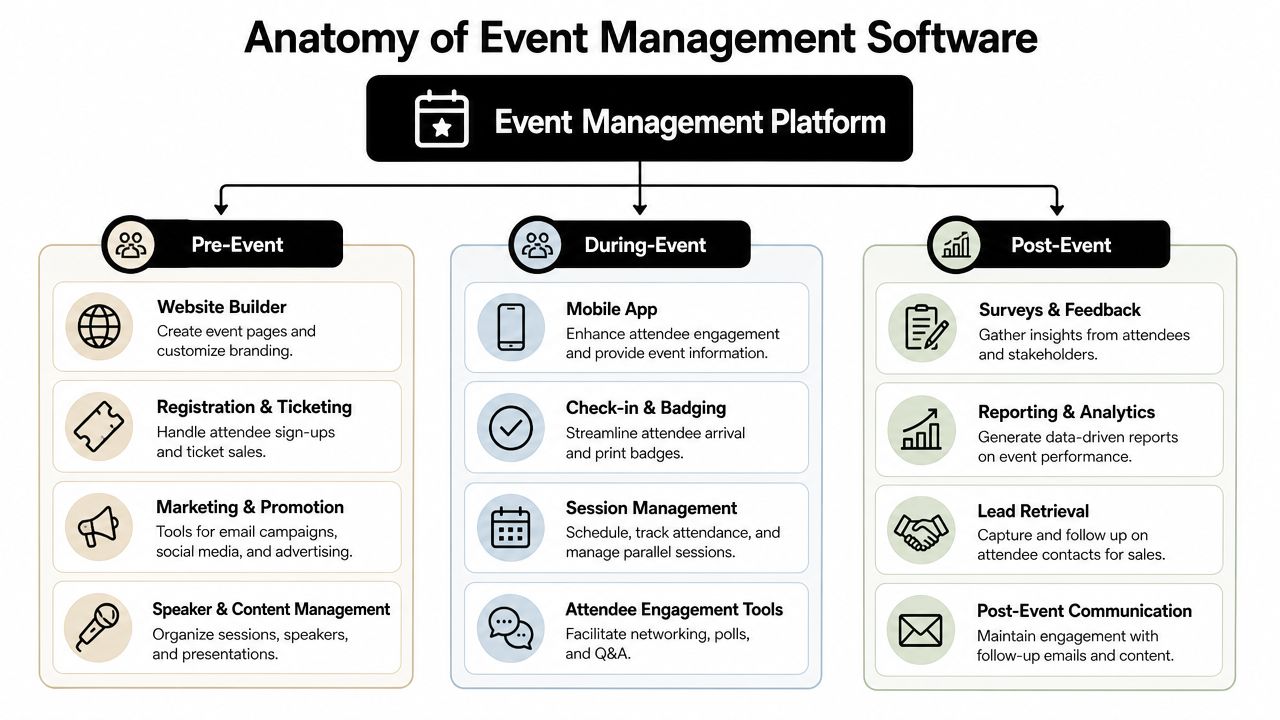
The pre-event stack determines whether your team starts organized or spends the final month cleaning up preventable issues.
Strong platforms support workflow automation, custom registration forms, payment processing, attendance tracking, and integrations with CRM, marketing, ticketing, social, and video systems, according to Monday.com's guide to event planning software.
If form design is one of your pain points, it's worth reviewing practical approaches to streamlining event registrations with AI, especially when your team handles multiple audience types and complex intake flows.
The on-site or live-event layer is where software either proves its value or exposes every shortcut made during setup.
During-event tools usually include:
A practical example of feature depth is the difference between “QR check-in exists” and “QR check-in updates attendance records in real time, triggers the right badge type, and syncs with the attendee record used by marketing and reporting.”
For teams comparing platforms, a detailed list of event management software features can help translate vendor language into operational requirements.
Many teams underbuy in this situation.
Post-event modules should include:
| Module | What it solves |
|---|---|
| Surveys and feedback | Captures attendee, sponsor, and speaker responses while memory is still fresh |
| Analytics dashboards | Gives teams a shared view of attendance, engagement, and commercial performance |
| Lead retrieval and exports | Helps sponsors and sales teams act on event interactions quickly |
| Content follow-up | Extends session value through replay access, resources, and targeted nurture paths |
The strongest systems don't treat these as separate reports. They connect registration, participation, and follow-up into one measurable workflow.
Most organizations don't need another argument for convenience. They need a defensible business case.
The strongest case for event software management is that it changes how value is created and measured across operations, attendee experience, and post-event outcomes. One industry article reports that organizations using event software with integrated analytics can see a 20% increase in attendee satisfaction and a 15% improvement in return on investment, especially when data from registrations, session attendance, and app interactions is centralized in one place, as noted in Lionwood's guide to event management software features.
Manual work is expensive, but not only in labor terms. It also introduces delay.
When registration corrections require hand edits, when attendee lists need repeated exports, or when sponsors wait days for lead files, the issue isn't merely time. It's operational drag. Centralized systems reduce rekeying, duplicate records, and internal back-and-forth. That improves handoffs between marketing, operations, finance, and membership teams.
Attendees notice friction quickly. They notice broken confirmation emails, inconsistent agendas, poor check-in flow, and irrelevant follow-up even faster.
Good event software management improves experience because the data model is cleaner. The same registration record can power communications, badge details, access rules, and post-event segmentation. That creates a more coherent experience without forcing staff to manage every touchpoint manually.
The attendee experience usually breaks in the same place the staff workflow breaks. Those problems are connected.
Software can support revenue in obvious ways through ticketing, sponsorship inventory, and paid upgrades. The more important gain is visibility into what produced those outcomes.
A team that can compare ticket types, sponsor engagement, session demand, and follow-up performance is in a stronger position to price future packages, adjust programming, and defend budget requests. The software doesn't create strategy on its own, but it gives the team evidence instead of instinct.
Event software management becomes strategic. A platform that only reports registrations and check-ins is useful. A platform that helps you analyze behavior, segment follow-up, and connect event interactions to downstream outcomes is much more valuable.
That's the difference between “the event went well” and “we can show what it produced.”
Most software evaluations fail before the demo starts. The team hasn't agreed on what problem it's trying to solve, so every vendor that looks polished stays in consideration too long.
Start with a disciplined checklist, not a wishlist.
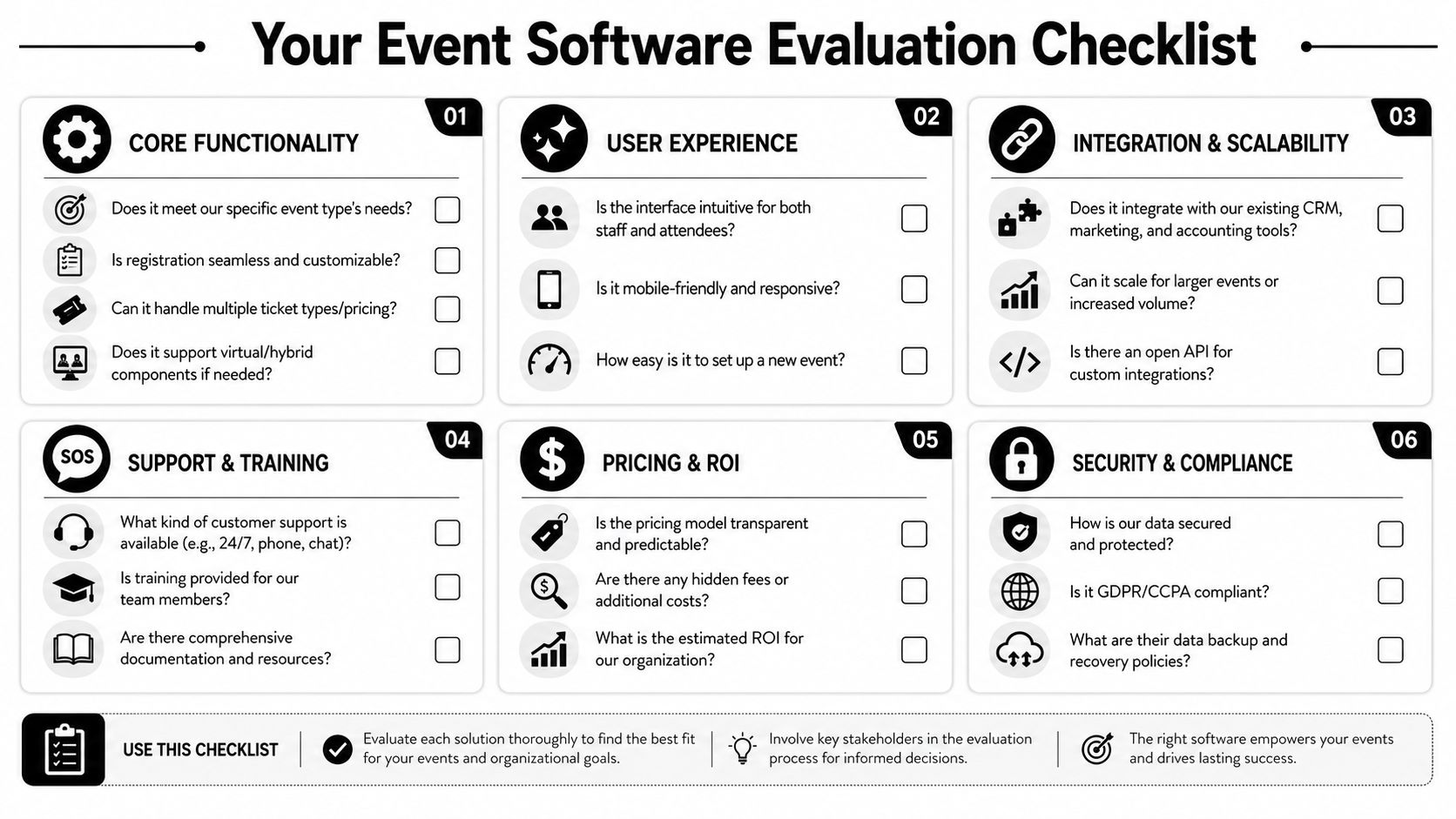
Ask these first, before feature comparisons:
A practical comparison framework helps. This event management software comparison guide is useful if your team needs a structured way to distinguish core needs from nice-to-haves.
Don't ask only whether the feature exists. Ask how it behaves under strain.
| Area | Better question |
|---|---|
| Registration | Can we build conditional forms, multiple ticket types, and approval paths without vendor intervention? |
| Integrations | What data syncs with our CRM or marketing system, and when does it sync? |
| Reporting | Can nontechnical staff export the views they need without custom report requests? |
| User permissions | Can finance, sponsors, staff, and exhibitors have different roles cleanly? |
| Support | What happens on launch day if check-in or payment issues appear? |
| Scalability | Can this handle our largest event and our smallest recurring one without heavy reconfiguration? |
Some red flags show up early if you know what to look for:
Buy for the edge cases that matter to your operation. Routine tasks look easy in every demo.
Price only makes sense in context.
A low-cost tool that forces manual exports, duplicate data entry, and custom fixes often costs more operationally than a platform with a higher software fee and a cleaner workflow. Ask for transparency around setup, support, integrations, payment processing, and any add-on modules your team will realistically need.
Selecting the software isn't the hard part. Living with it is.
Most event teams underestimate implementation because demos compress complexity. The platform appears unified, but your organization still has to decide how data is structured, who owns each workflow, how historical records will be migrated, and what staff will do differently on day one.
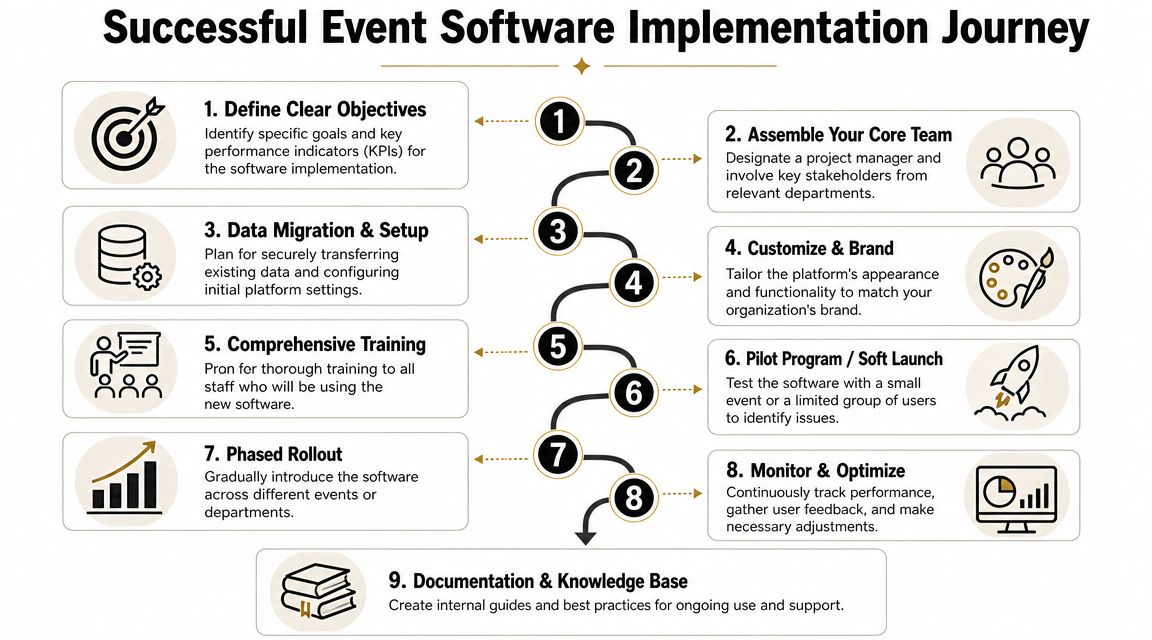
A major gap in many buying guides is operational resilience during rollout. Zuddl's guide to event management software highlights the need to plan data migration carefully, especially when organizations are moving member histories and event records out of fragmented systems such as email, Slack, and spreadsheets.
Data migration isn't just a technical transfer. It's a policy decision.
Before importing anything, define:
If you skip this step, the new system inherits old confusion. Teams often assume they'll “clean it up later.” They usually don't.
Training matters, but adoption matters more. A team can attend a vendor session and still return to spreadsheets if the platform feels slower than the old workaround.
Make adoption easier by assigning clear ownership:
Then document the new process in plain language. Staff need to know where a task now lives, who approves changes, and what should never be handled offline anymore.
A platform rollout succeeds when staff stop asking, “Where should I track this?” and start assuming the answer is already defined.
Implementation also touches communication quality. Teams often migrate email sends into the new platform without checking sender reputation, template hygiene, or authentication setup with the same rigor they apply to registration.
If event confirmations and reminders are landing poorly, operationally useful guidance on how to stop email from going to spam in Gmail can help the team close a problem that looks like a software issue but is often a deliverability issue.
A pilot event is almost always smarter than a full portfolio switch.
Use an early launch to test:
One option in this category is GroupOS, which combines memberships, ticketing, content delivery, communication, and branded community functions in one system. For associations and professional communities, that kind of setup can be useful when the goal isn't only event execution but also continuity across member engagement before and after the event.
The best way to judge event software management is to look at the operational question each organization needs to answer.
An association runs an annual conference, smaller chapter events, and webinars for members throughout the year. The event itself is only part of the value. The larger business question is whether participation drives renewals, volunteer activity, course engagement, or sponsor retention.
In this setup, the software needs to do more than register attendees. It has to support member-only pricing, segmented access, sponsor visibility, and post-event follow-up tied to the member record. If the team can't connect attendance with downstream membership behavior, the event remains operationally visible but strategically vague.
The right platform helps the association keep event history, engagement records, and follow-up activity in one place so the conference becomes part of a longer member journey rather than a standalone transaction.
A corporate events team manages a flagship conference with multiple tracks, sponsor packages, executive sessions, and a sales team that wants post-event intelligence fast.
Here the software has to hold a more demanding workflow together. Speaker changes need to cascade cleanly. Session attendance has to be visible. Sponsor entitlements must be tracked. Sales and marketing need usable attendee data, not a pile of exports that require cleanup before anyone can act.
Social promotion also tends to stretch internal teams thin. For planners trying to keep campaigns organized across channels, practical guidance on social media scheduling for event planners can reduce a lot of manual coordination before launch.
This kind of event shows why feature breadth isn't enough. The platform has to preserve consistency between registration, agenda, on-site participation, and post-event handoff. If those records don't align, everyone leaves the event with a different version of what happened.
Sponsors usually judge event value differently from organizers. They care about visibility, meetings, lead quality, and follow-up speed.
A sponsor-facing workflow works better when the platform gives exhibitors a structured presence, supports lead capture, and makes follow-up possible without waiting on the organizer to manually compile everything. Even simple improvements matter. A clean profile page, access to scanned leads, and a direct way to associate staff notes with contacts can make sponsor ROI more tangible.
Sponsors don't want raw activity. They want usable commercial context.
When organizers choose software with sponsor outcomes in mind, they can package inventory more credibly and defend renewal conversations with better evidence.
A lot of event reporting stops too early. Teams count registrations, check-ins, and survey responses, then move on. Those numbers matter, but they don't answer the business question executives usually care about.
The more important trend in event software management is post-event revenue attribution. Buyers increasingly want platforms that integrate with CRM systems so they can connect event interactions to downstream outcomes such as renewals, upsells, and sponsor leads, as noted in this analysis of event management software trends.
Track event performance in layers, not as one summary dashboard:
A practical framework for how to measure event success can help teams shift from operational reporting to business reporting.
The strongest reporting model links an event interaction to a later action in another system. That might mean a membership renewal, a sales follow-up, a sponsor conversation, or ongoing community participation.
If your platform can't support that connection, the event may still run smoothly. You just won't be able to prove what it contributed.
If your organization needs event software management that extends beyond registration and supports memberships, branded communities, ticketing, content delivery, and post-event engagement in one system, GroupOS is worth evaluating alongside your other platform options.







