June 2, 2026
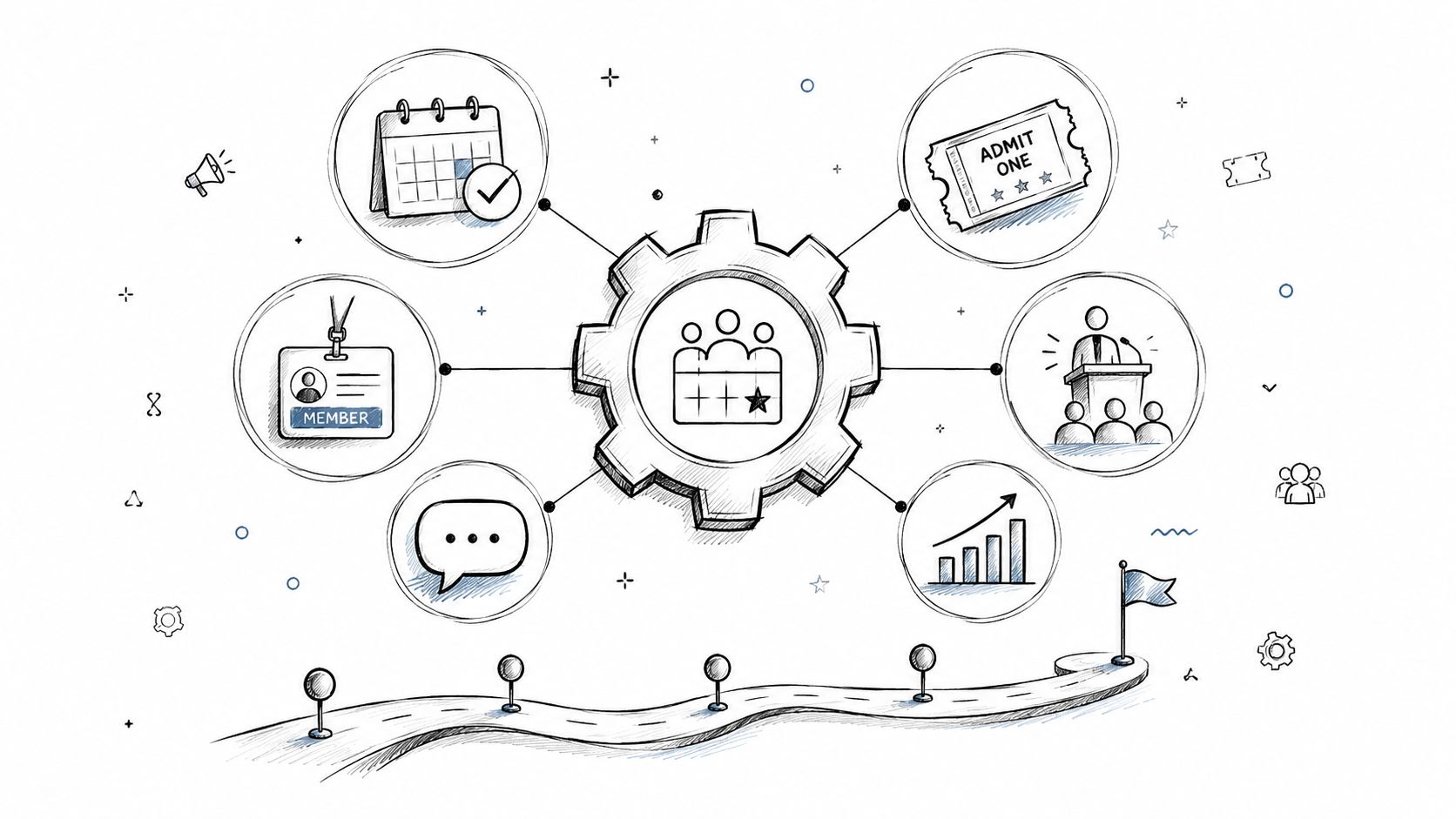
You're probably looking at a stack of tools that were never meant to work together.
Registrations live in one system. Speaker bios sit in shared docs. Sponsor deliverables are tracked in spreadsheets. Marketing sends from one platform, the website updates happen somewhere else, and attendee data gets exported, cleaned, re-uploaded, and questioned after every event. It works, until the event gets bigger, the reporting gets harder, or leadership asks a simple question like which sponsors drove engagement and what happened to those attendees after the event ended.
That's the point where event management software stops being a convenience purchase and becomes an operating decision.
The category has moved far beyond basic ticketing. Buyers now expect a platform to handle registration, communications, agenda management, engagement, reporting, and follow-up in one connected environment. That shift shows up in the market itself. One study values the global event management software market at USD 17.0 billion in 2025, projects USD 19.9 billion in 2026, and forecasts USD 96.5 billion by 2036, with a projected 17.1% CAGR over 2026 to 2036, according to Future Market Insights research on event management software.
A first major platform purchase usually feels messy because you're not only choosing features. You're choosing a workflow, a data model, and a long-term operating structure for your events.
For associations and enterprise community teams, that matters even more. You're rarely running a single event in isolation. You're managing recurring conferences, chapter programs, webinars, sponsor commitments, member records, and a year-round engagement calendar. If your software can't support that continuity, you'll keep rebuilding the same audience over and over.
Practical rule: If a platform only helps you stage the next event, it's a short-term tool. If it helps you recognize the same attendee across events, memberships, content, and sponsorship touchpoints, it's infrastructure.
A strong system reduces handoffs between teams and removes duplicate work. Registration data shouldn't need to be exported before marketing can use it. Session attendance shouldn't sit in a separate report that never reaches sponsorship or member success teams. Check-in activity, lead capture, survey responses, and post-event actions should all enrich the same record.
That's the strategic shift. You're no longer buying software just to run an event. You're building the operating layer for a community that exists before, during, and after the event.
When that's the lens, the evaluation becomes clearer. The right question isn't “Which platform has the longest feature list?” It's “Which platform gives us one reliable system for events, members, sponsors, and ongoing engagement?”
At its best, event management software is the central nervous system for your event operation.
It connects strategy to execution. Your registration rules affect communications. Your agenda affects attendee behavior. Your sponsor packages affect lead capture. Your analytics depend on how all of that data moves through the system. When those pieces are disconnected, your team spends more time reconciling records than improving the event.
Older event stacks usually grow by accident. A team adds a ticketing tool because they need payments. Then they add an email tool because the ticketing emails are too limited. Then a mobile app for agenda viewing. Then a survey tool. Then a lead scanner for sponsors. Every tool solves one problem and creates two more.
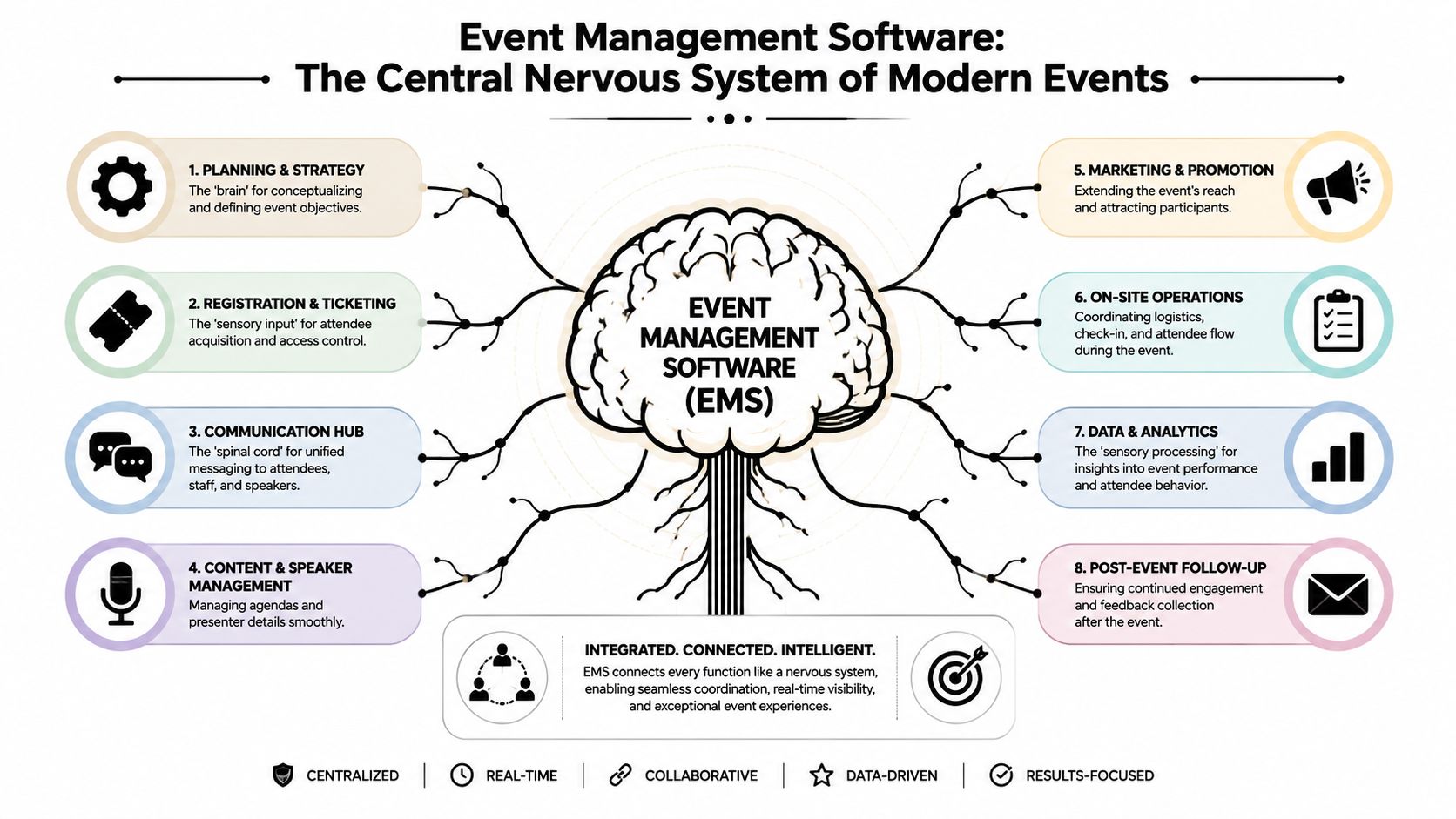
A modern platform does the opposite. It starts with a shared attendee record and lets each function work from the same source of truth. If you want a quick look at how vendors frame that model, Darkaa's platform for events is a useful example of the all-in-one approach buyers now encounter during evaluation.
Think of the software as managing a single flow:
That continuity is what turns event data into community data.
Software becomes valuable when your attendee stops being “a registration” and starts being “a person with history.”
If I were advising a peer on a first purchase, I'd define event management software this way: it's the operating system that governs how people enter your event ecosystem, how they move through it, and how their data stays useful after the event is over.
That means a real platform should help you do three things at once:
| Function | Operational role | Strategic role |
|---|---|---|
| Registration and ticketing | Capture attendance and payment | Segment audiences and package value |
| Session and engagement tools | Run the live experience | Understand interests and buying intent |
| Reporting and follow-up | Measure event activity | Extend relationships beyond a single date |
If a product only handles one row of that table well, it may still be useful. It just isn't the full answer for an organization trying to build durable community value.
The most important feature isn't any single module. It's the way the modules share data. Modern event management software works best when it treats registration, ticketing, agenda and session management, attendee engagement, lead capture, and analytics as a single data flow, because that reduces manual handoffs and makes it possible to connect registrations, attendance, and engagement back to channels or sponsors for ROI analysis, as explained in iVvy's overview of event software feature priorities.
Weak registration builds weak reporting. If your forms only capture a name, email, and payment, you're forcing every downstream team to guess.
Good registration tools should let you structure intake around your business model. Membership status, chapter affiliation, company type, buyer role, dietary needs, sponsor access, and content preferences all matter when they're tied to automation later. Dynamic forms can route people into the correct ticket type, communication path, or entitlement set without someone cleaning records by hand.
For teams comparing architectures, this overview of event booking management software is helpful because it frames booking not as a front-end function, but as the starting point for the full attendee lifecycle.
Agenda management sounds routine until your program gets complicated. Multi-track sessions, capacity limits, speaker changes, sponsor placements, access restrictions, and virtual or hybrid content all turn into operational risk if they're not tied back to the same system.
Point solutions often fall short when it comes to integrating attendance data. They display content adequately, but they don't always connect attendance behavior to the attendee record. This leaves your team with a polished front end and poor visibility into what people did.
A modern platform should let you answer practical questions quickly:
Communication tools matter less for the volume of messages than for timing and targeting. Confirmation emails, reminders, speaker updates, on-site alerts, and post-event follow-up should all reflect the same registration and attendance data.
Pre-event surveys are especially useful when they shape programming or sponsor activation instead of becoming another unused form. If your team is building those inputs more intentionally, this guide to designing effective pre-event surveys gives useful practical prompts.
Field note: The best survey question is the one your team will actually use to change an experience, not the one that simply sounds insightful.
Sponsors don't only want logo placement anymore. They want evidence of interaction, lead quality, and audience fit. That doesn't require flashy dashboards. It requires clean data.
A platform should connect sponsor exposure, scans, meeting requests, content views, or booth interactions back to actual attendee profiles. Then your team can package sponsor value around measurable engagement rather than vague visibility.
One place this gets missed is analytics design. Teams often obsess over executive dashboards and ignore event operations data quality. If attendance status, check-ins, and session interactions aren't captured reliably, the reporting layer won't rescue you.
For associations and enterprise communities, membership matters as much as event execution. The payoff comes when event participation updates the member profile automatically and informs future outreach, renewals, volunteer opportunities, and content recommendations.
That's where a platform like GroupOS can fit for some organizations. It combines memberships, ticketing, content delivery, communication, and sponsor visibility in one branded environment. That kind of structure matters when the event isn't a standalone product, but one part of an ongoing community relationship.
The true value of event management software isn't that it saves a few administrative hours. It's that it changes what your event program can produce as a business asset.
That matters because buyers are under pressure to justify outcomes, not just execution. The event management software market was estimated at USD 15.5 billion in 2024 and is projected to reach USD 34.7 billion by 2029, while recent product updates have focused on AI-assisted forecasting and risk management. That's a sign buyers increasingly need proof around revenue, sponsor value, and post-event conversion, not another feature checklist, according to MarketsandMarkets coverage of the event management software market.
Associations need continuity.
A conference should strengthen member records, identify highly engaged participants, surface potential speakers, create sponsor inventory, and feed renewal and recruitment strategies. If your event platform can't support that, the event may be successful on site and still weak as an organizational asset.
That's why many teams evaluating tools end up focusing on event management software for associations. The purchase criteria are different when events connect directly to chapters, committees, content libraries, and recurring member relationships.
Enterprise community managers usually need cleaner attribution across functions. Sales wants lead context. Marketing wants channel insight. Customer teams want to know which accounts engaged. Executives want a simple answer to whether the event moved relationships forward.
Those answers become possible when the platform links activity across the attendee journey.
Consider the difference:
| Event outcome | Disconnected stack | Integrated platform |
|---|---|---|
| Sponsor reporting | Manual recap, limited proof | Interaction history tied to attendee records |
| Member follow-up | Batch emails to everyone | Segmented outreach based on behavior |
| Sales handoff | Exported lead list | Context on sessions, content, and interest signals |
The strongest long-term benefit is that a unified platform turns events into a year-round community engine.
When the same system manages registrations, profiles, messages, content, and post-event engagement, your team can keep momentum alive. You're not starting from zero at each launch. You already know who attended, what they cared about, which sponsor they interacted with, and what content they consumed afterward.
A well-run event ends on the calendar. A well-run platform keeps the relationship active.
This is also where weak implementations disappoint. Buying an all-in-one product won't automatically create better business outcomes. Teams still need clear KPIs. If you don't define what counts as sponsor success, member progression, or qualified engagement, even good software will produce a lot of activity and very little clarity.
The best teams decide that before configuration starts.
Most buying mistakes happen because teams compare demos instead of comparing operating models.
A polished registration page is easy to show. So is a mobile app. The harder questions are the ones that affect year two. Can you move data cleanly? Can the system support recurring events without creating duplicate identities? Can your marketing, membership, and sponsor teams all work from the same record? That's where good decisions get made.
Before vendor calls, write down the workflows you cannot afford to break. Not broad goals. Actual processes.
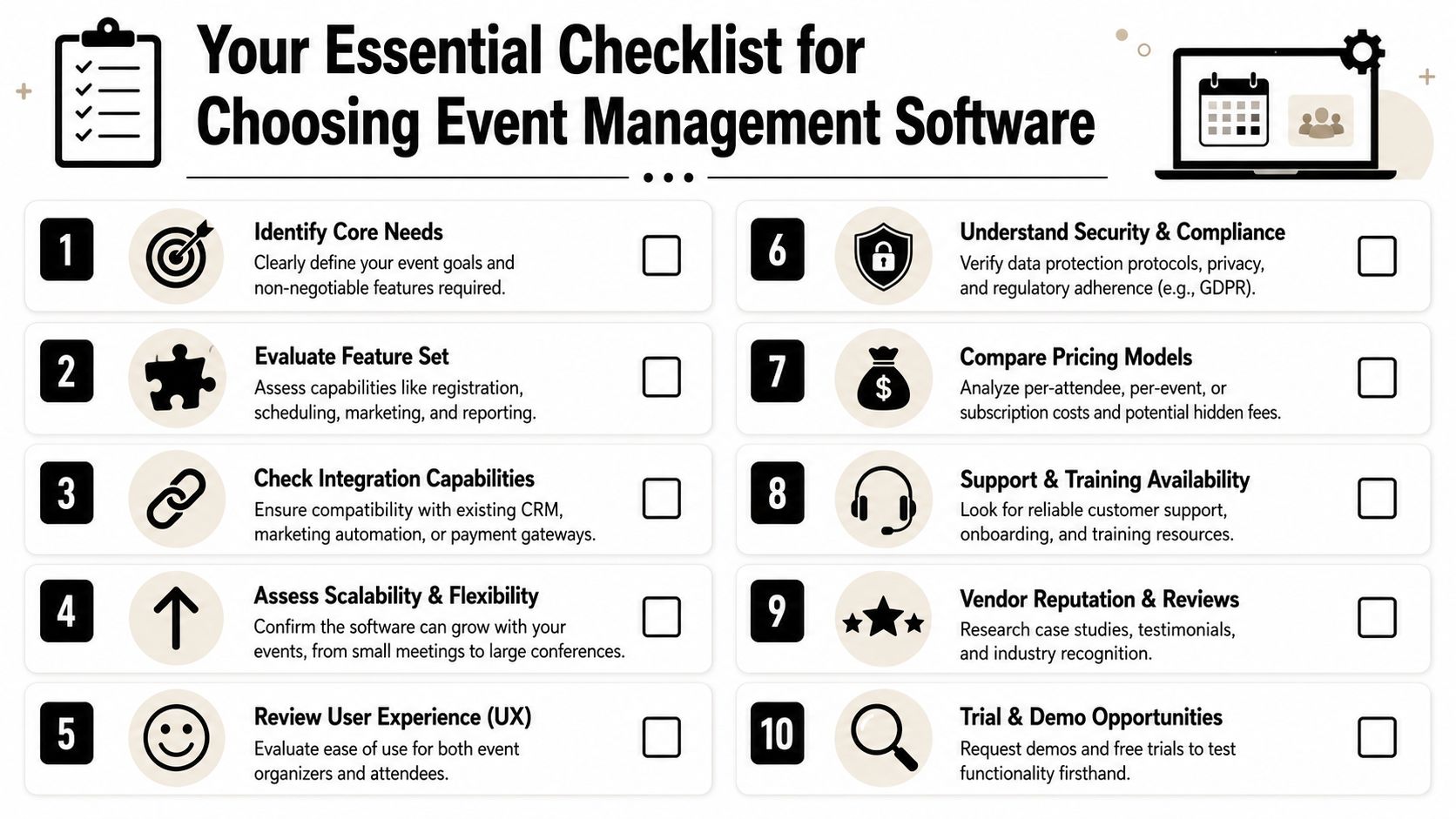
A practical shortlist usually starts with questions like these:
That governance piece is often overlooked. A strong buying question isn't just whether the software can collect more data, but whether it can manage permissions, retention, and unified identity across recurring events and memberships, especially as vendors add more AI and messaging tools that increase the sensitivity of the data moving through the platform, as noted in GEVME's discussion of modern event software use.
A short buyer overview can help your team align on basics before vendor meetings.
After that, get specific. This side-by-side look at event management software comparison factors is useful because it shifts the conversation from feature volume to evaluation criteria.
I'd evaluate vendors across four buckets.
Can the platform support your real event mix, not the idealized one in the demo? Ask how it handles recurring programs, tiered access, sponsor entitlements, speaker changes, and last-minute operational edits.
Who configures the system. Your team, the vendor, or a partner. How long does setup usually take. What happens if your first live event exposes a workflow gap.
Ask for a plain-language explanation of export formats, API access, field mapping, duplicate management, and historical record retention. If the answer gets slippery, pay attention.
Buying advice: The easiest demo is often not the easiest implementation.
You're not buying support for a quiet month. You're buying support for launch week, speaker changes, attendee access issues, and sponsor pressure. Find out how help is delivered when timing matters.
A vendor can have strong software and still be the wrong choice if their implementation model doesn't match your internal capacity.
Pricing looks simple until procurement starts asking what's included, finance asks what scales, and operations asks who's paying for setup.
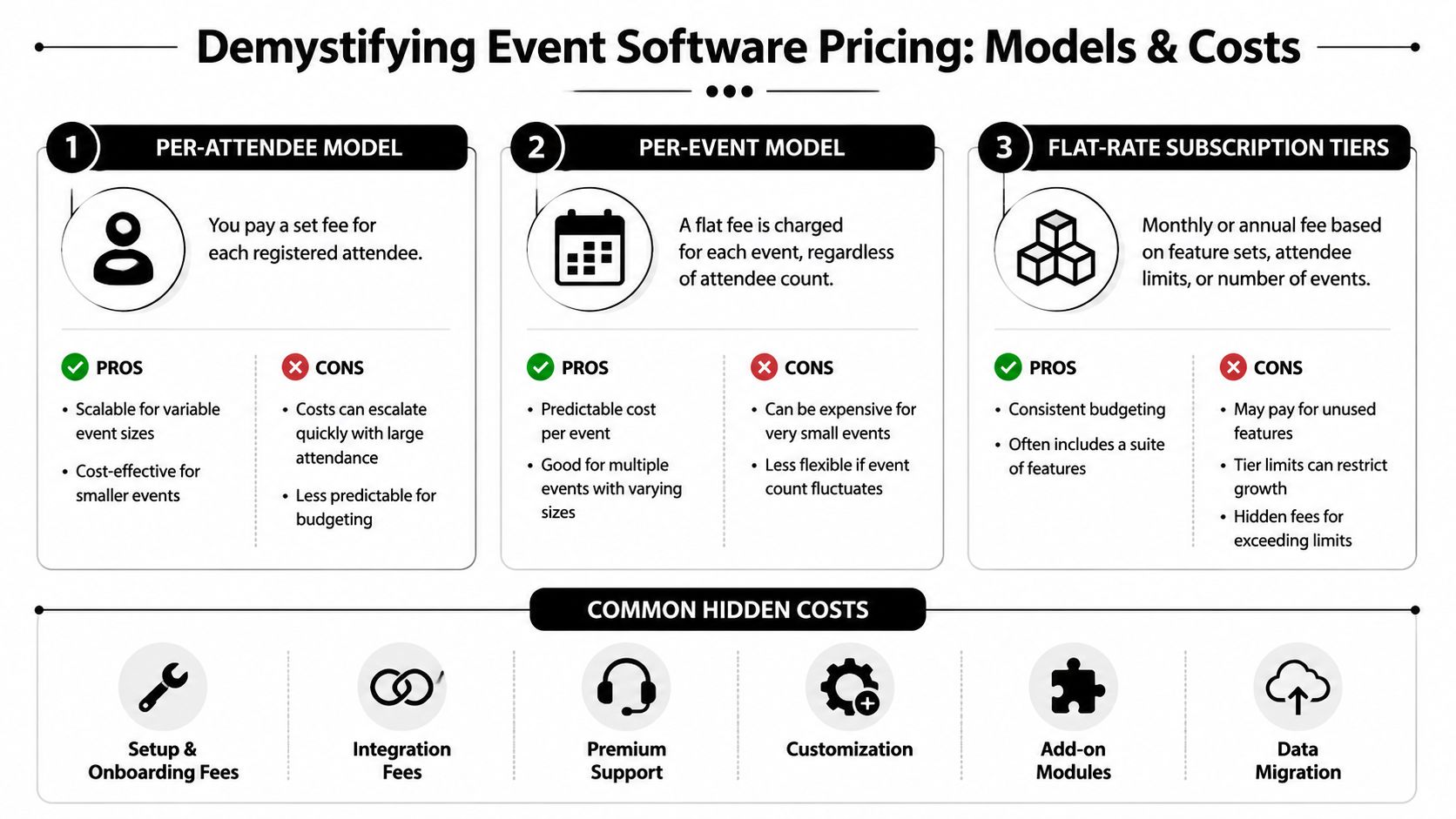
Most event management software lands in one of three models. None is automatically better. The right one depends on how often you run events, how variable attendance is, and how much functionality you need available all year.
| Model | Usually fits | Watch for |
|---|---|---|
| Per attendee | Teams with variable event sizes | Costs climbing faster than expected on large events |
| Per event | Organizations with a predictable event calendar | Overpaying for small or low-complexity events |
| Subscription tier | Associations and communities needing year-round access | Feature gates, attendee caps, and add-on charges |
Per-attendee pricing can work well when your volume changes a lot. It gives smaller teams flexibility. The downside is budget uncertainty once a flagship event starts growing.
Per-event pricing gives cleaner planning if you know how many programs you'll run. It's less forgiving if your calendar changes or if some events are tiny and don't need the full stack.
Subscription pricing often makes the most sense for organizations that treat event software as part of their core infrastructure. That's common for membership groups, enterprise communities, and teams with recurring content and communication needs beyond event day.
The license price is only one line item.
A more honest budget includes:
The trap is buying for today's event count instead of tomorrow's operating model. Cheap software gets expensive when your team adds manual work to compensate for missing functions. Expensive software also gets wasteful if you're paying for modules no one will implement.
A useful exercise is to ask each vendor for pricing in two views: launch-year cost and steady-state annual cost. That helps expose whether the proposal is front-loaded, usage-driven, or dependent on optional services you'll probably need anyway.
The software decision gets attention. The migration determines whether the decision pays off.
Cloud-based solutions held over 63.0% market share in 2024, and North America was the largest market in 2024, according to Grand View Research on the event management software market. That matters because cloud delivery makes adoption easier, but it also raises the bar for implementation discipline. If your data enters the new system poorly, you'll scale the mess faster.
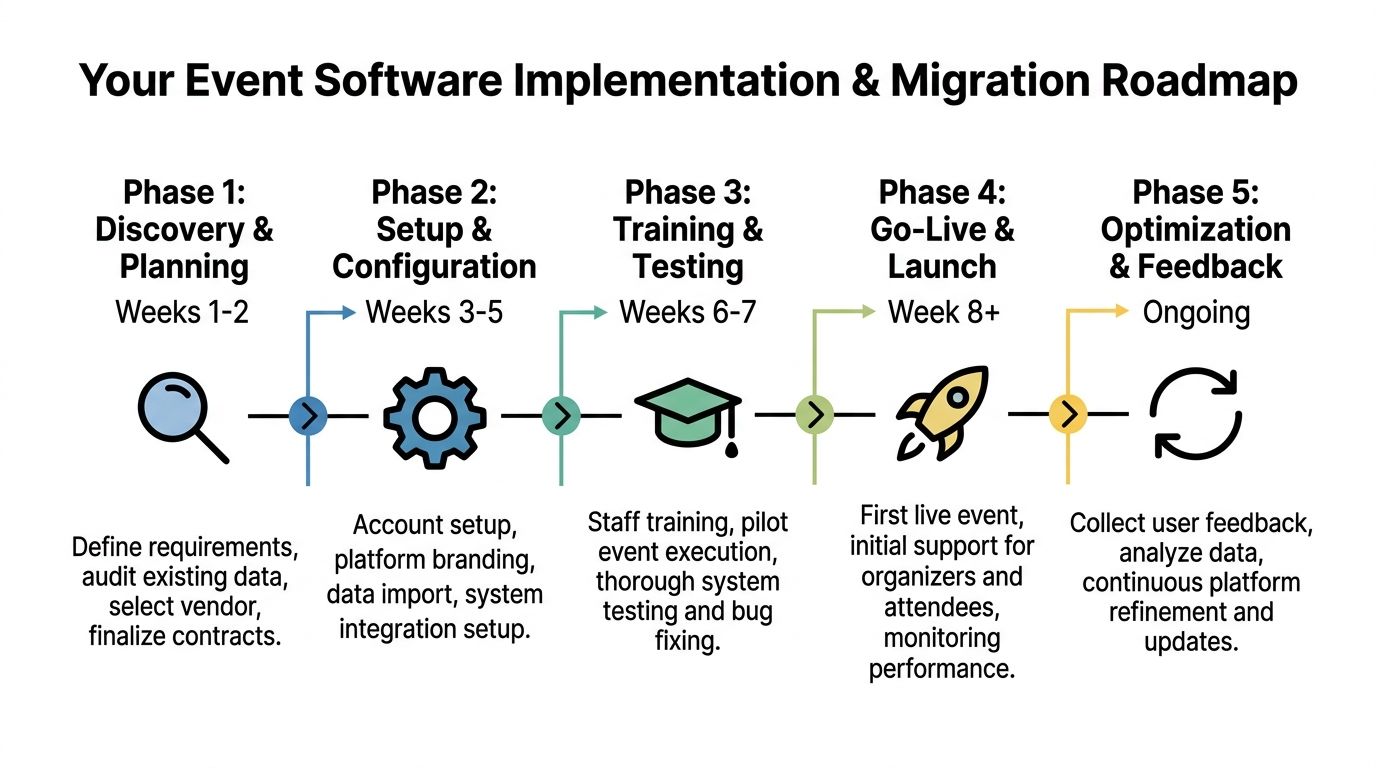
A practical rollout usually follows this sequence:
Discovery and audit
Review current tools, exports, field names, duplicate patterns, and workflow dependencies. Teams discover how many “temporary” processes became permanent during this review.
Configuration and mapping
Build your event types, user roles, permissions, ticket logic, communication templates, and integration rules. Don't import data until the field structure is settled.
Testing with a pilot
Use a smaller event, internal session, or controlled launch to test registration, check-in, messaging, reporting, and exports.
Live launch with guardrails
Keep fallback procedures ready for attendee support, payment issues, speaker updates, and check-in anomalies.
Post-launch cleanup
Review where staff still used side spreadsheets or manual workarounds. Those are the process gaps to fix next.
Teams often frame migration as a technical move. It's usually a governance move first.
Your source data is likely inconsistent. Company names are formatted differently. Member statuses don't align. One person may exist under multiple emails. Session history may be incomplete. If you import that as-is, the new platform inherits the old confusion.
Use a migration checklist that covers:
For teams that need a more structured process, database migration best practices is a solid operational reference. If your migration touches broader digital properties or needs outside support, Refact's expert migration services is also a helpful example of the kind of specialist migration planning some organizations bring in.
Clean data beats complete data. A smaller, trustworthy dataset is more useful than a perfect archive no one can rely on.
Treat the first event on the new platform as the start of a system, not the finish line of a project. The teams that get the most value keep refining forms, permissions, reporting logic, and profile design after launch. That's how event software becomes community infrastructure instead of another tool your staff works around.
If you're evaluating platforms with memberships, events, content, and ongoing community engagement in mind, GroupOS is one option built around that integrated model. It gives organizations a single branded environment for registrations, member management, communications, sponsor visibility, and content delivery, which can be useful when the goal isn't just to run the next event, but to keep the community active between events too.







