June 5, 2026

You're probably in one of two situations right now.
Either your team has outgrown spreadsheets, form builders, and a patchwork of check-in apps, or you're staring at a platform demo for Cvent and wondering whether you need something that big. That's the key buying moment with event management software Cvent. Not “can it do the job?” It usually can. The harder question is whether your team, budget, and event model can support everything that comes with it.
I've seen that fork in the road many times. For complex conferences, regulated environments, multi-stakeholder events, and programs that need strong controls, Cvent can make sense. For repeatable field events, member meetups, and community-driven programming, the same platform can become a heavy operating layer that slows people down instead of helping them move faster.
Most buyers first encounter Cvent while shopping for registration software. That framing is too narrow. Cvent behaves more like an operating system for events than a single-purpose tool.
That distinction matters. If you only need branded registration pages, automated reminders, and a clean attendee list, a large platform can feel excessive. But if you're managing speakers, sponsors, exhibitors, venue coordination, check-in, badge printing, analytics, and internal approval workflows across teams, Cvent starts to look more logical.
Apps Run the World tracks Cvent Event Management adoption across 195 countries and 21+ industries, with customer distribution spanning small businesses, midsize firms, large organizations, and enterprises. In that dataset, 39.64% of tracked companies are small businesses, 33.96% are midsize firms, 18.82% are large organizations, and 7.57% are enterprises, which shows the platform isn't limited to one company profile or sector (Apps Run the World on Cvent adoption).
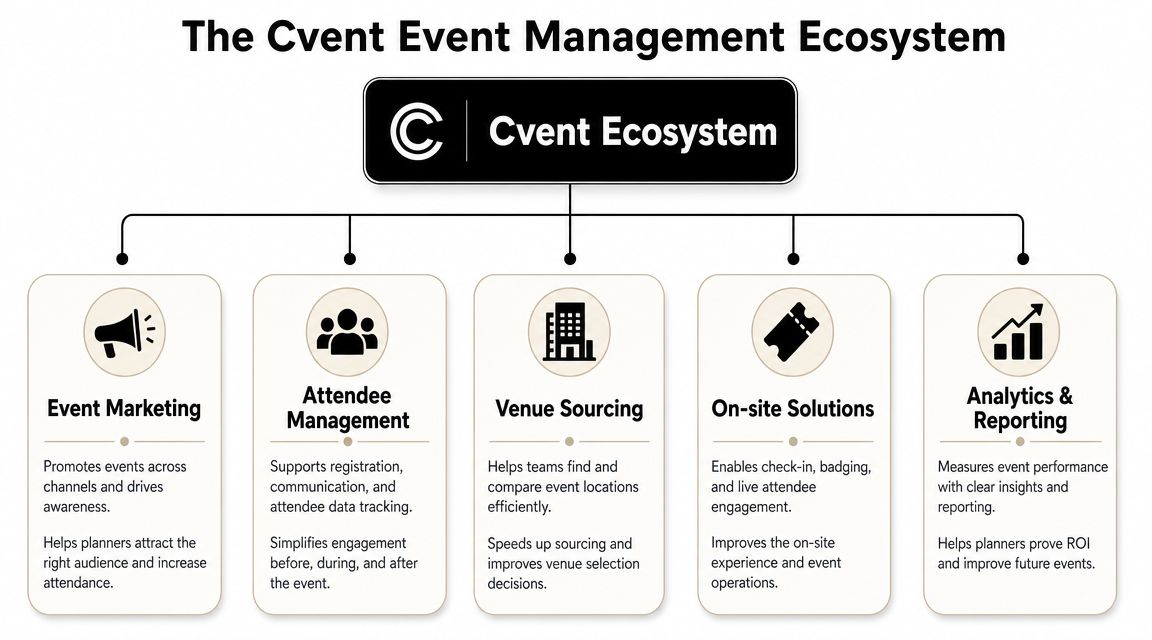
At a working level, teams typically experience Cvent through a few connected layers.
Event marketing and management handles the front end of the event journey. That includes event websites, registration paths, communications, and attendee data capture. For teams that care about consistency, governance often starts with these elements.
Then there's the attendee experience and onsite layer, which integrates mobile check-in, badge printing, communications, and event-day flow into one environment instead of separate tools stitched together.
A third layer sits around venue and supplier coordination. This is often the part lighter tools don't cover well. If your events include expo halls, sponsor activations, general sessions, breakout complexity, or physical build requirements such as an exhibition stand, the platform's broader operating model becomes more relevant.
Practical rule: Don't evaluate Cvent as “registration software with extras.” Evaluate it as a system that tries to centralize event operations, data, and control.
This breadth is valuable when several teams touch the same event. Marketing needs campaign attribution. Events needs registration logic. Operations needs onsite reliability. Leadership wants reporting. Procurement wants standardization.
But that same breadth creates friction when the event itself is simple.
If your team mostly runs recurring breakfasts, chapter events, small sponsor gatherings, or member sessions, you may be better served by a lighter stack that prioritizes speed and ease. A useful comparison point is this guide to online event management software, especially if your workflow is more about recurring engagement than enterprise event operations.
The easiest way to understand Cvent is to follow a real planning scenario. Think about a professional association running an annual international conference with multiple audience types, several ticket categories, educational tracks, sponsor obligations, and a busy onsite check-in window.
That's a good fit for event management software Cvent because the platform can hold a lot of complexity in one place.

The registration build usually starts with audience segmentation. Members, non-members, exhibitors, speakers, media, VIPs, and staff often need different flows, pricing logic, or permissions. In Cvent, that kind of branching can be managed inside a single system rather than through separate forms and manual reconciliation later.
Next comes communication. Teams can connect event websites, confirmation messages, reminders, and attendee updates so they don't have one system collecting registrations and another trying to email the same audience cleanly.
Then there's the operational middle layer that many buyers underestimate. Speaker management, attendee records, and reporting aren't just “nice to have” at conference scale. They reduce the number of spreadsheets floating between departments and make it easier to keep one source of truth.
For teams comparing stacks, this overview of event management software features is useful because it separates what looks impressive in a demo from what is critical in production.
The platform stands out when events have rooming, complicated schedules, or physical-space coordination.
Cvent Event Diagramming adds collaborative planning for venue layouts with 3D floor plans, photo-realistic visualization, and automated diagram generation, which helps teams coordinate room setups in real time and carry those decisions into execution workflows (Cvent Event Diagramming overview). That's not a minor add-on for convention teams. It changes how venues, planners, and stakeholders align before anyone gets onsite.
A typical use case looks like this:
Large associations don't usually buy Cvent because they want more features. They buy it because disconnected tools create too many points of failure.
For a flagship annual conference, that depth is helpful. For a monthly luncheon series, it often isn't.
That's the recurring theme with Cvent. Its best use cases involve complexity that would otherwise force your team to juggle multiple systems, manual workarounds, and post-event cleanup. If your event program doesn't have that problem, many of its strongest capabilities may sit idle.
Cvent deserves a fair read. It's powerful for reasons that matter. It also carries costs that many buyers underestimate until after signing.
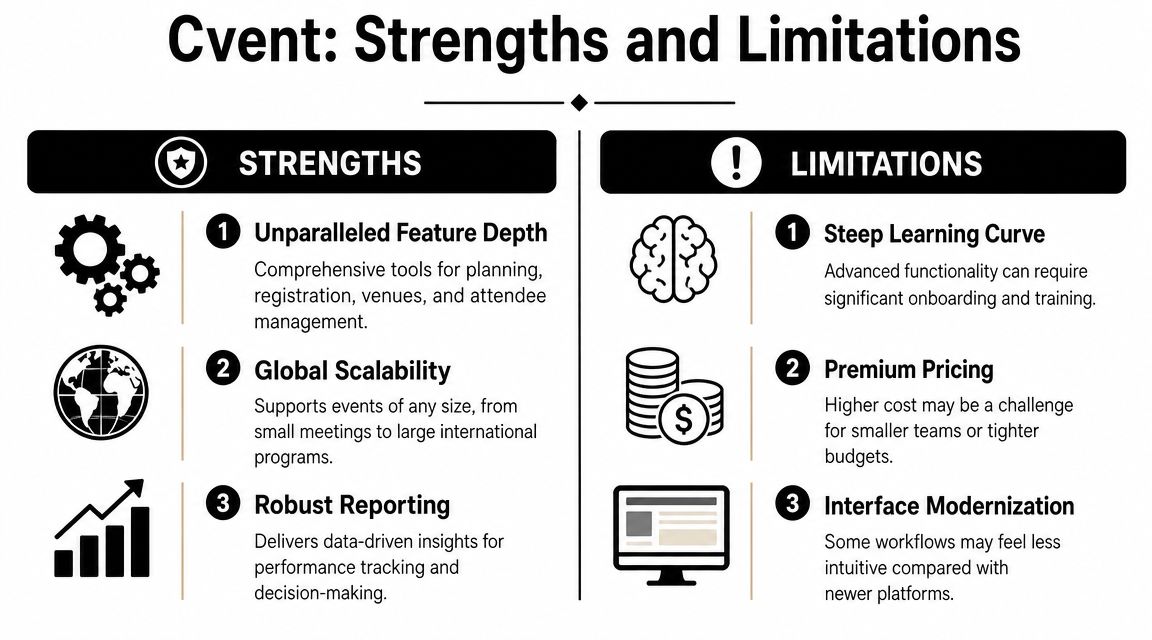
The platform's biggest advantage is depth. It supports a broad set of event functions in one environment, and independent reviewers describe it as an all-in-one system for conferences, conventions, webinars, product seminars, and hybrid events. That matters when your team wants registration, attendee management, reporting, and execution tied together rather than patched together.
It's also strong when organizations need standardization. Enterprise teams often care less about whether a platform feels light and more about whether it can enforce process, support multiple stakeholders, and keep event data structured.
Another plus is that Cvent has clearly invested in the broader platform vision. The vendor now frames the product around CventIQ and AI-powered event technology, while citing 8M+ events managed and 350M+ registrations processed as part of its positioning (Cvent platform overview). Whether that AI layer changes your day-to-day workload depends on your use case, but it signals where the platform is heading.
Here's a useful product video if you want to see how that broader ecosystem is presented in practice.
The limitations are not minor. They're operational.
Independent reviews point to a steep learning curve, high costs, an overwhelming feature set, and long implementation time, which is exactly why teams running simpler or repeatable programs often feel that Cvent is more system than they need (independent review summary of Cvent trade-offs).
That's the overkill threshold. It shows up when:
A platform can be feature-rich and still be the wrong tool. If your team avoids using half the system, complexity becomes waste.
A simple way to assess Cvent is to score it against the operating reality of your team.
| Decision area | Where Cvent fits well | Where it tends to miss |
|---|---|---|
| Event complexity | Large conferences, multi-track programs, regulated workflows | Straightforward events with limited branching |
| Team structure | Dedicated ops staff, event specialists, internal admins | Lean marketing or membership teams |
| Governance needs | Strong approvals, standardized templates, centralized control | Flexible, fast-moving local teams |
| Event cadence | High-stakes flagship events | Frequent repeatable programs that need speed |
| Tool strategy | Consolidating many event functions | Solving one or two simple workflow problems |
One of the more revealing signals in the market is that Cvent has introduced Cvent Essentials for marketers and hosts running frequent in-person events who want a more self-service workflow while keeping centralized visibility and control. That move acknowledges a real issue in the product line. Not every event team wants or needs the full enterprise operating model.
So the best way to judge Cvent isn't to ask whether it's powerful. It is. The right question is whether your program benefits from that power enough to justify the weight that comes with it.
Most software evaluations focus too much on feature demos and not enough on implementation drag. With Cvent, that's a mistake.
Capterra lists Cvent Event Management with a starting price of $7,000 per user, per month, and reviewers rate both registration management and attendee management at 4.6/5 from 176 reviewers who marked those features as important or highly important (Capterra listing for Cvent Event Management). That tells you two things at once. The product is well regarded in core areas, and it sits in premium-budget territory.
The direct subscription cost is visible. The total cost of ownership usually isn't.
Cvent often requires more internal effort than lighter tools because someone has to own the build logic, workflows, templates, data hygiene, and process rules. Even when the vendor or a partner helps with setup, your team still has to make operational decisions about attendee types, approvals, field mapping, branding standards, communication sequences, and reporting structures.
Those decisions take time. They also require cross-functional alignment, which is usually the slowest part of implementation.
If you're building a real business case, look past the contract and estimate the operating burden too.
Buying advice: If you can't name the person who will own Cvent internally, you're not ready to buy Cvent.
That's why some organizations end up happier with software that does less but gets used more consistently. If your needs are narrower, this guide to event booking management software is a better starting point than an enterprise platform comparison.
The event software market is more segmented than it looks from vendor websites. Most buyers aren't choosing between “good software” and “bad software.” They're choosing between products built for different operating models.
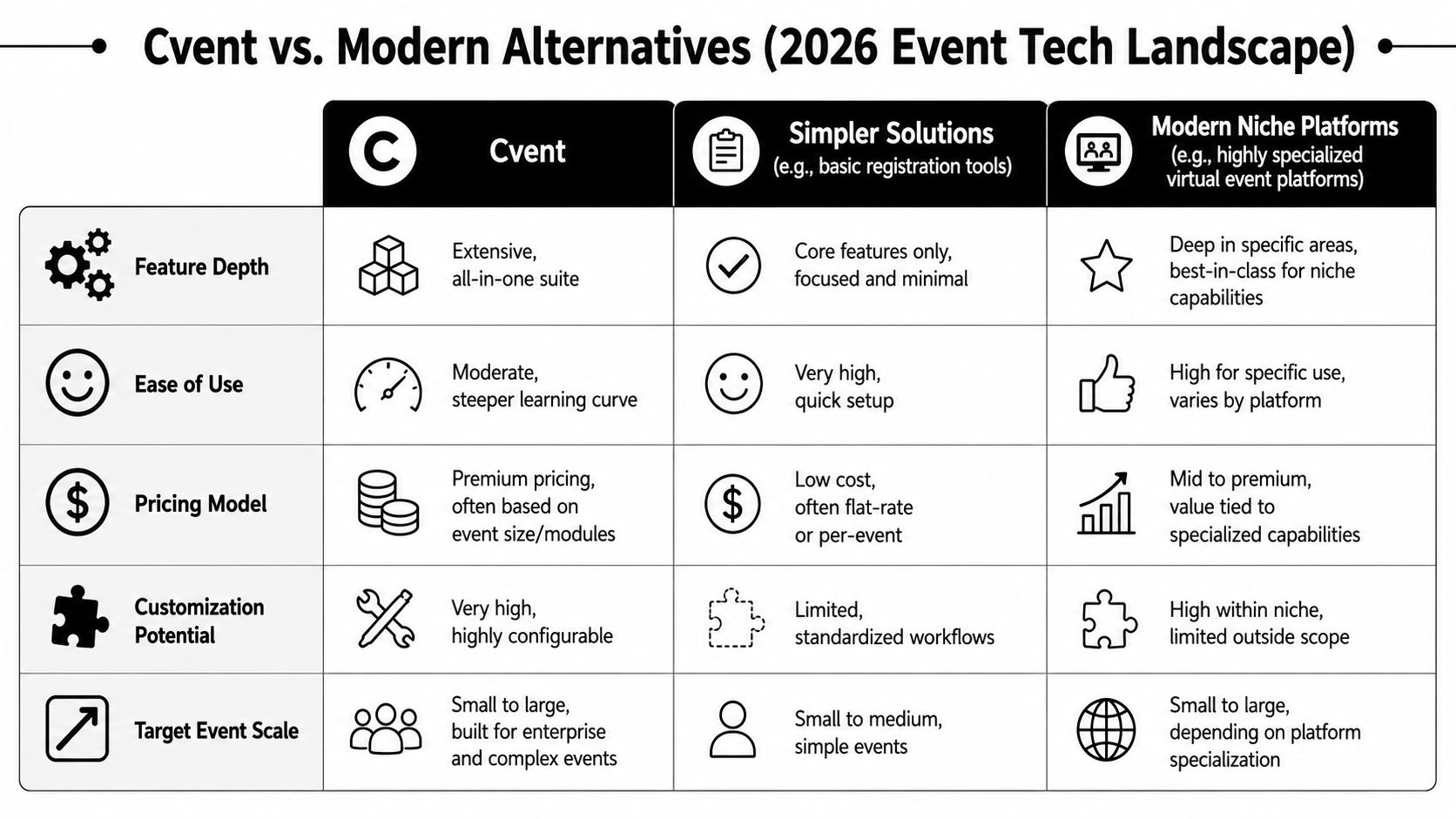
A point solution focuses on one job. That may be registration, ticketing, check-in, or webinars. These tools are usually easier to launch, easier to train on, and easier to replace.
Their weakness is fragmentation. Once your team adds separate tools for registration, email, onsite workflows, sponsor fulfillment, and reporting, you create handoff points where data gets messy and staff work doubles.
Cvent's answer to that problem is centralization. If your events are large enough, that's compelling. If not, the platform can feel like you bought an ERP to run a breakfast series.
This is the more interesting comparison for associations, professional networks, and membership organizations.
Some organizations don't just run events. They run communities with events inside them. That changes the software decision. Instead of asking “How do we execute this conference well?” they ask “How do we manage members, content, communication, sponsorship, and events in one branded environment?”
That's where a platform such as software for event management built around ongoing engagement can make more sense. GroupOS, for example, is designed as an all-in-one community and event management platform for memberships, ticketing, content delivery, communication, sponsor visibility, and branded experiences. That's a different center of gravity than Cvent. It suits organizations that view events as one part of a broader member or community lifecycle.
Use this lens instead of a generic feature checklist.
| Platform type | Primary job | Best fit | Main trade-off |
|---|---|---|---|
| Cvent | Centralized event operations and governance | Enterprises, large associations, complex conferences | More implementation burden and higher operational weight |
| Point solutions | Solving one event workflow fast | Small teams, one-off needs, simple formats | Data fragmentation across tools |
| Community platforms | Managing members, content, communication, and events together | Associations, networks, cohorts, subscription communities | May not match Cvent's depth for highly complex event operations |
Cvent is positioning itself as an AI-powered platform and cites 8M+ events managed and 350M+ registrations processed in that context, which raises a useful buying question: where does AI remove workload, and where do governance, approvals, and centralized controls still drive value? That question matters more than the marketing label because event teams don't benefit from AI in the abstract. They benefit when it removes real production work in their current operating model.
In enterprise settings, AI may help with planning speed, communications, or workflow assistance. But if your biggest challenge is still getting local teams to launch repeatable events without bottlenecks, simpler software may produce more day-to-day benefit than an advanced AI story.
Better software fit usually comes from matching the platform to the job your team does most often, not the one you aspire to do someday.
The cleanest event tech decisions start with honesty. Not ambition. Not vendor demos. Not fear of outgrowing a tool later.
Ask these questions in order.
If most of your value comes from a few high-stakes events with many moving parts, Cvent deserves serious consideration. If most of your value comes from recurring engagement across chapters, members, sponsors, or professional communities, a community-oriented platform may fit better.
Look closely at frequency too. Teams running repeatable formats need speed, templates, and low-friction publishing. Teams running flagship conferences need control, process, and operational depth.
Software succeeds when the people using it are able to run it.
Use this short checklist:
If several of those answers feel shaky, a leaner platform is usually the safer decision.
Many teams overlook this point. An association, a field marketing team, and a trade show organizer may all run events, but they are not buying software for the same reason.
If your organization also depends on year-round communication, sponsor visibility, member services, and ongoing engagement, your event stack should support that broader strategy. Teams thinking through audience growth may also benefit from reviewing broader marketing strategies for small businesses, especially when event promotion is tied to community development rather than one-time campaigns.
A simple decision path looks like this:
The best choice isn't the most powerful platform. It's the one your team will use well, consistently, and without building a second job around the software.
If your organization needs to manage events alongside memberships, content, communication, sponsor visibility, and branded community experiences, take a look at GroupOS . It's built for teams that want event operations connected to the broader community lifecycle, not isolated from it.







