May 18, 2026
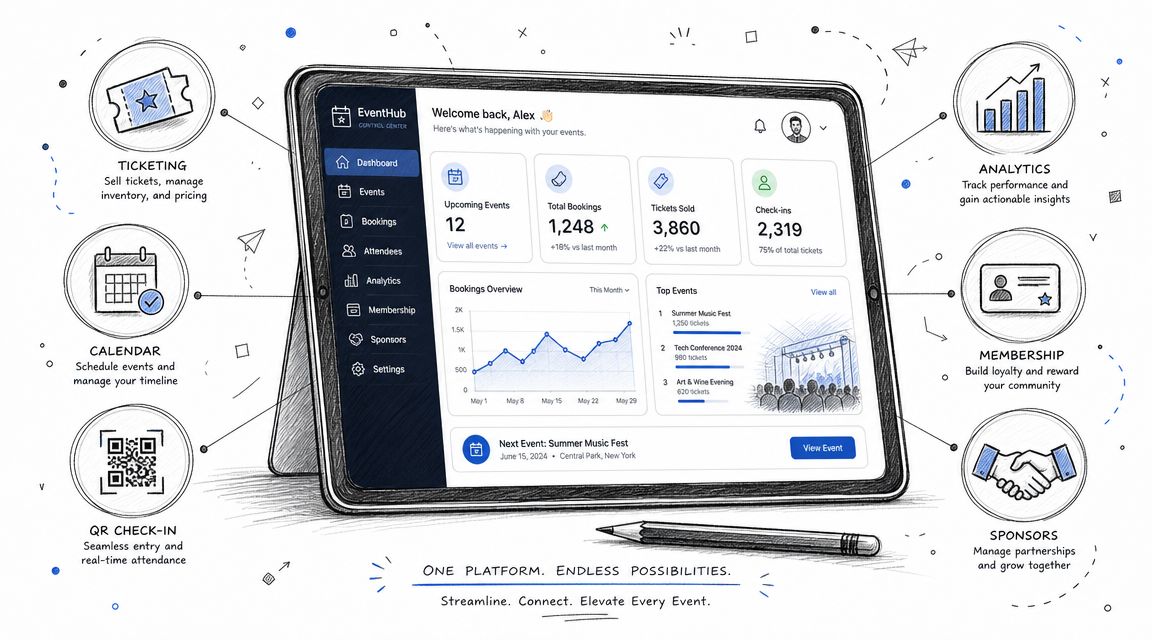
You're probably dealing with some version of the same mess most associations hit when events outgrow their original tools. Registrations live in one system. Member status lives somewhere else. Finance wants cleaner payment records. Marketing sends updates from a separate email tool. Staff keeps a backup spreadsheet because nobody fully trusts the data in the platform.
That setup works for a while. Then the cracks show. Members get the wrong price. A VIP registrant receives general admission instructions. A cancellation opens a seat, but nobody promotes the next person from the waitlist fast enough. Sponsors ask for better lead visibility, and your team exports CSV files at midnight.
That's the point where event booking management software stops being a convenience purchase and becomes an operating decision. For professional associations, the question isn't just how to sell tickets. It's how to manage the full lifecycle of a member, attendee, sponsor, exhibitor, and staff user without forcing every team to patch the gaps manually.
The old event stack usually doesn't fail all at once. It fails through friction.
A coordinator updates the agenda in one place but not another. Finance reconciles payments after the fact. Membership staff manually checks eligibility for discounted registration. Speakers get one email list. Sponsors get another. Nobody has a reliable, current view of who is coming, what they bought, what access they should have, and what follow-up should happen next.
That's why event booking management software has moved from a niche category into core infrastructure. Mordor Intelligence projects the global event management software market will grow from USD 15.20 billion in 2026 to USD 24.17 billion by 2031, at a 9.73% CAGR (Mordor Intelligence event management software market projection). That kind of expansion usually signals a category shift. Buyers no longer see these platforms as simple booking tools. They see them as systems that connect registration, communication, logistics, and reporting.
For associations, that matters even more because events rarely stand alone. A conference registration is tied to membership type, committee participation, sponsor access, content permissions, and future renewals. If your software only captures a transaction, it leaves the harder operational work to staff.
Practical rule: If your team still relies on spreadsheets to reconcile attendee status across departments, you don't have a software problem alone. You have a system design problem.
That's also why event leaders should evaluate event operations the way corporate planners evaluate broader workflows. A practical guide to event planning for corporate teams is useful here because it shows how transportation, scheduling, communication, and guest experience quickly become interconnected once an event reaches real operational complexity.
The fundamental buying decision is sharper than most software roundups admit. Do you need a booking tool that handles transactions well, or do you need a platform that becomes the system of record for your community's event activity year round?
A true event booking system is less like an online checkout page and more like air traffic control for your event ecosystem. It coordinates who is coming, what they can access, what they owe, what they've already done, and what should happen next.

At the light end of the market, you'll find basic booking widgets. These are fine for simple public events with a straightforward form, standard payment flow, and limited follow-up. If all you need is date selection, headcount, and payment capture, a simple tool may be enough.
The problems begin when your organization needs software to reflect relationship context, not just attendance.
An association might need to:
That's the dividing line between a booking tool and a broader platform.
A useful parallel exists outside events. When organizations book your security services, the request itself is only part of the workflow. Staffing, approvals, timing, venue requirements, and service coordination matter just as much as the initial booking. Event systems face the same reality. The transaction is only the front door.
A critical question missed in many software reviews is whether a platform is only for event booking or whether it functions as a community operating system. Basic tools handle registration. More advanced platforms unify member profiles, content hubs, and communication, which is especially valuable for professional associations that depend on recurring engagement rather than one-time attendance (Accruent on event software and broader community workflows).
The strongest platforms don't stop working after check-in. They keep supporting the relationship after the event ends.
That distinction changes how you evaluate software. A booking-first platform is optimized for transactions. A community-first platform is optimized for continuity. For associations running annual conferences, chapter events, webinars, sponsor programs, and member education, continuity usually wins.
Most feature lists are too shallow to help buyers. They tell you what exists, not what solves operational pain. The better way to assess event booking management software is by the problems it removes.

This is the first place weak software gets exposed.
High-performing platforms treat registration as a rules engine, not just a form. Conditional logic, tiered ticketing, automated waitlists, and invitation-only access reduce manual work and help prevent revenue leakage, especially when events serve different attendee types such as members and non-members (InEvent on event management software features).
In practice, that means the system should be able to do things like:
If a vendor demo still revolves around “you can build custom fields,” that's not enough. The question is whether those fields drive workflow.
For a deeper breakdown of what strong platforms should include, this guide to event management software features is a useful comparison point.
The attendee experience often breaks before the event even starts. Confusing forms, clunky payment steps, and weak confirmation flows increase support requests and create mistrust.
Strong software should support:
The goal isn't cosmetic polish alone. It's to reduce friction for attendees and exceptions for staff.
Many event-focused tools often fall short. They manage the event, but not the member.
Associations often need one system that can track membership plans, event eligibility, content access, and communications without forcing staff to sync records manually. If your members attend events as part of an ongoing relationship with your organization, then event software that operates in isolation usually creates more work downstream.
A platform like GroupOS, for example, combines memberships, ticketing, content delivery, messaging, and branded community spaces in one environment. That model fits organizations that want event activity connected to year-round engagement rather than stored in separate systems.
Field note: The more often your staff asks, “Can this attendee access that because they're a member?” the more likely you need lifecycle management, not just event registration.
Sponsors don't buy booths or placements for the sake of appearing in a directory. They want visibility, lead capture, and cleaner interaction with attendees.
Good event booking management software should support:
If the platform treats sponsors as an afterthought, your operations team will end up building side processes with email threads and spreadsheets.
A quick product walkthrough helps here before comparing advanced capabilities:
Reporting matters, but only if the data is trustworthy. Dashboards that look clean but sit on incomplete records don't help much.
Look for software that can:
A mature platform shouldn't make your team export, clean, and reinterpret event data every time leadership asks a basic question.
Software buying often stalls because each stakeholder sees a different problem. Event operations wants fewer manual tasks. Membership wants a better view of engagement. Sponsors want clearer return from the program. If the platform only solves one of those needs, adoption usually suffers.
Planners need fewer moving parts and fewer exceptions.
That means the software should reduce repetitive work such as access checks, reminder emails, attendee status updates, session caps, and on-site check-in coordination. It should also create a reliable audit trail. When a registrant says they bought one package and received another, staff should be able to verify what happened without searching three systems.
A practical sign of value is simple. Your team spends less time asking, “Who changed this?” and more time running the event.
Association leaders care about more than attendance. They care about whether events strengthen the member relationship.
That's why the right platform helps connect:
When those elements live together, staff can understand engagement in context. A member who attended a chapter event, downloaded materials, joined a discussion group, and registered early for the annual meeting should not look like four unrelated records.
A conference can be profitable and still underperform strategically if it doesn't deepen the member relationship.
Sponsors judge events by visibility, access, and follow-up quality. They want a cleaner line between investment and outcome.
The software should make it easier for them to:
What doesn't work is forcing sponsors into generic attendee workflows or giving them exposure without useful interaction tools. If sponsorship is a meaningful revenue line for your organization, this part of the system can't be bolted on at the end.
Most software evaluations go wrong because buyers compare feature grids instead of workflows. A vendor may check every feature box and still create operational drag if the setup is rigid, the integrations are weak, or the admin experience frustrates staff.
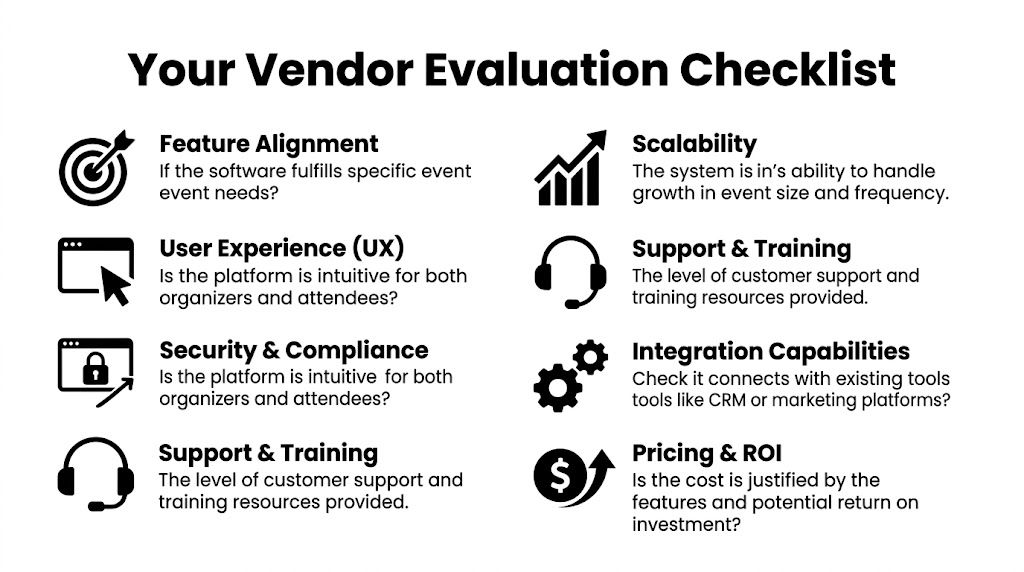
Ask each vendor to show your real use case. Not a polished demo. Your actual pricing rules, your membership logic, your sponsor workflow, your approval process.
A practical model for scoring vendors is to compare platforms using this checklist, then adapt the framework to event operations. The discipline is the same. You need to evaluate fit, usability, support, and hidden complexity, not just headline features.
This comparison resource for event management software comparison can also help structure vendor shortlisting.
For larger events, integration depth is a critical benchmark. Software that syncs with CRM, ERP, and access control systems in near real time helps prevent double-bookings, cuts duplicate data entry, and improves data accuracy across the operational stack (Momentus on integration depth in event software).
Use that standard during evaluation.
| Evaluation area | What to ask |
|---|---|
| Registration logic | Can the system handle member pricing, approvals, invitations, and access tiers without custom workarounds? |
| Admin usability | Can your team build and edit workflows without opening support tickets for every change? |
| Data flow | What syncs with CRM, finance, marketing, and access control systems, and how often? |
| Sponsor workflows | Are sponsor assets, profiles, visibility, and lead capture built into the product or handled externally? |
| Reporting | Can leadership get useful reports without manual exports and spreadsheet cleanup? |
| Support model | Who helps with setup, migration, testing, and issue resolution when an event is live? |
Some vendors look excellent until you ask about exceptions. That's where risk appears.
Look closely at:
The best demo question is often the least glamorous one. “Show me how this breaks, and how my team fixes it.”
Implementation is where many software projects lose credibility. The sales process promises efficiency. The rollout introduces messy data, unclear ownership, and a training burden nobody budgeted for.
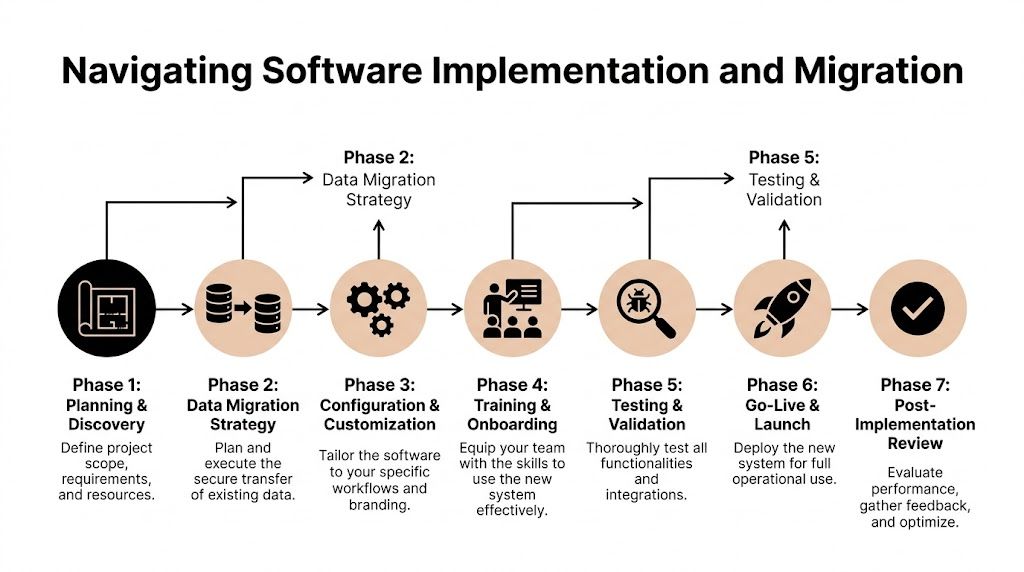
Buyers need to account for hidden costs in implementation, data migration, and staff training. Platforms often promise time savings, but the initial switching and integration burden can erase those gains if the transition isn't planned carefully (Event.Gives on overlooked implementation and ownership costs).
The hardest part usually isn't moving records. It's deciding which records are worth moving.
Legacy event systems often contain:
Before any migration starts, define what the new platform should treat as authoritative. If membership status lives in one system and event history in another, decide which one wins when records conflict.
This guide to database migration best practices is useful if your organization is trying to clean and map member and attendee data before rollout.
The safest implementations usually follow a phased model.
Plan the scope clearly
Define which event types, user roles, integrations, and workflows are included in phase one.
Clean the data before importing
Don't use the new platform as a storage locker for bad records.
Configure for real scenarios
Test member pricing, sponsor access, transfers, cancellations, and reporting before launch.
Train by role
Finance, event ops, membership, and marketing don't need the same training.
Run a controlled first event
Choose a manageable program before migrating your flagship conference.
Software adoption usually fails for ordinary reasons. The wrong fields map over. Staff doesn't trust the records. Training is too generic. Nobody owns the exceptions.
The teams that transition well usually assign one internal owner with enough authority to make process decisions. They also resist the urge to recreate every old workaround inside the new system.
That matters. A migration should simplify operations, not preserve historical clutter in a newer interface.
The return on event booking management software isn't limited to ticket revenue. It shows up in reduced manual work, cleaner finance and member records, faster sponsor follow-up, stronger attendee communication, and better continuity between one event and the next.
To assess value, measure outcomes your organization cares about. That might include staff time saved, fewer support issues, cleaner reporting, stronger sponsor workflows, or better member engagement after the event. This guide to measuring event ROI is a practical place to frame those decisions.
A low-risk next step looks like this:
The right software should make your events easier to run and your community easier to grow.
If your organization needs more than ticketing, GroupOS is one option to evaluate. It's built for associations and community-driven organizations that want event registration, memberships, content delivery, sponsor visibility, and communication managed in one branded platform instead of a patchwork of disconnected tools.







