May 23, 2026

You've probably been handed this task in the most casual way possible: “Can you just delete that old group?”
It might be a conference community from last year, a project workspace that drifted inactive, or a member cohort that merged into a new structure. On the surface, it sounds administrative. Open the platform, click a button, move on.
That's how group removals go wrong.
A group usually holds more than conversation threads. It holds member expectations, file history, role assignments, integrations, moderation context, and sometimes records your organization may need later. Remove it carelessly and you can leave behind broken workflows, frustrated members, inaccessible history, or a compliance problem no one saw coming.
The safest way to handle how to remove a group is to treat it like a controlled decommissioning. That means deciding whether deletion is even the right move, documenting what the group affects, communicating before action, and only then executing the final removal. The click matters least. The preparation matters most.
A familiar scenario plays out like this. An event ends, the sponsor lounge is quiet, the speaker group has gone cold, and someone on the team says it's time to clean things up. The old group looks harmless. No one has posted in a while. It feels like low-risk housekeeping.
Then the problems surface after the fact.
Members start asking where their files went. A staff lead realizes the group held important context for a recurring program. A connected app starts failing because it was still pointing at that space. Someone from legal or operations asks whether the discussion archive had to be retained. At that point, the team is no longer deleting a group. They're managing fallout.
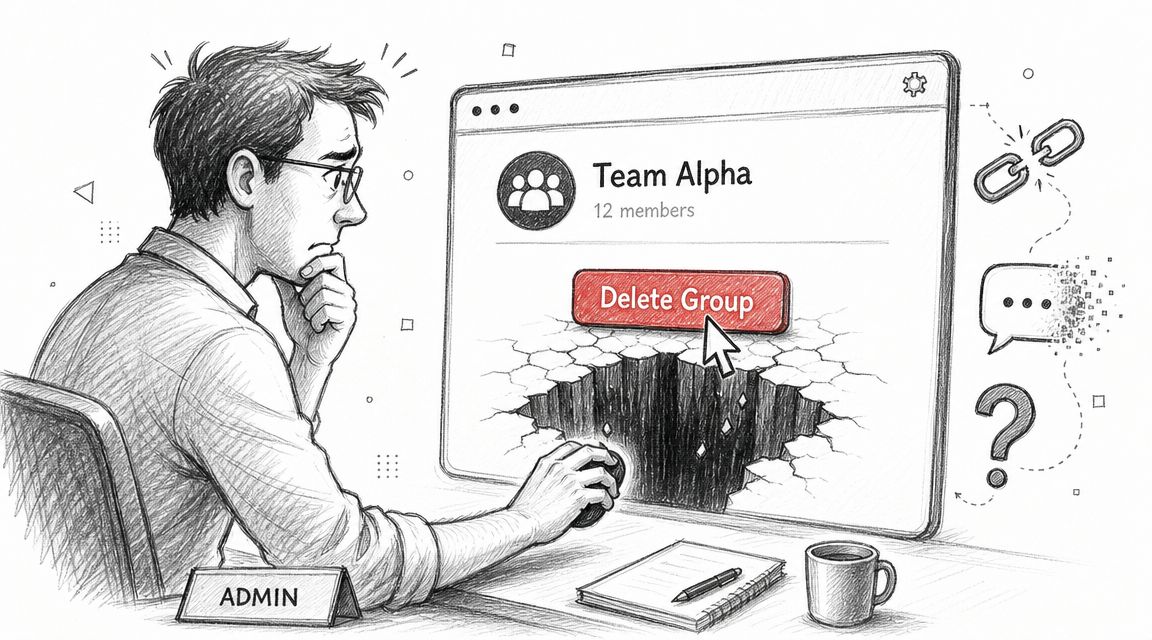
The risk is higher in organizations that run multiple communities at once. Event teams, associations, and member organizations often have overlapping ownership, partial admin visibility, and reused workflows. One group can affect registration follow-up, sponsor communication, volunteer coordination, or internal reporting. That's why mature operations teams build governance first. If you're tightening lifecycle controls, these effective Teams governance strategies are a useful parallel because they focus on ownership, permissions, and lifecycle discipline before cleanup starts.
The failure isn't usually technical. It's procedural.
Practical rule: If more than one team touched the group, don't delete it on the same day you first discuss deleting it.
A cautious process doesn't slow you down. It keeps a cleanup task from turning into a recovery exercise.
Deletion should be the last option, not the default.
Teams often say they need to “remove” a group when what they truly need is to stop activity, reduce clutter, or close out a program without losing its record. Those are different outcomes. Treating them as the same decision leads to unnecessary loss.
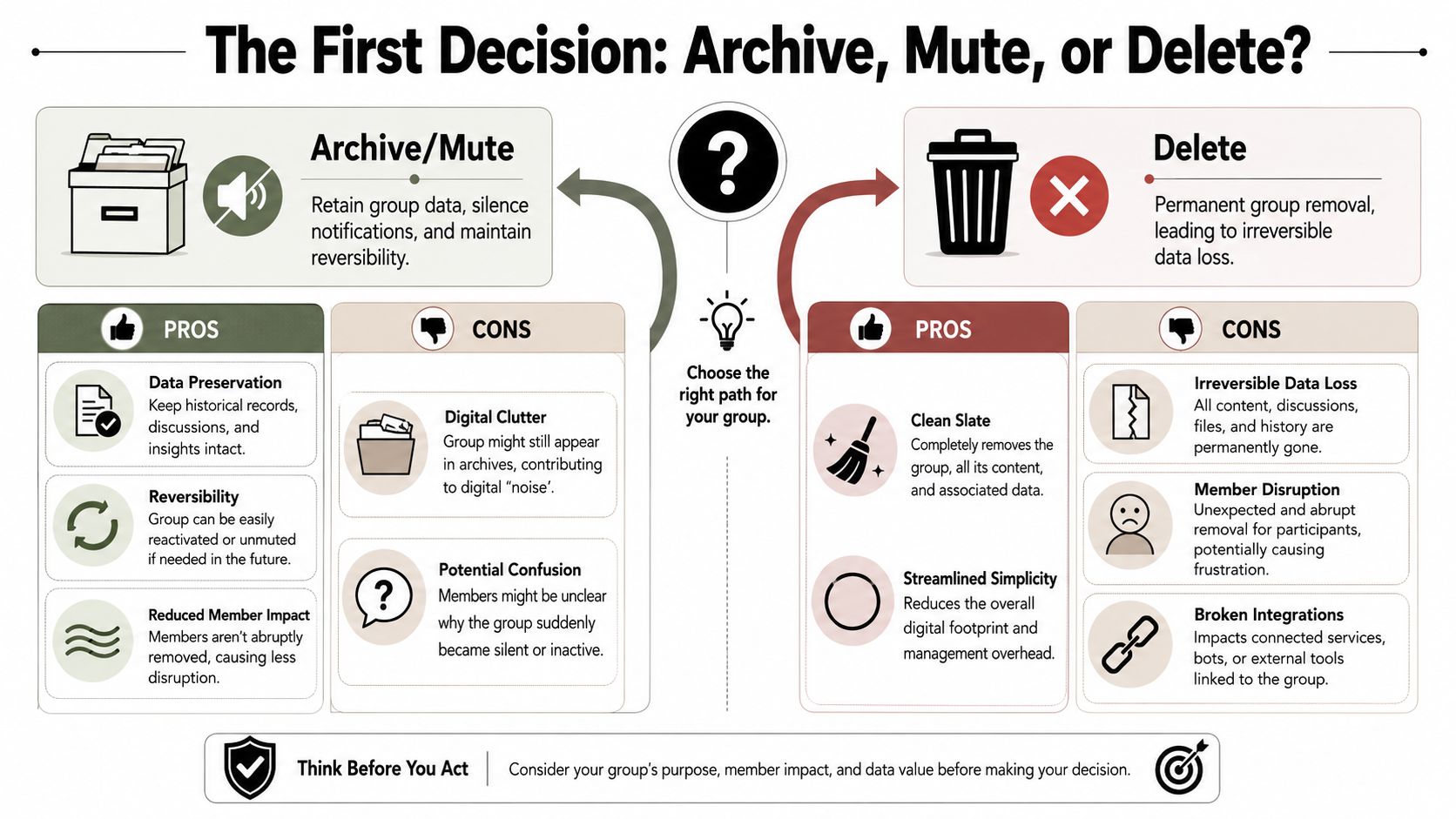
Archiving is the right move when the group has served its purpose but still has long-term value. This is common with conferences, certification cohorts, board committees, or program launches. The group no longer needs active posting, but people may still need to review files, decisions, or past conversations.
Archive if the group answers questions like these:
Sometimes the issue isn't the existence of the group. It's ongoing activity.
Google explicitly offers alternatives to deletion, such as stopping members from posting or viewing conversations instead of deleting the group, and Microsoft notes that only owners can delete a group while members may leave it, which supports a model where groups can be made inactive rather than destroyed while preserving history and preventing new activity (Microsoft guidance on deleting a group).
That matters because muting, locking, or making a group read-only solves many operational problems without introducing irreversible ones.
| Option | Best use | Main advantage | Main risk |
|---|---|---|---|
| Archive | Finished groups with reference value | Keeps history accessible | Can add interface clutter |
| Mute or restrict | Groups that should stop activity | Reversible and low disruption | Members may not understand the status |
| Delete | Groups with no retention or reuse value | Clean removal | Permanent loss and dependency breakage |
Deletion fits when the group no longer has operational, legal, or historical value and when keeping it creates more risk than removing it. That might apply to test groups, duplicate communities, abandoned pilots, or spaces created in error.
If you haven't documented why deletion is better than restriction, you probably aren't ready to delete.
The strongest operators I've seen make this decision in writing. Not a formal memo. Just a clear internal note: why the group is closing, what will replace it if anything, what data must be preserved, and who approved the outcome. That small step prevents vague assumptions later.
Once deletion is the chosen path, treat the preparation like a shutdown checklist. This is not optional. Many platforms treat deletion as irreversible, and Google Workspace states that group deletion cannot be restored and can only be done by a Groups administrator in the Admin console or by a group owner in Google Groups (Google Workspace guidance on deleting a group).
That's why the work before deletion carries significant weight.
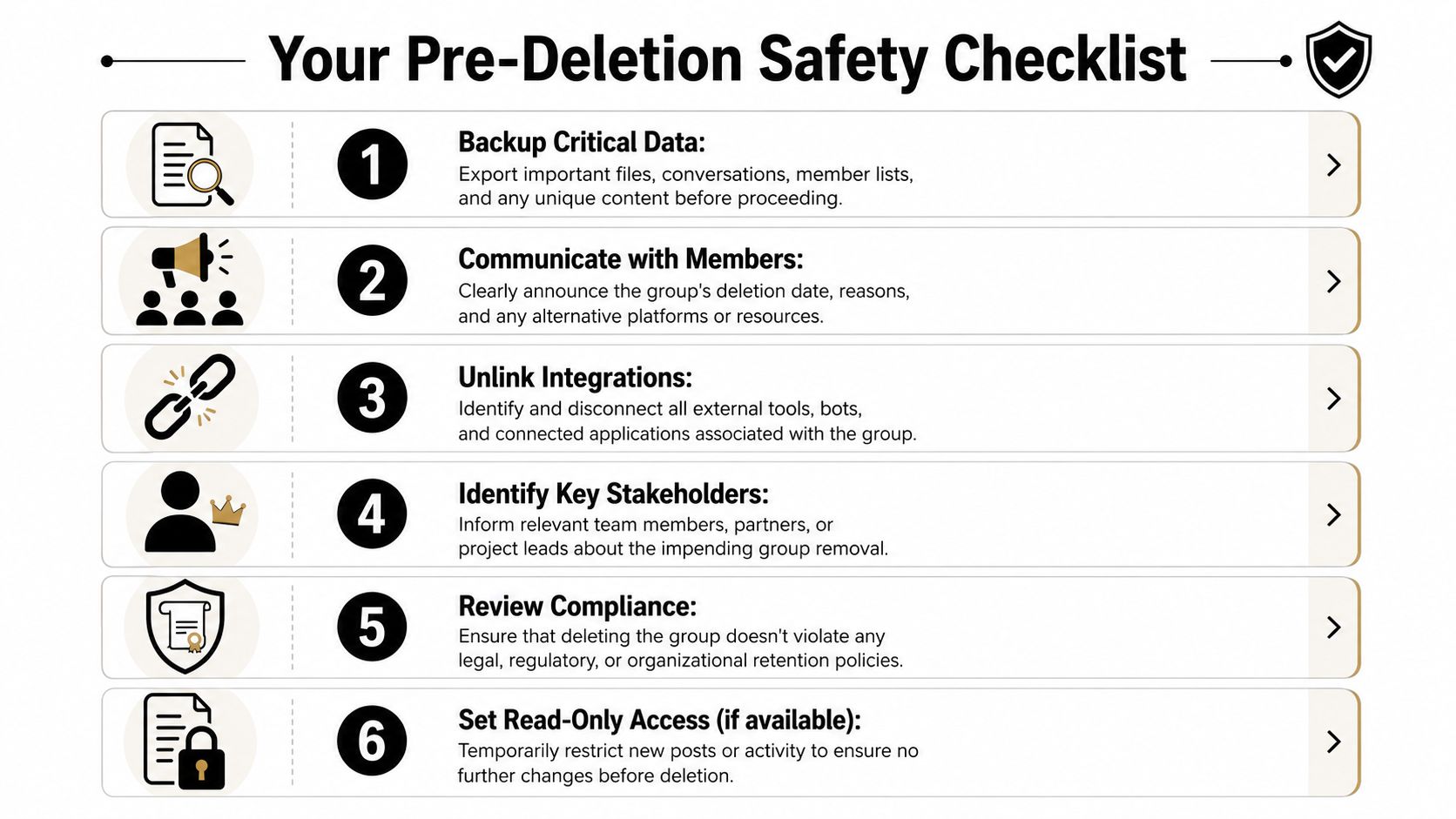
Backups aren't just for files. They're for context.
A sound backup pass usually includes exported files, key discussion threads, membership lists, moderation notes, pinned resources, and any analytics or reporting snapshots your team may need later. If the group supported a member program, sponsor activation, or event sequence, preserve the pieces that explain participation and decisions.
This is also the point where migration discipline matters. If the group is being replaced by another system or consolidated into a new structure, the same care used in database migration best practices applies here too. Know what is moving, what is staying, what is being retired, and who owns validation.
A surprising number of removal attempts fail because the person doing the work doesn't have the final permission needed.
Check these before you schedule deletion:
A blocked deletion is inconvenient. A deletion by the wrong person is worse because it often skips the accountability trail your organization needs.
Before the final action, it helps to review a visual walkthrough of the wider process:
Deleting a group without notice creates unnecessary confusion. Most members don't care about your platform lifecycle policy. They care about whether they can still access what they need and where to go next.
Your communication plan should answer:
Use plain language. “This group will be retired” is clearer than “This workspace will be decommissioned under revised governance.”
The best deletion notice is boring. It removes surprise, gives a date, names the replacement, and tells people what to save.
This check gets skipped when the group feels informal. That's a mistake.
A professional association committee, sponsor group, or staff advisory channel may still contain records subject to organizational policy. Review internal retention rules before removal. If needed, involve legal, compliance, or records management early. It's much easier to pause a deletion than to explain why records disappeared.
If your platform allows it, set the group to read-only before deletion. That gives you a stable final state. No new posts come in while you're exporting data or validating ownership, and no one mistakes an active group for one that's safe to use.
That short freeze period prevents last-minute messes more often than teams expect.
This is the untangling phase. It's where most of the hidden work lives.
A group doesn't exist in isolation. Members join it, admins moderate it, apps connect to it, and outside systems may rely on it for notifications, automation, or reporting. If you skip this phase, the deletion may succeed technically while failing operationally.
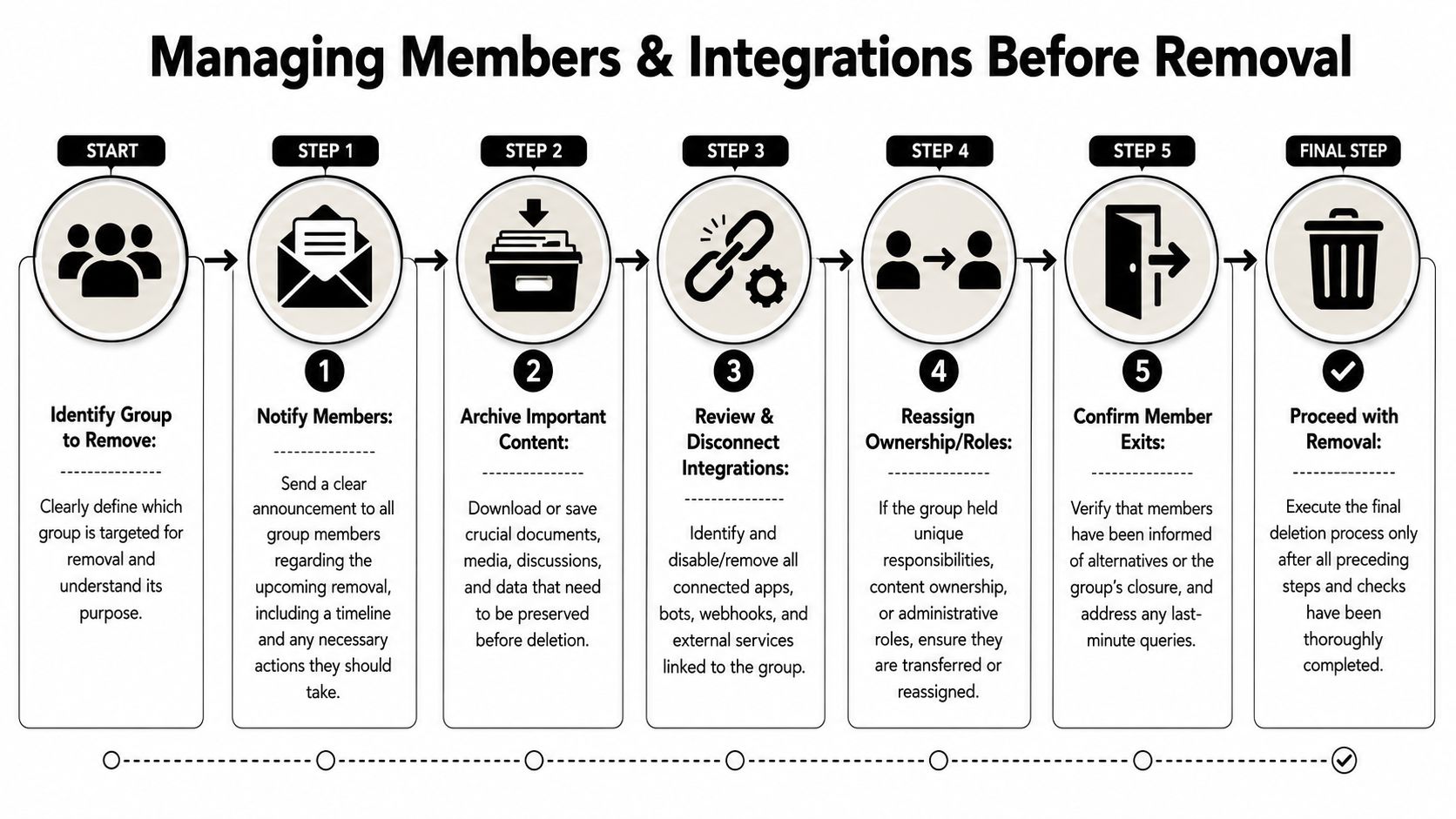
Members need more than a closing announcement. They need closure and redirection.
If the group is ending because a program is complete, tell them where future updates will live. If it's being replaced, give them the exact destination and timeline. If key content needs to be saved, state that clearly before access changes.
For communities that originated on social platforms, preserving member continuity may also require an export or transition plan. If that's part of your workflow, this guide to a Facebook group export is a practical reference for preserving data before platform changes.
Some systems won't let you remove the group until membership is handled in a specific order.
For WhatsApp, only group admins can permanently delete a group, and the sequence is strict: the admin must remove all participants, exit the group, and only then can the group be deleted for everyone. Skipping that sequence only removes the group locally for the admin (WhatsApp group deletion workflow).
That's a good example of a broader operational truth. “Leave” and “delete” are not the same action. They often have very different consequences for everyone else.
Teams remember files and members. They forget integrations.
Run through the full list:
If you operate communities across several environments, including a dedicated platform such as GroupOS alongside Facebook, Slack, or email-driven workflows, you will find a central system inventory pays off. You need to know which system is the source of truth before shutting any one group down.
A clean deletion starts with a clean dependency map. If you can't name what connects to the group, you're not ready to remove it.
Some groups carry roles that outlive the group itself. Ownership of files, moderation responsibilities, shared inbox references, sponsor contacts, or recurring event assets may still need a home after the group disappears.
Don't assume deletion will sort this out. Reassign it first. That includes human responsibility, not just platform ownership.
At this point, the actual removal should feel almost uneventful. That's the sign the process is working.
The mistake people make here is rushing because the “hard part” seems done. In reality, the final prompt is where platforms often reveal the consequences with more precision than users expect. Read every confirmation screen carefully. Don't scan for the delete button. Scan for scope, inheritance, retention, and side effects.
In specialized software, delete prompts can be more nuanced than they look. In FlowJo v10, if you select a group-owned gate or statistic in the Group Analysis pane and press Delete, the software presents four choices: allocate to the first sample, delete entirely, allocate to samples, or cancel. The active outcomes differ in scope. “Allocate to First Sample” removes the analysis from the group but leaves it on the first sample, “Delete Entirely” removes it from all samples in the current group, and “Allocate to Samples” removes it from the group pane while keeping it attached to individual samples (FlowJo group delete behavior).
That example matters far beyond FlowJo. It shows why final deletion screens deserve real attention. A prompt that looks simple may be asking whether you want to remove shared inheritance, preserve item-level data, or destroy the object everywhere.
Use a quick verification table before you confirm:
| Check | What you should know |
|---|---|
| Scope | Are you deleting only the group container, or all associated content too? |
| Ownership effects | Will content be reassigned, orphaned, or removed? |
| Member outcome | Do members lose access immediately, or only after a separate step? |
| Recovery path | Is there any undo, or are you relying only on backups? |
This is also where platform literacy helps. If your organization runs member programs, volunteer teams, or nonprofit groups and teams, document the exact deletion path for each environment you use. Generic internal notes like “owner deletes group” are too loose to prevent mistakes.
Before the final click, note the date, operator, approvals, and backup location. Then complete the deletion and immediately verify that the group no longer appears in admin views, member directories, and linked navigation.
If the group lives on Facebook and you need a platform-specific walkthrough, this guide on how to delete a Facebook group you created is a useful operational reference.
The button click should be the shortest part of the process. The confidence behind it should come from everything you did beforehand.
A group disappearing from the interface doesn't mean the job is finished. It means the closure phase has started.
Here, experienced operators separate a completed task from a complete process. You're confirming that removal worked, checking for loose ends, and preserving the ability to answer questions later.
Start with direct confirmation. Check the admin area, the member-facing view, and any bookmarked links or navigation paths that previously exposed the group. If the group had public landing pages or internal references, test them.
Then look for indirect leftovers:
A deletion that leaves dead links scattered through your ecosystem creates a long tail of support work.
Stakeholders need final confirmation, not silence.
Send a short completion note to the people who approved or depended on the removal. State that the group has been removed, when it happened, and where archived material or successor resources now live. This is also the right moment to log any exceptions, such as content preserved outside the original platform or integrations that required special handling.
Removal isn't finished until the people affected know it's finished.
That final message becomes part of your operating record. It helps if someone later asks whether the group was retired, migrated, or deleted outright.
Even when deletion is correct, recovery requests can still happen. Someone may need a file, a participant list, a moderation record, or a past announcement that no one thought to preserve in the active system.
That's why backups should be organized for retrieval, not just dumped into storage. Label them clearly. Record what was captured and where it sits. If the deletion later proves to have been premature, your ability to recover depends on whether the archive is understandable.
In many organizations, the smarter long-term fix is reducing reliance on fragile external group structures altogether. If you're rethinking where future communities should live after repeated platform cleanup issues, this overview of a Facebook alternative for groups is a practical starting point.
The best outcome isn't just a successfully removed group. It's a reusable playbook.
Document what worked, what surprised your team, which integrations were easy to miss, and what communication template got the fewest follow-up questions. The next time someone asks you to “just delete that old group,” you'll have a process instead of a guess.
If your organization manages recurring communities, events, memberships, and private group conversations, GroupOS is one option for bringing those operations into a single managed environment. That can make lifecycle decisions like archiving, migration, and group retirement easier to govern because ownership, communication, and member experience are handled in one place instead of spread across disconnected tools.







