December 7, 2025

So, what exactly is community manager software? Think of it as the digital headquarters for your online community. It's the dedicated platform that lets you build, grow, and manage your group of people, all in one place. It’s your toolkit for centralizing conversations, automating the boring administrative stuff, and giving your members the infrastructure they need to form real connections.
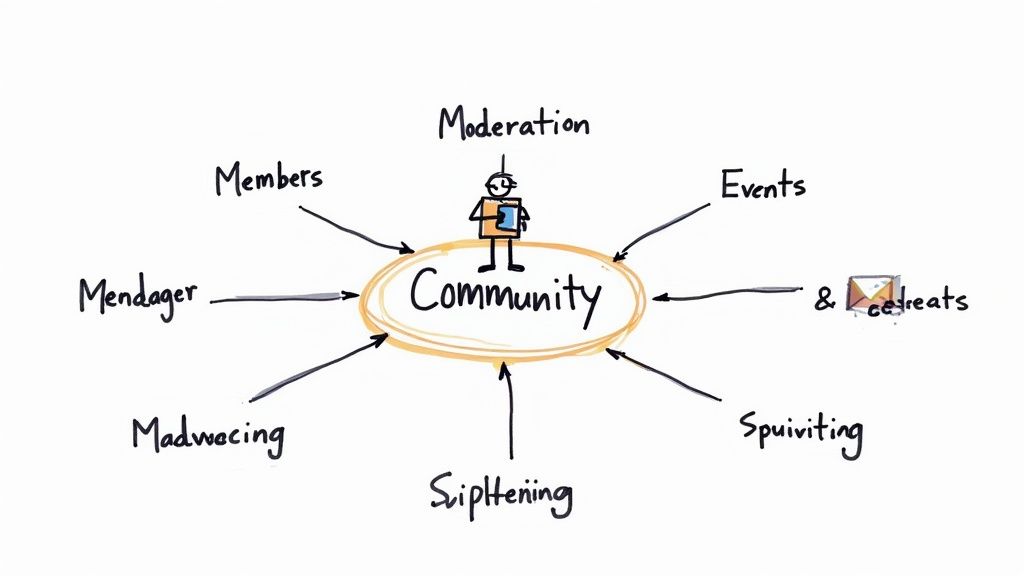
This sketch really gets to the heart of it—a community isn't just one thing. It's a web of members, events, content, and management, and the software is what holds it all together.
Imagine trying to build a bustling neighborhood from scratch. You'd need a town hall, a post office, a park for gatherings, and roads to connect everything. Trying to manage a community without the right software is like trying to build that neighborhood with nothing but scattered spreadsheets, endless email threads, and a dozen different social media groups that don't talk to each other. It’s pure chaos.
Community manager software is the digital blueprint and toolkit for your online space. It pulls you out of that mess and provides the core infrastructure a successful community needs to thrive.
The primary job of this software is to bring order to that chaos. Instead of jumping between five different tabs just to manage one event, you get a single source of truth for everything your community does.
This centralized hub is the key to creating a smooth, professional experience for both you and your members. When every touchpoint—from signing up for a membership to joining a discussion—happens in one predictable place, you gain a crystal-clear, unified view of your community’s health.
And this isn't just a niche idea anymore. The market for these platforms is expected to explode, growing from USD 6.7 billion to nearly USD 19.8 billion by 2032. That massive jump, detailed in this in-depth industry analysis, shows just how critical these tools have become for building real engagement and loyalty.
At its core, good community management software is built to do a few critical jobs really well—the kinds of jobs that are simply impossible to handle manually once your community starts to grow.
Take a look at this quick breakdown of what these platforms are designed to do.
Essentially, the software gives you the power to scale your efforts without scaling your workload.
A great community platform doesn't just manage members; it empowers them. It transforms a passive audience into an active, contributing network by giving them the tools and the space to connect meaningfully.
This shift from manual grunt work to a dedicated platform isn't just about being more efficient—it’s about being more effective. It frees you up to focus on the human side of community building, like creating amazing content or sparking great conversations, instead of getting buried in administrative tasks.
Ultimately, this software provides the structure you need to cultivate true loyalty. For a deeper look into the day-to-day work these platforms support, check out our guide on the role of a community manager. By offering a reliable and valuable home base, you give your members a powerful reason to stick around, get involved, and invest in the community you’ve built together.

Not all community manager software is created equal. Some tools are little more than a simple forum, while the best platforms offer a connected ecosystem of tools that lets you manage every part of your community from one place. Picking software without the right features is like buying a car without a steering wheel—it might look nice, but it won't get you anywhere.
Think of these features as the non-negotiable pillars of a healthy, engaging community. They’re the core functions that turn a group chat into a powerful, self-sustaining network. Without them, you’ll find yourself constantly patching together different tools, which just creates a clunky, frustrating experience for both you and your members.
Let's break down the absolute must-haves.
This is your community’s digital roster, but it's so much more. At a bare minimum, this feature tracks who your members are. But truly great software acts as a lightweight CRM, keeping tabs on member activity, subscription status, and engagement levels.
It’s the key to making things personal. When you understand your members, you can tailor their experiences, segment your communications, and easily spot your biggest fans. It also automates the tedious-but-critical tasks.
This kind of automation is a game-changer. Instead of manually chasing payments or welcoming every single person, the software handles the grunt work, freeing you up to focus on what matters: building real relationships.
For many communities, events are the main event. They can be in-person conferences, virtual workshops, or hybrid meetups. A platform with built-in event management tools becomes the central hub for these shared experiences, handling everything from promotion to post-event feedback.
This means you can ditch the third-party ticketing sites that fragment the experience and scatter your data. Look for platforms that can handle routine inquiries with tools like customer service automation software to keep things running smoothly. A solid event module should let you sell tickets, manage registrations, send reminders, and even check people in with QR codes.
The goal is to make participation seamless. A member should be able to discover an event, register, pay, and attend without ever leaving your community's branded environment.
This unified approach doesn't just make life easier for your members. It gives you a complete picture of event performance and attendance, all tied directly back to their profiles.
A community is only as valuable as the content it provides. Your software should act as a secure, organized library for all your resources—from training courses and webinars to documents and on-demand videos.
This feature turns your platform from a simple discussion board into a true knowledge base. Members get a central place to learn and grow, which reinforces the value of their membership. You can create member-only content sections, drip-feed course materials over time, and see exactly who is accessing what. For a deeper look, check out these essential tools for community engagement that can take your content strategy to the next level.
If content is the library, communication tools are the live-wire conversation happening within it. Good software provides built-in direct messaging, group chats, and topic-based forums, so you don't need a separate chat app. These tools are absolutely crucial for sparking those vital member-to-member connections.
This creates a self-sustaining loop of engagement. A member asks a question in a forum, others jump in to help, and those little interactions build lasting relationships. Look for features like push notifications and email digests that keep people in the loop without being annoying, pulling them back into the conversation at just the right time.
You can't improve what you don't measure. Analytics are your community's health dashboard. Strong reporting moves you from guesswork to data-driven decisions by giving you real, actionable insights into what's working and what's not.
You’ll want to keep an eye on a few key metrics:
By watching this data, you can spot trends, identify popular topics, and get a feel for the overall health of your community. For instance, if you see a spike in engagement every time you post a case study, you know you should create more of them. This feedback loop is essential for continuous improvement and proving the ROI of your community.
Picking the right community software is a big deal. Let's be honest, it's more than just a tool—it's the digital home you're building for your members. It's your command center. Get it right, and you've laid the foundation for growth. Get it wrong, and you're stuck with a platform that creates more problems than it solves.
So, how do you find a partner, not just another product subscription? It starts by looking past the flashy feature list and thinking about the bigger picture. You need a platform that aligns with your goals, your budget, and the kind of experience you want to give your members—not just today, but years down the road.
Scalability is one of those words that gets thrown around a lot, but what does it really mean for you? It's the difference between a platform that grows with you and one you outgrow in six months. The software that works perfectly for your first 100 members might completely buckle when you hit 10,000.
Think about what growth actually looks like in practice:
A truly scalable platform gives you a clear runway for growth, so you aren't forced into a painful and expensive migration right when you’re hitting your stride.
Your community platform can't be an island. It has to play nicely with the other tools you use every single day, whether that's your CRM, your email marketing software, or your payment processor. Without solid integrations, you’re looking at a future filled with data silos and tedious manual work for your team.
Just picture it: a new member joins your community. In a perfect world, that person is automatically added to your Mailchimp mailing list and a new contact record pops up in HubSpot. The alternative? You or someone on your team is stuck manually exporting and importing CSV files. That’s not just a time-waster; it’s a recipe for errors.
A truly integrated system lets data flow freely between your tools. This creates a single source of truth for all your member activity, saving you hours of work and giving you a much clearer, more accurate picture of your community’s health.
When you're vetting platforms, look for one with a robust API or, even better, native integrations with the software that’s already central to how you operate.
This might be the most important piece of the puzzle. The user experience (UX) is everything—for both your members and your team. If a platform is clunky, confusing, or just plain ugly, people won't use it. End of story. Poor adoption is the number one killer of online communities.
You really need to look at UX from two different angles:
A great UX simply removes friction. When a platform is genuinely enjoyable to use, members show up more often, engage more deeply, and stick around for the long haul.
Now for the practical part: the budget. Community software pricing is all over the map, from simple monthly subscriptions to complicated, custom-quoted enterprise deals. Don't just look at the advertised monthly fee; you need to understand the total cost of ownership.
When you're talking to sales reps, ask about the things they don't always put on the pricing page. Are there extra fees for payment processing? What happens if you go over your data storage or member limits?
Choosing a software partner is a big step, but it doesn't have to be overwhelming. To help you weigh your options, here's a look at how to approach your decision depending on whether you're considering an all-in-one platform or a collection of specialized tools.
Ultimately, whether you choose a unified platform or stitch together several specialized tools, your goal is the same: find a solution that delivers a clear return on your investment through better member retention and deeper engagement. By carefully weighing these criteria, you can choose a community manager software that will truly help your community thrive.
It's one thing to talk about features and specs, but the real "aha!" moment comes when you see how community manager software actually works day-to-day. So, let's step away from the abstract and dive into a couple of real-world scenarios.
We’ll see how a single platform can take what used to be a jumble of spreadsheets, emails, and third-party tools and turn it into a smooth, almost effortless operation. We'll follow an association manager rolling out a new course and an event planner juggling a hybrid conference to see how it all comes together.
This is the high-level thought process for finding the right software to make these workflows happen.

It boils down to a simple journey: figure out what you need, see what's out there, and make a choice.
Meet Sarah. She manages a professional association and needs to launch a new certification course exclusively for members. In the past, this was a logistical headache. We're talking spreadsheets for tracking, a separate payment processor, and endless back-and-forth emails. Not anymore.
Here’s how she does it with her community platform.
Step 1: Announce and Get People Registered
Sarah starts by building a dedicated landing page for the course right inside the platform. She adds the syllabus, bios for the instructors, and a prominent registration button. Then, she uses the platform's email tools to send a targeted announcement to all active members, with a direct link to sign up. Easy.
Step 2: Automate Payments and Access
This is where the magic happens. As members register, the software takes over. It securely processes their payment and instantly adds them to a private, course-only group within the community. Sarah doesn't have to lift a finger to verify payments or manually grant access.
The real game-changer here is the seamless integration. The moment a member pays, their status is updated, the payment is logged, and they get access to the content. No waiting, no human intervention.
Step 3: Deliver Content and Spark Conversation
Inside that private group, Sarah has already uploaded all the course materials—videos, PDFs, you name it. She sets the content to release on a weekly schedule, guiding members through the curriculum. A dedicated forum lets students ask questions and interact with the instructor and each other, creating a genuine learning environment.
Step 4: Get Feedback and Measure Success
As soon as the course wraps up, an automated survey goes out to everyone who participated. Sarah can then pop into her analytics dashboard to see the full picture: completion rates, how active the discussion forum was, and overall satisfaction scores. That data is gold for making the next course even better.
Now, let's turn to David. He’s an event planner organizing a three-day conference with both in-person and virtual attendees. His big challenge? Making sure everyone feels like they're part of the same event. His community platform is the central hub that connects everything.
Step 1: Create a Unified Ticketing Experience
David sets up a single event page with all the ticket options in one place. He can offer tickets for in-person attendees, virtual-only passes, and even VIP packages. The custom registration forms let him collect crucial details—like dietary needs for the on-site crowd and time zones for the online audience.
This focus on blending physical and digital is a huge trend. The market for in-person community management software alone was valued at USD 92 million and is expected to hit USD 146.8 million by 2030. That's a clear signal that tools for managing real-world interactions are in high demand. You can dig into these market trends and forecasts on Valuates Reports.
Step 2: Facilitate Check-In and Session Access
For people attending at the venue, the platform generates a unique QR code for each ticket. Event staff simply scan the code with a mobile app, and the attendee is checked in. At the exact same time, virtual attendees are logging into the community portal to stream the sessions live and jump into the Q&A.
Step 3: Foster Networking Across Audiences
David uses the platform’s networking tools to bridge the physical and virtual divide. He sets up discussion channels for each session where everyone can chat, regardless of where they are. The member directory is open to all, so attendees can find each other, send direct messages, and schedule one-on-one video calls. It ensures the valuable networking opportunities aren't limited by geography.
So you've chosen your new community manager software. That's a huge step, but the journey isn't quite over. Now comes the part where the vision becomes reality: implementation and data migration. It can sound a little intimidating, but with a solid plan, it’s a clear path to getting your members onto a platform they'll actually love using.
Think of it like moving into a new, custom-built house. You wouldn’t just show up with a truck full of boxes. You’d plan where the furniture goes, let the post office know your new address, and make sure the lights and water are on. A software switch needs that same thoughtful prep to make sure the transition is smooth from day one.
The whole point is to move your community's most valuable asset—your data—without losing a single member profile, piece of content, or bit of history.
A successful launch starts long before you flip the switch. This initial planning stage is all about setting yourself up for a flawless rollout. A good plan gets rid of surprises and makes sure everyone, from your internal team to your members, knows what to expect and when.
Here’s what you’ll be focused on:
Getting this prep work done ensures that when you do make the switch, it feels like a well-orchestrated upgrade, not a last-minute scramble.
Moving member data from an old system to a new one is often the most nerve-wracking part of the whole project. This step demands precision. After all, you can't afford to lose or scramble anyone's information. When you're dealing with these details, knowing some solid data migration best practices is a must for keeping your data safe and sound.
It really boils down to three key steps:
For any group managing complex member data, a well-planned move is non-negotiable. To dig deeper into this, take a look at our detailed guide on database migration best practices.
A successful launch isn't just about flipping a switch; it's the result of meticulous planning and clear communication. Your members should feel guided and excited, not confused and frustrated.
By breaking the whole process down into these manageable stages, you can launch your new community platform with confidence and give your members a better, more engaging experience right from the start.
How can you tell if your community is actually working? It’s easy to get fixated on a vanity metric like the total number of members, but a truly healthy community is defined by its pulse—the daily, active engagement—not just its size. This is where your community manager software becomes an indispensable tool, turning all that member activity into clear, actionable Key Performance Indicators (KPIs).
When you track the right metrics, you stop guessing and start building a real strategy. It's how you prove the value of your community work and make smart decisions that create a more vibrant, valuable space for everyone. The analytics are your guide, showing you exactly what resonates with your members and what’s falling flat.
The most revealing KPIs usually fit into a few core categories. By keeping an eye on a healthy mix of engagement, growth, and satisfaction metrics, you'll get a complete, 360-degree view of your community’s health.
These numbers give you a clear, objective look at how your community is really doing. To dig deeper into this, check out our detailed guide on the most important community engagement metrics to track.
A thriving community is a living ecosystem. Measuring its health isn't about a single number; it's about understanding the interconnected patterns of how members connect, contribute, and find value over time.
At the end of the day, tracking these KPIs is about proving the return on investment (ROI) of your community. Strong engagement and high retention numbers are powerful evidence that your work is building real brand loyalty and creating tangible business value.
This isn't just a niche idea; it's a major market trend. The global online community management software market was valued at around USD 5.52 billion and is expected to grow substantially. That kind of investment shows just how much businesses are prioritizing digital communities to forge better customer relationships. You can find more insights on this growing market on Cognitive Market Research.
By using the analytics inside your community manager software, you can answer critical questions about your community's impact with confidence. If a particular event leads to a spike in new sign-ups, you have proof it was a success. If a certain type of content consistently gets people talking, you know you need to create more of it. This data-backed approach is the secret to building a community that doesn't just survive, but truly flourishes.
Jumping into the world of community management software can feel like a big step. You probably have a lot of questions floating around. How is this different from a Facebook group? What's this actually going to cost? How long until we're up and running?
Let's clear the air and tackle some of the most common questions we hear.
It's a fair question: "Why not just use a free social media group?" While places like Facebook or LinkedIn are great for casting a wide net, a dedicated community platform gives you something crucial: ownership. You control the experience, you own your member data, and you're not at the mercy of a mysterious algorithm that decides who sees your posts.
Think of it like this: a social media group is like renting a booth at a chaotic public market. A dedicated platform is your own custom-built storefront. It brings your payments, events, and exclusive content under one branded roof, creating a focused, professional home for your members that social media just can't replicate.
The price tag for community software can really vary, and it usually comes down to the number of features you need and the size of your community.
For smaller communities just getting started, some platforms offer basic plans for under $100 per month. For professional associations or businesses needing an all-in-one solution, you'll often see prices ranging from $300 to over $1,000 per month.
Most platforms, including GroupOS, use a tiered pricing model. This is a huge plus because it lets you start small and affordable, then scale your plan as your community—and your revenue—grows. You only pay for what you actually use.
Getting your new platform off the ground depends on how much data you're bringing with you and how much customization you need. For a simple setup without a massive member list to import, you could be live in just a couple of weeks.
If you’re a larger organization with years of member data, specific branding requirements, and a few integrations to connect, the process is naturally a bit longer—typically around 4 to 8 weeks. Any good provider will walk you through a clear, step-by-step onboarding process to make sure the transition is smooth for both your team and your members.
Ready to see how an all-in-one platform can transform your community? GroupOS provides the tools you need to manage members, events, and content effortlessly. Start your free trial and get a custom setup today.







