April 9, 2026

A lot of community managers inherit a mess instead of a clean launch.
Membership lives in one system. Events live in another. Sponsors want reports you cannot pull without spreadsheets. Moderation happens in Slack DMs, inbox threads, and memory. Leadership asks whether the community is driving renewals, registrations, or revenue, and you end up answering with activity screenshots instead of a business case.
This reflects the state of community management online for many professional associations, enterprise networks, and membership businesses.
The work is not just posting prompts and replying to comments. It is operations. It is governance. It is revenue design. It is member experience. It is data architecture. Done well, it becomes part of how the organization retains members, runs events, serves sponsors, and protects its brand.
The market signals are clear. The global community management solutions market is valued at $4.5 billion by 2024, 86% of businesses report that community management is essential for success, 72% plan to increase investment in 2025, and brands with active online communities see 53% higher customer retention than those without structured engagement, according to CreatorLabz’s 2025 community management statistics and trends.
A strong community does not happen because people like each other. It happens because someone built the systems that make value repeatable.
Before launch, answer three questions. If any one of them is fuzzy, the community will drift.
Purpose comes first. Not mission-statement fluff. Define the Minimum Viable Value your community will deliver in its first phase.
For a professional association, that might be peer problem-solving and event follow-up. For an enterprise customer community, it might be product education and support deflection. For a membership network, it might be introductions, resource access, and local chapter coordination.
A simple test helps. If a member joined today, what useful thing could they do by the end of the week that they could not do alone?
People comes next. Pick a primary member type before you try to serve everyone. Most communities get weaker when they launch too broad. New managers often say “our audience is anyone interested in the topic.” That creates generic programming, weak onboarding, and unclear norms.
Start narrower:
Platform is the decision that many teams postpone and then regret. Duct-taping free tools together feels agile at first. It also creates duplicate profiles, fragmented analytics, inconsistent permissions, and a messy member journey.
If you are still clarifying the basics of launch, this guide on forming a community is a useful starting point for pressure-testing your assumptions.

Most governance documents fail because they read like legal disclaimers. A working community playbook should help staff act quickly and members understand what good participation looks like.
Use this outline.
| Governance element | What to include | Why it matters |
|---|---|---|
| Community purpose | Who the space is for, what members should expect, what the community is not for | Prevents scope creep |
| Membership model | Who can join, who approves access, paid vs free tiers, sponsor visibility rules | Sets fair expectations |
| Code of conduct | Acceptable behavior, prohibited behavior, reporting pathways, consequences | Gives moderators something enforceable |
| Role definitions | Staff owners, moderators, volunteer leaders, sponsor contacts | Removes decision ambiguity |
| Content rules | Where announcements go, where discussions go, self-promotion limits, event posting rules | Keeps the feed usable |
| Data and privacy norms | What member data is visible, who can message whom, how private spaces work | Builds trust |
| Escalation process | What happens when someone violates policy or a sponsor crosses a line | Protects the team under pressure |
A useful Code of Conduct is plain English. It should answer practical questions such as:
A code of conduct is not a values poster. It is an operating tool for moderators on a busy Tuesday afternoon.
The mistake I see most often is over-indexing on inspiration and under-investing in enforcement. Communities need both. Warmth without structure creates stress for the staff. Structure without warmth creates a sterile forum nobody wants to visit.
The “we’ll start with Slack, Eventbrite, a Google Drive, and a newsletter tool” approach works only until members expect a coherent experience.
Then the cracks show:
For community management online, the foundation should reduce future admin, not create it. Good architecture is invisible to members, but staff feel it every day.
A new member decides very quickly whether your community is worth returning to. Most do not need more information. They need a reason to take one small action.
That is where many onboarding flows fail. They welcome people, but they do not activate them.
The participation pattern in most communities follows the 90-9-1 rule. About 90% of members lurk, 9% contribute occasionally, and 1% become super users who create a large share of the value. Communities that deliberately activate lurkers and support top contributors report 35% higher NPS scores, according to APQC’s discussion of communities of practice participation dynamics.
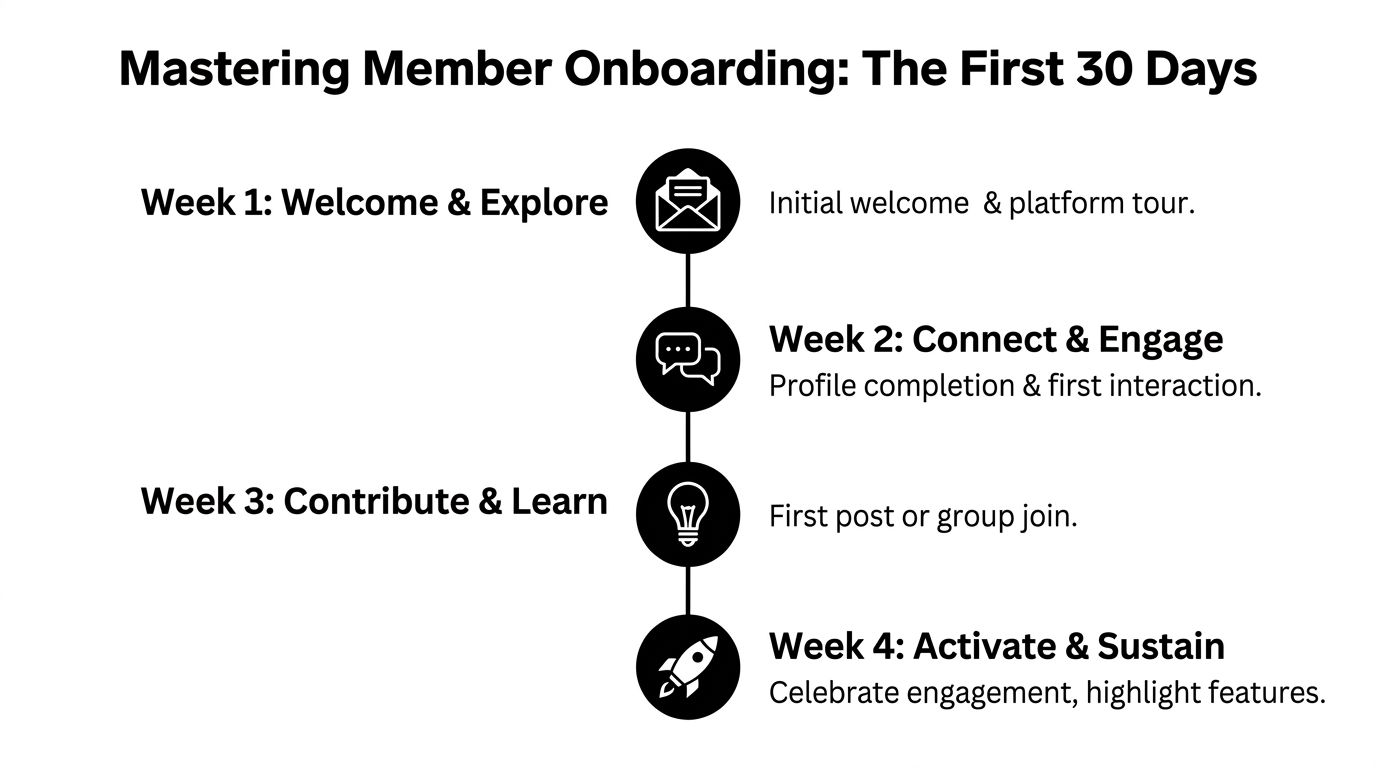
Treat the first month as a managed experience, not an automated sequence.
Week 1
The member should understand where to go and what to do first.
Your actions:
Member behavior to look for:
profile completion, first login after welcome, first click into a discussion or event page.
Week 2
Move from passive reading to visible presence.
Your actions:
Member behavior to look for:
first comment, first direct reply, first group join.
A lot of teams borrow proven tactics to reduce customer churn from product and customer success workflows during onboarding. That is smart. The principle is the same. Early signals matter, and intervention works best before disengagement becomes a habit.
To spot friction early, run short check-ins and pulse surveys. This approach is easier when you already have a process for gathering member feedback, and online community survey planning helps formalize that habit.
At this stage, the goal changes. You are no longer introducing the platform. You are creating identity.
Here is a useful training resource to share with internal teams when you need alignment on activation habits:
Week 3
Push toward contribution, but keep the ask small.
Good prompts include:
Member behavior to look for:
first original post, first uploaded resource, first event registration.
Week 4
Reinforce progress and direct the next habit.
Your actions:
Member behavior to look for:
repeat visit, second contribution, peer-to-peer interaction without staff prompting.
The rule is not just an observation. It is operational guidance.
Do not shame lurkers. In many professional communities, reading is still value. The mistake is failing to build safe bridges from reading to participating.
The cleanest onboarding systems combine automation with human intervention. Automation can route, tag, remind, and segment. Staff should handle context, encouragement, and pattern recognition.
Activation gets members through the front door. Retention comes from rhythm.
Communities lose momentum when every post feels improvised and every event lives in isolation. Strong community management online turns content, conversation, and events into a flywheel. Each part feeds the next.
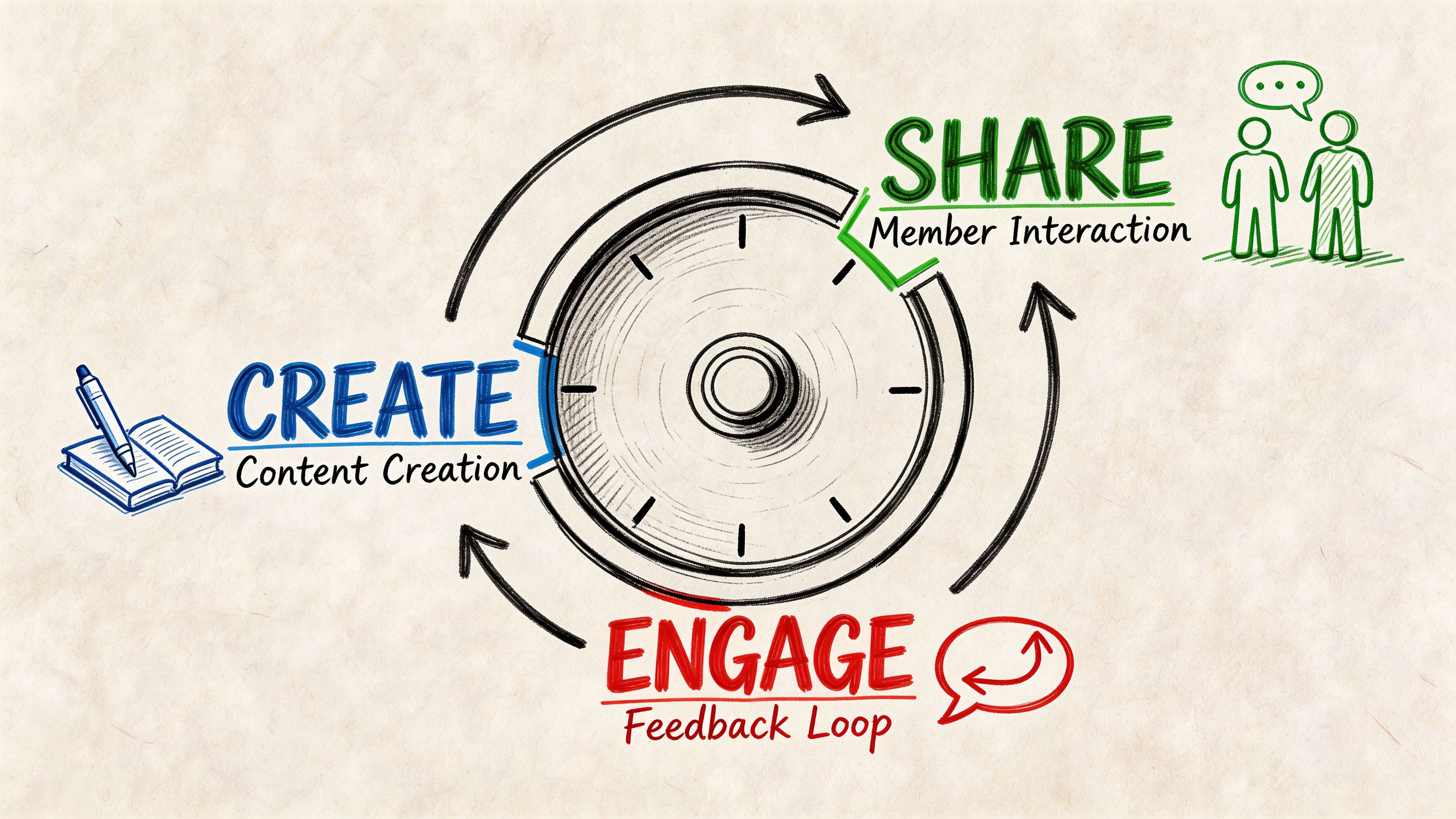
A content calendar matters, but on its own it produces publishing. It does not guarantee interaction.
The flywheel has four connected motions:
Expert signal can be a webinar, office hours session, short briefing, or practical template. The point is to introduce something useful enough to spark reactions.
Member response is the layer many teams skip. They post the recording and move on. Instead, create a prompt tied to the session. Ask members what they are trying, what they disagree with, or what they need next.
Community reuse turns one asset into several member touchpoints. A live event becomes a clipped video, a summary post, a discussion thread, a checklist, and a sponsor-safe recap if relevant.
Program insight closes the loop. Track which topics generate replies, registrations, resource downloads, and peer introductions. Use that pattern to plan the next cycle.
The communities with the strongest engagement are rarely the most spontaneous. They are the most predictable in a useful way.
Good recurring formats include:
Mixing these formats matters because different members participate differently. Some speak live. Some write thoughtful follow-ups. Some only attend events and then contribute later.
The strongest event communities do not treat events as temporary spikes. They use them as anchors for ongoing engagement.
A practical quarterly model looks like this:
| Program type | Purpose | Output that feeds the community |
|---|---|---|
| Flagship event | Gather broad attention | Session recordings, discussion threads, sponsor exposure |
| Member roundtable | Deepen peer relationships | Quotes, takeaways, follow-up intros |
| Training or workshop | Deliver practical value | Templates, action plans, cohort spaces |
| Informal networking | Increase repeat attendance | New member connections, local or role-based groups |
When registration, ticketing, and post-event content delivery sit in separate systems, staff usually stop short at “event complete.” When those workflows are connected, the event becomes the start of a new discussion cycle. Here, tool choice affects engagement strategy. An integrated setup can tie registration data, attendance, content access, and post-event discussion back to the same member record. That makes follow-up sharper and less manual.
For teams refining their editorial mix, this guide on how to create engaging content is useful because it pushes beyond “post more” and toward repeatable formats.
Your top contributors are not just active members. They represent latent operational capacity.
Do not wait for them to volunteer. Invite them into defined roles:
Give these roles boundaries. “Help us however you want” sounds generous, but it creates confusion. Defined responsibilities protect volunteers from burnout and protect staff from inconsistency.
The best engagement plan is not the busiest one. It is the one members can recognize, return to, and contribute to without needing staff to hand-hold every interaction.
A quarter of programming should feel coherent when viewed as a whole. Members should be able to say what the community does regularly, where they fit, and how to participate next.
Many professional communities sabotage sponsorships in one of two ways. They either hide commercial activity so aggressively that sponsors see no value, or they flood the member experience with promotional clutter and erode trust.
The middle path is operational, not cosmetic. Sponsors buy when the package is clear, delivery is organized, and reporting is credible.

Sponsorship is not just ad inventory. It crosses sales, event operations, content, member communications, and analytics.
When sponsor fulfillment lives across disconnected tools, five problems appear fast:
That is why integrated sponsorship management is not optional for serious professional communities. It is the difference between a repeatable revenue line and a seasonal scramble.
A sponsor package should answer one question for the buyer. What outcome does this help them pursue inside your community?
That outcome might be awareness, thought leadership, recruiting, meeting bookings, product education, or exhibitor lead generation. Build tiers around those use cases.
A practical package structure often looks like this:
| Tier | Best for | Typical components |
|---|---|---|
| Entry | Awareness-focused partners | Branded listing, rotating banner placement, newsletter mention, event directory presence |
| Mid-tier | Partners who want engagement | Sponsored content slot, exhibitor page, lead form, session visibility, attendee follow-up option |
| Premium | Strategic partners | Dedicated hub presence, branded sessions, richer profile pages, direct meeting workflows, post-campaign reporting |
Do not overload every tier. If a package includes too many disconnected benefits, sponsors struggle to activate them and your team struggles to fulfill them.
Strong sponsor operations resemble member onboarding, but with commercial controls.
Use a stage-based workflow:
Prospecting and fit check
Confirm the sponsor aligns with the audience and the community’s rules on promotion.
Package selection and scoping
Lock deliverables in writing. Be precise about placement, dates, review steps, and approval owners.
Asset collection
Gather logos, copy, landing pages, contact details, disclosures, and any event requirements in one place.
Launch and fulfillment
Publish sponsor assets where promised. Coordinate discussion moderation if sponsored content includes member interaction.
Reporting and renewal review
Show what ran, what engagement occurred, what leads or meetings were generated if applicable, and what to improve next time.
A good prospectus includes inventory, audience description, disclosure language, lead process, content guidelines, and a simple fulfillment timeline. That document saves your team from custom-selling every package from scratch.
Members tolerate sponsorship when it is relevant, labeled clearly, and woven into useful experiences. They reject it when it interrupts every interaction or disguises sales pitches as community value.
Set hard rules:
The biggest trade-off is staffing discipline. Integrated tooling helps, but only if sponsorship has an owner, a review process, and rules that the sales team respects.
Small communities can get away with informal moderation for a while. Someone spots a problem, pings a teammate, and handles it manually. That stops working as soon as the community spans time zones, hosts live events, or attracts commercial traffic.
Safety at scale requires a system.
According to ICUC’s analysis of why 24/7 community management is essential, 24/7 moderation delivers 3x faster response times, under an hour compared with standard office-hours models, and correlates with 45% higher member retention in global brands. The same source describes a hybrid human-AI triage model and global team rostering as the practical path to fast, personalized replies.
Reactive moderation sounds cheaper because you wait until something goes wrong. In practice, it is expensive in all the ways that matter.
Staff lose context. Members lose trust. Harm spreads in public before anyone intervenes. A sponsor complaint, harassment report, or misinformation thread can easily touch multiple channels before a single person has full visibility.
A proactive model works differently. It combines rules, detection, routing, and escalation before volume forces improvisation.
A workable moderation stack has several layers.
First layer: automated detection
Use automation for spam, duplicate posting, obvious abuse, and keyword-based flagging. Automation should sort and surface. It should not be your final judge in nuanced disputes.
Second layer: human triage
A trained moderator reviews context, intent, member history, and channel norms. Most difficult moderation work lives here.
Third layer: escalation and documentation
Some incidents need legal, HR, executive, or sponsor-team input. If the escalation path is not written down, staff will hesitate when speed matters.
Fourth layer: resolution and follow-up
Members need closure. That may be a warning, a temporary restriction, a removal, or a private explanation of how the issue was handled.
The demand for moderation is uneven. It spikes around launches, events, controversial topics, product changes, and sponsor activations.
A practical staffing model includes:
Do not confuse staffing count with readiness. One skilled moderator with clean workflows can outperform a larger team trapped in inbox chaos. But no solo moderator can deliver real global coverage indefinitely without burnout or blind spots.
Members judge safety by response quality and response speed. They do not care which internal team owns the queue.
A public code of conduct matters, but reporting channels matter more in the moment. Members need a private path to raise concerns without escalating conflict in public.
At minimum, provide:
The most common moderation mistake is acting only on visible disruption. Some of the most serious issues arrive through private reports, not public flare-ups. If your systems cannot connect those signals to member history and prior incidents, your team will keep solving the same problem from scratch.
AI can help with queue management, spam detection, and first-pass sorting. It is valuable when it speeds up review and reduces moderator fatigue.
It becomes harmful when teams let generic bot responses replace judgment. Community safety depends on tone, context, and trust. Members can tell the difference between efficient triage and a canned deflection.
For community management online, the durable model is simple. Let automation handle scale. Let people handle meaning.
The hardest question in community is usually not “How do we get engagement?” It is “How do we prove this matters to the business?”
Many teams still answer with member counts, impressions, likes, or anecdotal praise. Those metrics can be useful context, but they are weak budget arguments.
Recent data summarized by Bettermode’s overview of online community management notes that 68% of B2B community managers struggle to demonstrate ROI to leadership, and only 22% use advanced attribution models that tie engagement to revenue. That gap exists because many teams track activity but not outcomes.
Member count is not the same as member value. A big Slack workspace with weak participation and no reporting structure does not outperform a smaller community that drives renewals, attendance, and sponsor action.
The same goes for engagement rate in isolation. If a discussion thread gets replies but none of them correlate with retention, event attendance, support efficiency, or partner value, leadership will eventually question the spend.
A business-aligned dashboard should start with outcomes your organization already cares about.
A strong dashboard usually has four categories.
Track signals connected to membership health.
Professional communities often create value through convening.
If sponsorship is part of the model, you need operational reporting.
This category is often ignored, even though it can produce one of the clearest ROI stories.
If your organization is building a support deflection case, a tool like this support automation ROI calculator can help frame the math leadership expects, even if your community model is broader than support automation alone.
For teams setting up reporting discipline, this overview of analytics and insights is useful because it pushes the conversation from surface engagement toward operational measurement.
Here is the common setup:
Each tool may work fine on its own. The problem is attribution.
When a member attends an event, downloads a resource, messages another member, renews, and later becomes a volunteer or sponsor lead, fragmented tools force you to rebuild that journey by hand. Few organizations undertake this. They settle for partial reporting because the reconciliation cost is too high.
This is not just a reporting inconvenience. It shapes strategy. If you cannot see the full member journey, you cannot tell which programs deserve more budget, which sponsor benefits are underperforming, or which onboarding steps influence retention.
A unified platform migration should not be sold internally as “cleaner tech.” That sounds cosmetic. The compelling case is operational and financial.
Frame it around these questions:
| Problem in current stack | Business consequence | What consolidation fixes |
|---|---|---|
| Member data lives in multiple places | No single member journey | Better segmentation and lifecycle tracking |
| Events and community are disconnected | Weak post-event retention | Stronger follow-up and content reuse |
| Sponsor reporting is manual | Renewal friction and staff drag | Faster fulfillment and cleaner reporting |
| Moderation context is fragmented | Slower response and higher risk | Better incident handling |
| Leadership reporting takes too long | Budget vulnerability | Repeatable ROI dashboards |
Migration does have trade-offs. It takes planning. Permissions need review. Old spaces need archiving. Member communications must be sequenced carefully. Some stakeholders resist change because they are comfortable with their own tools.
That resistance is normal. The answer is not to pretend migration is painless. It is to show that the current mess is already expensive. The cost just hides in staff time, weak attribution, member confusion, and missed renewals.
Once systems are unified, focus on a short list first.
Track whether you can now answer questions that used to require manual digging:
That is when community management online starts to look less like a soft function and more like infrastructure.
Leadership does not need every interaction summarized. They need evidence that the community helps the organization keep members, run better events, support partners, and operate more efficiently.
If your team is trying to replace fragmented tools with one operating system for memberships, events, content, messaging, and sponsor workflows, GroupOS is worth evaluating. It gives professional communities a single place to manage the full member lifecycle, which makes day-to-day operations simpler and ROI reporting far easier to defend.







