February 16, 2026
So, what exactly is a membership website builder?
Think of it as a specialized, all-in-one toolkit for creating, running, and expanding a private online community. It neatly bundles everything you need—a website creator, member database, payment processor, and secure content delivery—into a single, cohesive system that’s actually easy to use.
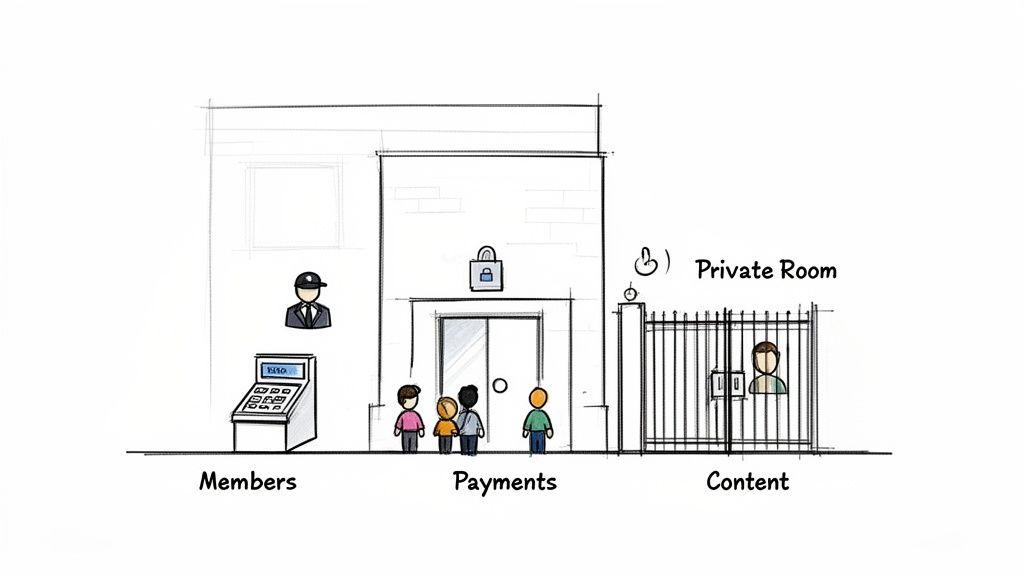
Imagine you want to build an exclusive online clubhouse. You could go the old-school route: hire developers, designers, and security experts to build everything from the ground up. That’s a long, expensive, and complicated road.
The alternative? A high-end, prefabricated kit designed specifically for the job. That’s exactly what a membership website builder is—a powerful, all-inclusive kit that gets you up and running fast.
This approach saves you from the headache of juggling a dozen different tools, plugins, and subscriptions. Instead of duct-taping a payment gateway to a generic website and then trying to connect a separate email tool, a dedicated builder integrates everything from the start. It’s a unified system built for one purpose: running a successful, community-driven organization.
So many organizations start out with a patchwork of disconnected software. Maybe they use one tool for event ticketing, another for member emails, and a basic website builder that was never meant to handle private access. While this might work for a little while, it quickly creates data silos and operational nightmares as the community grows.
A true membership website builder fixes this by bringing all the critical functions under one roof. Let's look at the core functions these platforms provide and what they replace.
This table breaks down the essential capabilities of a modern membership website builder, showing how it consolidates scattered tools into a single, powerful platform.
By centralizing these key operations, a dedicated builder empowers even non-technical leaders to launch a professional, branded hub without writing a single line of code. You can dive deeper into the fundamentals in our complete guide on what a membership site is.
The demand for these integrated solutions is growing fast. The website builder software market—which includes platforms like GroupOS—is projected to climb from $5.79 billion in 2025 to $6.38 billion in 2026. That’s a 10.2% compound annual growth rate fueled by professional associations and event organizers who need better tools. You can explore more market insights from The Business Research Company to see the full scope of this trend.
By providing a single source of truth for all member activities, a dedicated builder allows organizations to understand engagement, create more value, and build predictable, recurring revenue streams.
At the end of the day, a membership website builder isn't just about technology—it’s about strategy. It’s a purpose-built engine designed to foster community, deliver value, and simplify operations, so you can focus on what really matters: growing your organization.
Not all platforms are built the same. While plenty of tools can slap together a basic website, a true membership website builder is engineered from the ground up to run a community, not just show off a brochure. These core features are the four pillars that hold up a thriving organization, turning a simple site into a hub of activity.
Think of it like building a house. You need more than just walls and a roof; you need plumbing, electricity, and security to actually live in it. In the same way, your membership platform needs a solid infrastructure to handle the day-to-day work of managing a community.
This visual from GroupOS really drives the point home, showing how these four pillars—member management, payments, content, and communication—all work together.
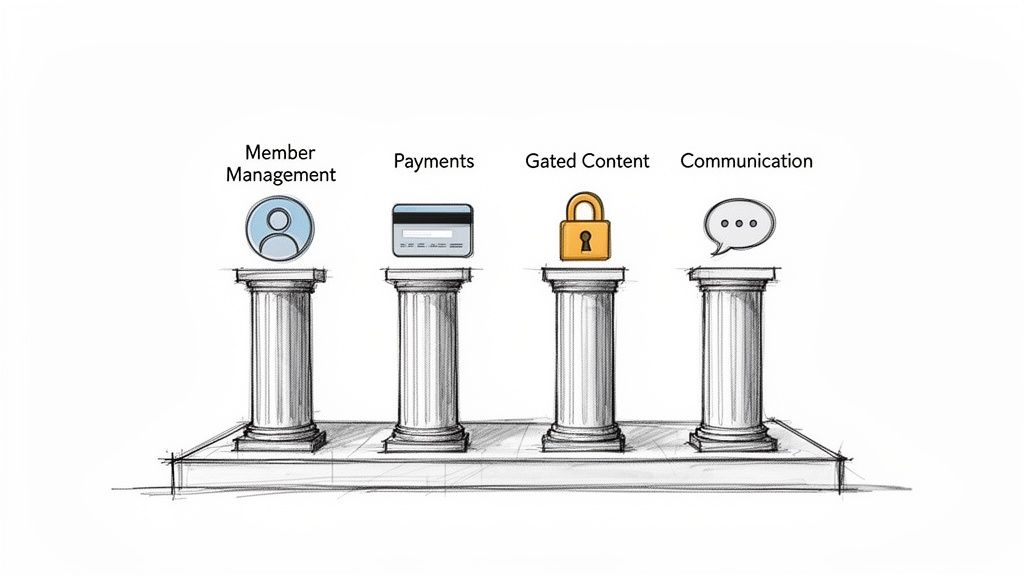
When these pieces are connected, every part of the member journey feels seamless, from the moment they sign up to every interaction afterward. Let’s break down what these features actually do and why they're non-negotiable for any serious association or event organizer.
At its heart, a membership platform is really just a specialized CRM designed for people, not sales leads. It’s so much more than a spreadsheet of names and emails. This is the central nervous system of your organization, automating all the tedious tasks so you can actually focus on your members.
Good member management should absolutely include:
Without these tools, you’re just an administrator, not a community builder.
Let's be honest: handling money is one of the most critical—and stressful—parts of running any organization. A great builder takes that friction away by integrating payment processing directly into the platform. No more clunky, confusing connections to third-party tools like Stripe or PayPal.
The goal is to make payments invisible for the member and effortless for the administrator. A seamless transaction process builds trust and improves retention from day one.
Look for a platform that offers one-click payments, automated invoicing, and crystal-clear financial reports. This tight integration ensures a member's payment status is instantly linked to their access level, automatically granting or revoking privileges without any manual work. For a deeper look at how these systems are built, check out our guide on the essential elements of a modern membership platform.
The whole point of most memberships is getting access to exclusive stuff. Your platform’s most important job is to protect that content, making sure it’s only available to paying members. We call this content gating.
This feature should be incredibly simple to use. For instance, an association offering certification courses needs to lock down video lectures and downloadable materials for enrolled members only. With a proper membership website builder, this should be as easy as checking a box on a page.
Here’s what you should be looking for:
These tools are what turn your website from a public brochure into a private, high-value resource hub.
A community without communication is just a list of names. While you could use external tools like Slack or a Facebook Group, they pull your members away from your branded space. A top-tier builder keeps the conversation right where it belongs: on your platform.
Features like built-in forums, direct messaging, and group chats create connections and give members a reason to keep coming back. It’s a powerful loop: members come for the content and stay for the community. Even mainstream platforms are catching on. Popular builders like Wix and Squarespace are now bundling blogging, eCommerce, and even live chat to help groups build revenue-generating communities. You can see how the top website builders stack up and what features are quickly becoming standard.
By making sure your platform is built on these four pillars, you're not just buying software—you're investing in a complete operating system designed for your community's success.
Picking a membership platform is a huge strategic decision, not just a technical one. The right builder becomes a genuine partner in your growth. The wrong one? It can box you in with frustrating limitations and hidden costs down the road. To get this right, you need to look past the flashy marketing and dig into the core features that will actually support your community for years.
This whole process is about finding a solution that fits your specific needs, not someone else's. A great starting point is to research the best website builders for small business, since many of the best-in-class features overlap with powerful membership platforms. By asking the right questions from the start, you can confidently choose a partner that truly gets your long-term vision.
Let's break down the five most important areas you need to evaluate.
Your organization isn't going to stand still, so your platform shouldn't either. Scalability is simply about making sure your membership website builder can grow with you. That might mean going from 100 members to 10,000, or it could mean adding new revenue streams like online courses or large-scale virtual events. A platform that can't scale will eventually become a roadblock to your success.
When you're looking at different options, ask direct questions about their limits. Can the system handle a massive surge in traffic when event registration opens? What happens when your member database triples in size? A truly scalable platform delivers consistent performance and lets you add new features without having to start from scratch.
Think of it like a foundation for a building. You wouldn't build a skyscraper on a foundation meant for a single-story house. Your platform is your community's foundation—make sure it's built to support your future ambitions.
No platform is an island. Your membership site has to play nicely with the other tools you rely on every day, whether that's your accounting software, email marketing service, or CRM. When these systems talk to each other seamlessly, you eliminate data silos and stop wasting countless hours on manual data entry.
Before you even start looking at demos, make a list of your non-negotiable tools. Then, ask potential vendors exactly how they connect with them.
A builder with a long list of native integrations or a flexible API is a great sign that you're dealing with a mature, well-thought-out system.
Your brand is your identity. A generic, cookie-cutter website makes your organization feel amateur and does nothing to build a real sense of community. The right builder gives you the controls to customize the entire member experience, ensuring every single touchpoint reflects your unique brand.
This goes way beyond just uploading your logo. Look for a platform that lets you control colors, fonts, and page layouts without needing a developer. Can you build custom registration forms to capture the exact data you need? Can you design branded email templates for your welcome series, event reminders, and newsletters? The goal is to create a digital home that feels like it belongs to your community, which is key for reinforcing member loyalty.
A platform is only as good as the number of people who actually use it—and enjoy it. This is true for both your internal team and your members. A clunky, confusing backend will frustrate your staff and slow them down. For your members, a poor user experience is one of the fastest ways to increase churn.
The platform has to feel intuitive from both sides. For your admins, things like adding new content, managing membership tiers, or pulling reports should be simple. For your members, the entire journey—from signing up and accessing exclusive content to joining a discussion—needs to be smooth and frictionless.
This is especially true on mobile. Performance metrics show GoDaddy's mobile site usage is at 76% versus 75% on desktop, with Jimdo close behind at 74%. For event organizers who depend on things like QR code check-ins, or for members who need to access benefits on the go, a mobile-first experience isn't just a nice-to-have, it's essential.
You can't improve what you don't measure. Strong analytics are crucial for understanding the health of your community and making smart, data-driven decisions. Your builder should give you a clear, easy-to-read dashboard that tracks your most important key performance indicators (KPIs).
At a minimum, you need to be able to track:
Having this data at your fingertips gives you the power to spot opportunities, fix problems before they get out of hand, and clearly demonstrate the ROI of all your hard work.
Choosing the right platform can feel overwhelming, but a structured approach makes all the difference. This checklist is designed to help you systematically compare different options and ensure you're asking the right questions. Use it during demos and vendor calls to keep your evaluation focused on what truly matters for your organization's future.
By the time you've gone through this checklist with a few potential vendors, a clear winner will likely emerge. The goal isn't just to buy software; it's to find a technology partner that aligns with your mission and is invested in your success.
Okay, let's get past the feature lists. What does a membership website builder really do for your organization? The truth is, its biggest impact isn't about the tech itself—it's about the results that tech delivers. For any group built on community and engagement, these platforms are less like tools and more like growth engines.
They tackle the core operational headaches that hold you back. This frees you and your team up to stop chasing paperwork and start creating genuine value for the people you serve.
Let's break down the specific, high-impact outcomes you can expect when you ditch the patchwork of separate tools for a single, unified hub.
Professional associations live and die by their ability to provide ongoing value and a true sense of belonging. A membership website builder becomes the digital heart of that mission, directly boosting member retention and making your operations run smoother.
When members have one clear place to go for everything—resources, networking, updates—their bond with your association naturally gets stronger.
This central hub creates a ripple effect of benefits:
Think of it this way: a unified platform elevates an association from an administrative office into a dynamic, 24/7 community. It’s the difference between sending a monthly newsletter and hosting a constant digital convention where your members can truly connect and grow.
For associations, the right software is about so much more than managing a list of names. If you want to dig deeper, our complete guide on choosing the best membership software for associations has even more insights.
If you run events, you know success is all about the experience—from the first ticket purchase to the last follow-up email. A membership website builder with powerful event features streamlines that entire journey, helping you turn one-off attendees into a dedicated, year-round community.
Stop juggling a separate ticketing site, your email marketing tool, and a clunky website. Managing the entire event lifecycle from one dashboard unlocks revenue and engagement opportunities you simply couldn't access before.
Here’s what that looks like in practice:
By bringing all these functions under one roof, you can run a tighter ship, open up new revenue streams, and build a loyal community that can't wait for your next event. The right platform doesn't just manage an event; it elevates it.
Thinking about switching your community's digital home can feel overwhelming, but it doesn't have to be. A well-planned move to a new membership website builder is actually one of the smartest things you can do for your organization's future. With a clear roadmap and the right partner, this transition can be a smooth, and even exciting, process for you and your members.
The secret is to break the project down into smaller, more manageable phases. A successful implementation isn't just about shuffling data around; it's about smart planning, careful execution, and open communication. Let's walk through the four key stages that turn a complex project into a successful launch.
Before you even think about moving a single byte of data, you have to define what success actually looks like. This initial planning phase is, without a doubt, the most important step.
Start by outlining your primary goals. Are you trying to cut down on admin headaches, boost member engagement by 25%, or open up new revenue streams with online courses? Once you have those goals nailed down, you can map out the specifics. Document your current membership tiers, payment schedules, and how you categorize your content. This gives you a clear blueprint to build from—and improve upon—in the new system. A comprehensive Website Relaunch Checklist is a great resource to make sure you don’t miss any critical steps.
This is where the more technical work kicks off, but with a modern platform, it’s far less intimidating than it sounds. Your main focus here is getting your member database moved over securely and accurately. A quality builder will offer both the tools and the expert support to make this painless. For a deeper dive into this process, check out our guide on database migration best practices.
With your member data safely imported, the fun part begins: configuring the new site. This usually involves:
This diagram shows how a dedicated platform helps associations and event organizers create a clear path toward delivering more value to their members.
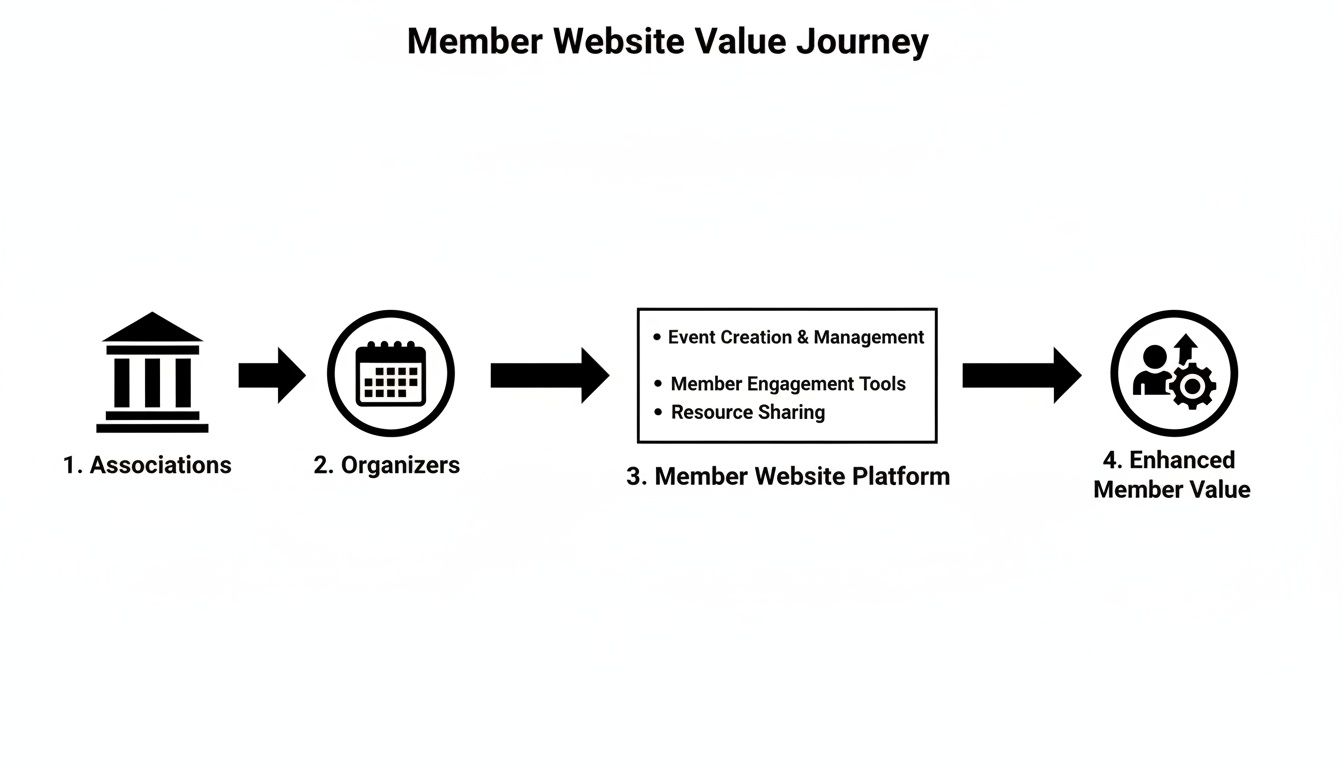
As you can see, a structured platform directly translates into a more valuable and engaging experience for your community.
You wouldn't open a new storefront without checking the locks, and you should never launch a new site without thorough testing. Create a few test accounts and run through the entire member experience yourself. Can new members sign up without a hitch? Do the payment gateways process transactions correctly? Is your members-only content properly secured?
This is your final quality control check. It's a great idea to ask a few trusted members or colleagues to kick the tires, too. Their fresh eyes are invaluable for catching little hiccups before your entire community sees them.
This is also the time to get your launch communications ready. Draft the emails you'll send to announce the new platform, making sure to highlight the exciting new benefits and explain any new login steps. A little prep here goes a long way toward ensuring everyone feels excited, not confused.
The big day is here! Your launch plan should be straightforward. Announce the new platform to your members via email and your other channels, and point them directly to the new site.
Your job now is to make their first visit as easy as possible. Provide clear, simple instructions for logging in, and think about creating a short tutorial video or an FAQ page to answer common questions. A great membership website builder will also provide guided onboarding and expert support, so you have a partner to lean on during this crucial period. A successful launch isn't the end of the project—it's the beginning of a whole new chapter of growth for your community.
We've walked through how a modern membership website builder can really get to the heart of the challenges you face when running a community. This isn't just about software—it's about finally having one solid platform to manage member engagement, gate your best content, and run events without all the usual technical headaches.
An all-in-one system pulls everything together, giving you powerful analytics, smooth integrations, and ticketing tools all in one place. Instead of juggling a dozen different apps that don't talk to each other, you get a single, focused system built to help your organization thrive. You now have a clear roadmap to make a smart decision and move forward.
The next logical step? Seeing one of these platforms in action. Reading about features is helpful, but it’s the hands-on experience that really makes it all click. This is exactly why a trial or a personalized demo is so important—it bridges the gap between theory and reality.
The right builder doesn't just manage your members; it gives you the freedom to focus on what truly matters: growing and engaging your community. It shifts your role from administrator to strategic leader.
Getting your hands dirty lets you test drive the interface, see just how easy it is to set up a new event, and check out how member data is actually presented. It’s your chance to make sure a platform not only ticks all the boxes on your list but also feels like a natural fit for you and your team.
We genuinely believe the best way to grasp the power of an integrated platform is to experience it yourself. That’s why we invite you to start a free trial with GroupOS. Our team is ready to help with a custom setup, making sure the platform is dialed in to your specific needs right from the start.
You’ll see exactly how GroupOS can help you:
It’s time to see how the right membership website builder can completely change how you operate and open up new opportunities. This is your chance to partner with a team dedicated to helping you build the community you’ve always imagined.
Jumping into the world of membership platforms can feel like a big step, and it's natural to have a few questions. Let's tackle some of the most common ones we hear from organizations so you can make your next move with total confidence.
Yes, you absolutely can. In fact, any platform worth its salt is built specifically for this. They should have a clear process and plenty of support to help you migrate your members smoothly.
It typically starts with exporting your current member list into a common format, like a CSV file. From there, you simply upload that file into the new system, and it will map the data to create new profiles. A good partner will be there every step of the way to make sure the transition is seamless and doesn't disrupt your community.
Honestly, practically none. The whole point of a modern membership website builder is to put the power in your hands, not a developer's. They’re designed for leaders, not coders, with intuitive features like drag-and-drop editors, pre-built templates, and simple dashboards for managing your daily operations.
The goal is to let you build and run a professional-grade community hub all by yourself. You shouldn't ever have to touch a line of code to handle members, set up an event, or check your growth reports.
This self-serve model is a game-changer, saving you the significant time and money you’d otherwise sink into hiring technical help.
This is a big one. While you can use WordPress with a bunch of plugins to create a membership site, a dedicated builder offers a much more stable and cohesive experience. The WordPress route forces you to become an integrator, patching together separate tools for memberships, payments, and events.
This DIY approach might seem flexible at first, but it often leads to a tangled web of compatibility problems, security risks, and a disjointed experience for both you and your members.
A dedicated membership website builder, on the other hand, gives you all the core functionality you need in one unified system.
Ultimately, this all-in-one approach delivers a more professional, secure, and dependable platform for the community you're working so hard to build.
Ready to see how an all-in-one platform can transform your organization? GroupOS is built to help you automate tasks, increase engagement, and grow your community without the technical headaches. Start your free trial today and get a custom setup to see the difference for yourself.







